What should you check before choosing?
Start with the apps and account arrangement your household needs, then compare the hardware for the places and tasks where you will use the tablet.
| Priority |
What to check |
Your needs |
| Screen and sound |
Compare screen size and resolution where you will hold or prop up the tablet. Check brightness for brighter rooms and the exact model’s speaker arrangement. |
I want to watch video and browse comfortably without choosing a screen that feels awkward to hold. |
| Video calls and battery |
Check the front camera, your Wi-Fi connection and battery results for comparable tasks. Which? identifies battery life as a tablet-testing factor; a battery-capacity figure alone does not establish call or streaming runtime. |
Calls need to work in the rooms where I use the tablet, and I want a realistic idea of how long it lasts between charges. |
| Apps and accounts |
Confirm must-have apps in the relevant app store. For shared use, check user or guest support on the exact Android model; on iPad, distinguish Apple’s Family Sharing from its managed Shared iPad mode. |
Several of us may use the device, so I want to know whether our apps, accounts and personal information can be kept separate. |
| Storage |
Allow internal space for apps and downloads. Check whether the exact Android tablet accepts microSD cards and what it can store on them; compare fixed iPad capacities before choosing a variant. |
We may keep games, photos and video downloads on the tablet, and I do not want to rely on a card for apps that need internal storage. |
| Typing setup |
Check keyboard compatibility with the tablet generation, UK layout, connection method and whether a stand is included. Confirm that required work apps suit a tablet workflow. |
Short emails and forms come up regularly, but I still have a computer for specialist work. |
Joybuy Android tablet options
These Android tablets are options for home viewing, browsing, calls and light tasks. Compare each configuration against your app and shared-use requirements; this selection does not cover the iPad route.
 No image available
Lenovo Tab Plus 128GB Grey
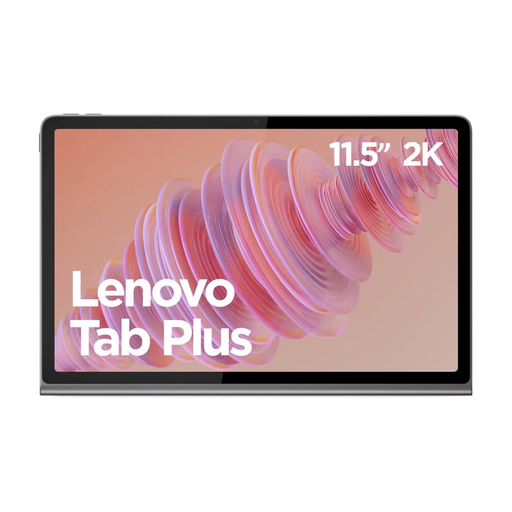
Consider the Tab Plus if you often prop up a tablet to watch video at home. Lenovo lists an 11.5-inch 2K display and eight JBL speakers for this model; this option is identified as the 128GB Grey variant. Check the apps your household needs and whether its weight suits how you will hold it. A charging adapter is not included with this selection.
View on Joybuy
 No image available
Samsung Galaxy Tab A11+ SM-X230 6GB 128GB Silver
This 6GB/128GB Galaxy Tab A11+ configuration is worth checking for home calls and media. Samsung lists an 11-inch display and 5MP front camera for the Tab A11+; confirm your essential apps and any separate-user setting on this exact device. A 25W charger is sold separately.
View on Joybuy
 No image available
Samsung Galaxy Tab A11+ 8GB 256GB WiFi Gray
The 256GB internal-storage variant gives more room for planned apps and downloads than the 128GB configuration shown above. Samsung lists an 11-inch display and 5MP front camera for the Galaxy Tab A11+; check the apps and account arrangement needed by everyone who will use this exact tablet.
View on Joybuy
 No image available
DOOGEE U11 PRO 256GB Black
This option lists an 11-inch 90Hz IPS screen and 256GB of storage for browsing and downloaded media. Its stated 1280 × 800 resolution is worth comparing with other screens if text sharpness matters to you. Check your streaming and calling apps, and whether the exact device supports the household accounts you need.
View on Joybuy
Questions about home tablets
Is an 11-inch tablet too large to use around the home?
Not necessarily: an 11-inch screen gives you room for video, web pages and calls, but comfort also depends on weight and whether you hold or prop up the device. Apple lists its 11-inch Wi-Fi iPad (A16) at 477g. If you often read one-handed, compare a smaller tablet in person too.
Can several people use separate accounts on one Android tablet?
They can where the exact device supports multiple users or guests. Google’s Android guidance describes profiles with their own accounts, apps, settings and storage; check the manufacturer’s instructions and settings for the model you intend to buy.
Can family members share an iPad without sharing an Apple Account?
Yes, Apple says Family Sharing allows eligible purchases and subscriptions to be shared while each person uses their own Apple Account. It is not the same as separate everyday logins on one consumer iPad: Apple’s Shared iPad mode requires a supervised, managed deployment.
How much storage does a home tablet need?
List the apps, games, photos and offline downloads you expect to keep on it, then choose internal storage with those uses in mind. Apple lists the iPad (A16) from 128GB, while Samsung lists Galaxy Tab A11+ configurations up to 256GB with microSD expansion. Do not assume a microSD card can replace internal storage for every Android app.
Is a keyboard worthwhile for occasional tablet tasks?
Consider one if you regularly write emails, complete forms or draft short documents. Check compatibility with the exact tablet, along with the keyboard layout and what comes in the package. A keyboard can help with text entry, but it does not establish that your specialist computer software will work on the tablet.


