What matters when buying?
For a main TV used for catch-up, subscriptions and online video, establish the essential services and connections before choosing picture formats. Check sound and shared-viewing features against the people who will use the setup.
| Concern |
What to check |
Who this matters to |
| Essential apps |
Check each service’s supported devices for the exact model and software version; confirm an available HDMI input if adding a player. |
If my TV screen still suits me, I want to regain the catch-up and subscription apps I actually use without replacing it. Roughly 30% of consumers would put service compatibility first. |
| Live and catch-up TV |
If broadcaster viewing is central, check Freely compatibility and Wi-Fi at the TV; confirm other required apps separately. |
I want live UK channels and broadcaster catch-up together, not just access to subscription video. For around 20% of consumers, that integration would be the primary concern. |
| Connection reliability |
Test the connection at the TV. Netflix recommends at least 3 Mbps for HD, 5 Mbps for Full HD and 15 Mbps for 4K UHD playback on its service. |
When playback buffers or changes quality, I need to address the connection before changing picture hardware. Approximately 20% of consumers would prioritise reliable streaming. |
| Access and shared controls |
Check the required app and device for captions, audio description, navigation, profiles or parental controls; check TV audio connections separately. |
Everyone using our TV needs to navigate and hear their programmes comfortably, with suitable controls for shared use. Access, audio or household controls would come first for roughly 20% of consumers. |
| Picture formats and ports |
Match the player’s HD, 4K or HDR formats to the TV, content and service plan; check spare ports and any required cable. |
If I am choosing a player for a 4K TV, I want its supported formats to match what the rest of my setup can use. Around 10% of consumers would make picture capability their primary concern. |
Joybuy product choices
These choices address three different parts of a home TV setup: streaming sticks for adding a player, a range extender for viewing-area connectivity, and soundbars for TV audio. Choose according to the problem you need to solve rather than treating them as substitutes for one another.
 Image unavailable
Roku Streaming Stick 4K Dolby Vision
Consider this stick if you want a separate streaming interface for a TV with an available HDMI input. Its title identifies 4K and Dolby Vision capability; check that the TV, content, service and connection meet your viewing requirements, and confirm each essential app for the exact model.
View on Joybuy
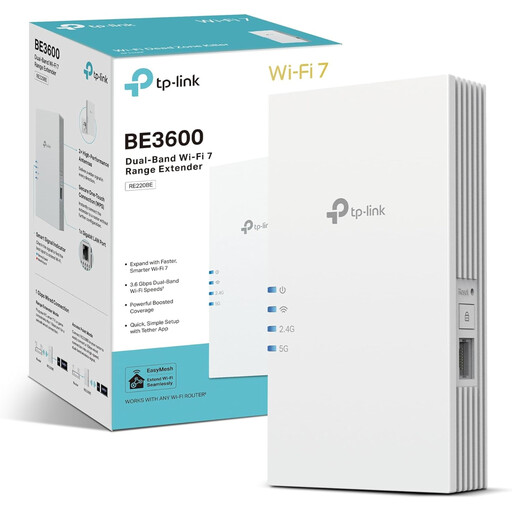 Image unavailable
TP-Link RE220BE BE3600 Wi-Fi 7 Range Extender
Consider a range extender if weak Wi-Fi coverage at the TV is the issue, rather than missing apps. This RE220BE model is identified as a BE3600 Wi-Fi 7 range extender; check that a suitable position remains within reach of the existing router and test coverage where you watch.
View on Joybuy
 Image unavailable
Roku Streaming Stick 4KPlus
This is another stick to consider for an existing TV when you want a separate streaming player. Check the TV connection, the exact 4KPlus model’s supported picture formats and every essential app before choosing it.
View on Joybuy
 Image unavailable
Bose Smart Ultra Soundbar, Arctic White
Consider a soundbar when TV audio, rather than access to streaming apps, is the priority. Check the TV’s available audio output, the soundbar connection and where it would sit before choosing this Arctic White variant.
View on Joybuy
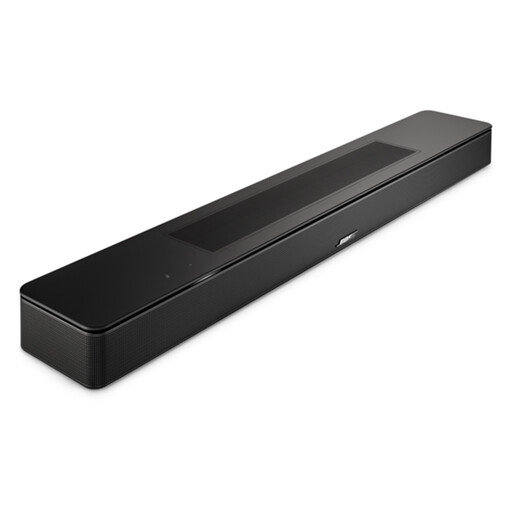 Image unavailable
Bose Smart Compact Sound Bar
This soundbar is relevant if your main concern is the TV audio setup, not service compatibility. Check the TV’s audio output and the intended placement; if you plan to wall-mount it, confirm which mounting accessories you need.
View on Joybuy
Common questions
Will any streaming stick run all the UK apps I use?
No: check each essential app against the precise device model and software version. ITV Support lists supported platforms but also identifies excluded models and firmware requirements, so a platform name alone is not enough.
When should I improve the network instead of replacing the TV?
Check the network first when buffering or changing picture quality is the main problem. Test at the TV location: Netflix recommends at least 3 Mbps for HD, 5 Mbps for Full HD and 15 Mbps for 4K UHD on its service, and says unstable connections can reduce playback quality.
Do I need a TV Licence to stream programmes?
TV Licensing says you need a TV Licence to watch or download BBC iPlayer and to watch live television through streaming services. Watching other on-demand programmes does not by itself create that requirement, provided you are not watching live TV or BBC iPlayer content.
Will ITVX profiles work on every device that plays ITVX?
No. ITV Support lists profiles for specified device groups, including Amazon Fire TV and Roku, rather than every ITVX-capable device. Check its current device list if separate household profiles or parental controls are essential.
What should I check before adding a soundbar?
Check how the soundbar will connect to your TV and whether its placement works in the room. If captions, audio descriptions or particular audio formats matter, check those features in the services and equipment you will actually use; a soundbar does not add missing streaming apps.


