What to prioritise when buying
Start by comparing a wired test with Wi-Fi in the rooms and at the times that cause trouble. Ofcom’s postcode checker gives predicted services and speeds, but availability and speeds at an individual property may differ.
| Concern |
What to check when buying |
Who this matters to |
| Coverage across occupied rooms |
Map the rooms and likely node positions; check whether Ethernet backhaul is practical. |
If calls and streaming falter in separate rooms, I need Wi-Fi where each activity happens. Around 31% of consumers put multi-room coverage first. |
| Simultaneous calls and streaming |
Compare tests at busy times, including a wired test, before paying for more wireless capacity or a faster broadband contract. |
When several people or devices are online together, I want to know whether the service or the home network is the bottleneck. Around 31% of consumers prioritise performance during simultaneous use. |
| A dependable fixed-location connection |
Check the cable route and Ethernet ports; decide whether the location needs a wired device connection, an access point, or both. |
For one desk or fixed device, I may need a reliable connection there rather than wider wireless coverage. Around 23% of consumers prioritise a fixed-location connection. |
| Broadband-line suitability |
Use the postcode checker as an initial guide, confirm availability with a provider for the property, and compare wired results with the contract. |
Before choosing hardware, I need to know whether the incoming service can support the household’s intended use. Around 15% of consumers put service suitability first. |
Brands to consider
These brands illustrate different home-networking approaches. Manufacturer specifications describe particular models and configurations, not guaranteed coverage in a particular home.
TP-Link
The Deco X50 mesh system and Archer AX55 router illustrate multi-unit coverage and single-router approaches.
- TP-Link specifies three gigabit ports per Deco X50 V2 unit and optional Ethernet backhaul.
- The Archer AX55 is a single Wi-Fi 6 router, according to TP-Link UK.
- TP-Link says some Deco routing features are unavailable in access-point mode; check the functions you need before using that configuration.
eero
The eero 6+ and Pro 7 represent different mesh options for households comparing wired ports and network requirements.
- Eero specifies two 1 GbE ports on an eero 6+ router and two 5 GbE ports per Pro 7 unit.
- Eero warns that mixing Pro 7 with older generations may reduce performance. It also describes some security and parental-control features as part of an optional subscription.
ASUS
The ZenWiFi AX (XT8) is a Wi-Fi 6 mesh option with single- and multi-unit variants.
- ASUS documents Ethernet-backhaul configurations for the XT8.
- Check the exact pack and setup: stated wireless rates do not guarantee throughput through particular walls.
NETGEAR
The Orbi 770 range is a mesh option for households considering multi-gigabit wired connections.
- NETGEAR describes the Orbi 770 series as tri-band Wi-Fi 7 with a 2.5 GbE internet port.
- That capacity may not be useful if the broadband service or connected devices cannot use it; check the exact pack and your requirements.
Joybuy product choices
These Joybuy choices cover multi-room mesh Wi-Fi, replacing a home router and connecting a fixed device by Ethernet. They do not determine whether your broadband line itself needs an upgrade.
 No image available
NETGEAR Orbi 370 RBE373 WiFi 7 Mesh System, 3-Pack, Dual-Band BE3600, 2.5Gbps Ethernet
A three-unit mesh option for households addressing weak Wi-Fi across several rooms.
The product name specifies Wi-Fi 7, dual-band BE3600 and 2.5Gbps Ethernet. Check that your existing modem or gateway and internet service meet the listing’s stated requirements; coverage varies with network and building conditions.
View on Joybuy
 No image available
TP-Link Deco BE22 (3-Pack) BE3600 Whole Home Mesh Wi-Fi 7 System
A three-pack mesh option for households looking to address weak Wi-Fi across several rooms.
The product name specifies Wi-Fi 7 and BE3600. If you plan to use wired backhaul, check that the intended setup and cable route suit your home.
View on Joybuy
 No image available
TP-Link Deco BE65 BE9300 Tri-Band Wi-Fi 7 Whole Home Mesh System (3-Pack)
A three-pack mesh option for households seeking Wi-Fi coverage in multiple rooms.
The product name specifies Wi-Fi 7, tri-band BE9300 and a three-pack. Check that the pack and intended setup suit your home and connected devices.
View on Joybuy
 No image available
TP-Link BE9300 Tri-Band Wi-Fi 7 Router
A single-router option to consider when replacing home router equipment rather than adding mesh nodes.
The product name specifies Wi-Fi 7, tri-band and BE9300. Check your broadband provider’s connection requirements before replacing its equipment.
View on Joybuy
 No image available
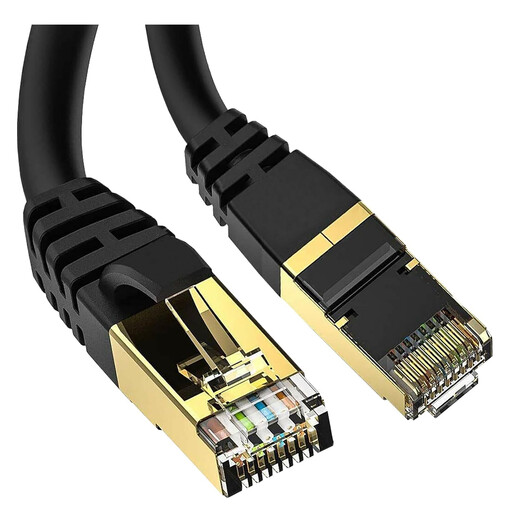
5-metre Cat 8 Ethernet Cable with RJ45 Connections
A wired option for a fixed computer or other device where a cable route is practical.
The product name specifies a 5-metre Cat 8 cable with RJ45 connections. Check that the length reaches along your intended route and that the device has a compatible Ethernet connection.
View on Joybuy
Frequently asked questions
How can I tell a broadband-line problem from weak Wi-Fi?
Compare repeated tests at different times, including a computer connected to the router by Ethernet, with results in the affected rooms and the speed in your contract. Ofcom notes that distance, walls, interference and the device itself can affect Wi-Fi; contact your provider about suspected line underperformance.
How do I check whether faster broadband is available at my home?
Use Ofcom’s broadband checker for predicted services and download and upload speeds, then confirm availability for your exact property with a provider. Ofcom cautions that actual availability and received speeds may differ from the checker’s predictions.
Can I keep my existing broadband router when adding mesh?
That depends on the mesh system and its configuration. TP-Link documents a Deco access-point mode that uses the existing router, but says some Deco routing features are unavailable in that mode. Check the exact model’s instructions and your provider’s requirements.
Will a powerline adapter work in any two sockets?
Do not assume it will. TP-Link’s instructions for its powerline adapters say the paired units must be on the same electrical circuit. Check the chosen model’s instructions and intended sockets.
What if my provider cannot deliver my minimum guaranteed broadband speed?
For providers covered by Ofcom’s Broadband Speeds Code of Practice, report a qualifying network-side shortfall to the provider. Ofcom says that if the provider cannot fix the problem within 30 days, it must allow you to leave without an early exit fee. Check that your provider and contract are covered; a slow Wi-Fi-only test does not establish a line-speed shortfall.


