Several weak rooms
You can connect near the router but need usable Wi-Fi for calls, streaming or study across more than one room or floor. Compare possible node positions and wired backhaul before choosing equipment.


Before buying extra Wi-Fi equipment, compare the connection near the router with the rooms where calls, streaming or gaming struggle, including during busy household use: extra equipment cannot outperform an inadequate broadband service. If the broadband connection is adequate, choose according to where coverage is weak, whether fixed devices can be wired, whether the home’s wiring suits powerline adapters and whether a replacement works with your provider’s service.
You can connect near the router but need usable Wi-Fi for calls, streaming or study across more than one room or floor. Compare possible node positions and wired backhaul before choosing equipment.
Calls, streams and game downloads coincide, so check whether the slowdown also happens close to the router before paying for more Wi-Fi coverage. Ofcom advises considering other people’s data-heavy use when diagnosing a slow connection.
A computer, TV or console stays in a room where a cable might provide a connection without relying on a weak wireless link. Whether cabling is practical affects the choice between Ethernet and other room-side options.
Consider it: when several rooms or floors need usable Wi-Fi and you can position nodes where they can connect to one another.
Trade-off: a multi-node setup involves more equipment than a single-room fix, and node placement still matters.
Consider it: for a particular weak room if an intermediate position can still receive the router’s signal.
Trade-off: repeating a poor incoming signal will not fix it; check router compatibility if you want a unified mesh setup.
Consider them: for a distant fixed device when running a cable is impractical and the home’s wiring is suitable.
Trade-off: performance depends on the electrical wiring, and an Ethernet-only endpoint does not provide room-side Wi-Fi.
Consider it: for a stationary computer, TV or console when a practical cable path reaches a router LAN port.
Trade-off: a cable connects its endpoint, not every wireless device in the room.
Consider it: when the incoming connection is adequate and your provider confirms that a third-party router will work with your service and any required phone features.
Trade-off: replacing one router may still leave distant rooms weak; setup and provider support can also depend on the service.
For UK consumers choosing among in-home networking routes, Ofcom advises checking the Wi-Fi conditions and other household use before adding equipment.
| Concern | What to check when buying | Who this matters to |
|---|---|---|
| Coverage across several rooms | Compare the affected rooms with the area near the router; check possible node positions and Ethernet-backhaul support. | If calls or streaming struggle in more than one room, I need to compare where nodes can go and whether a wired link is practical; around 31% of consumers put multi-room coverage first. |
| Slowdown during shared use | Check whether the slowdown also occurs near the router and whether it coincides with other household activity. | When calls, streams and downloads overlap, I want to know whether the broadband service or in-home Wi-Fi is the constraint before choosing equipment; around 25% of consumers prioritise performance during shared use. |
| Connection for one fixed device | Check the cable route from a router LAN port; for powerline, check the sockets, wiring and whether the destination also needs Wi-Fi. | If my work computer or console stays in one room, I want to assess a direct cable before relying on wireless coverage; around 25% of consumers prioritise a fixed work or gaming connection. |
| One weak Wi-Fi spot | Check whether an extender can receive the router’s signal from its intended position and whether its operating mode works with your router. | For one problem room, I would rather check a local fix than assume a whole-home system is needed; around 19% of consumers prioritise a single weak Wi-Fi spot. |
Ofcom explains that Wi-Fi cannot outperform the broadband service. Extra access points do not remove a limitation in the incoming connection.
Compare the connection near the router with the affected rooms during the same household activities before choosing hardware.
Features can depend on the exact model and setup. TP-Link says RE705X EasyMesh operation needs a compatible router; eero says its 6+ Extender requires an existing eero network and has no Ethernet ports.
Check the model, operating mode, router compatibility and ports rather than relying on the word “mesh”.
The TP-Link TL-PA7017P KIT provides an Ethernet endpoint, not room-side Wi-Fi. Powerline performance depends on wiring and interference, and a quoted link rate is not a measurement of your internet connection.
Check the destination’s connection needs, the home’s wiring and the compatibility of the adapters you plan to use.
The Openreach ONT is the fibre termination, not the router. Ofcom notes that setting up a third-party router can be difficult and provider help may be limited.
Identify the ONT and router separately, then confirm service, authentication and any phone-feature requirements with your provider before buying.
Allow for the setup effort and check what support your provider offers for third-party equipment.
Its Deco X50 mesh, RE705X extender and TL-PA7017P KIT powerline products illustrate distinct home networking routes.
The eero 6+ family offers examples of a mesh router unit and a separate extender; distinguish the two when checking a setup.
The Magic 2 WiFi 6 next starter kit combines powerline networking with Wi-Fi at the destination.
The RT-AX86U Pro is an example of a standalone router to consider only when replacement is compatible with the household’s broadband service.
The Orbi RBK763S is a router-and-two-satellite mesh kit to compare when considering a multi-node arrangement.
These Joybuy choices cover a single-room extender, multi-room mesh, powerline Wi-Fi, router replacement and a short wired connection for a fixed device. Check the relevant compatibility and setup requirements before choosing a route.
 No image available
Consider it for a weak room or a fixed device when the extender can still receive the existing router’s signal.
The product description specifies a 1 Gbps LAN port, access-point mode and EasyMesh compatibility.
EasyMesh pairing requires a compatible router.
 No image available
Consider this three-unit mesh system when you need Wi-Fi across several rooms and can place the units to link with one another.
The product description specifies two 1 Gbps ports per unit, MLO and wireless or wired backhaul.
Check whether the system’s modes suit your existing router and provider setup.
 No image available
Consider it when a distant room needs Wi-Fi and wired connections and running an Ethernet cable is impractical.
The product description specifies dual-band Wi-Fi, three Gigabit Ethernet ports and OneMesh compatibility.
It relies on the home’s electrical wiring, and unified OneMesh operation requires a compatible router.
 No image available
Consider a replacement router only after confirming that it works with your broadband service and any required phone features.
The product description specifies MLO, one 2.5 Gbps WAN port, four 2.5 Gbps LAN ports and EasyMesh compatibility.
Compatibility with a specific provider and whole-home coverage depend on the setup and home.
 No image available
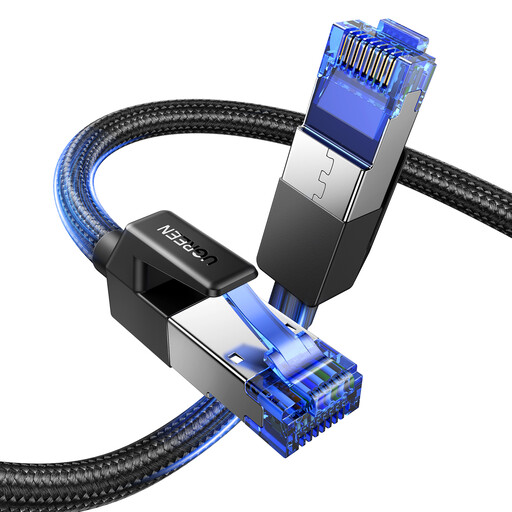
Consider a wired connection for a fixed device if the cable can reach from a suitable router port.
The product is a 1.5 m Cat 8 cable with RJ45 connections for devices such as routers, computers and gaming consoles.
The 1.5 m length limits use to connections within that cable reach.
Compare the connection close to the router with the affected rooms, including when other people are streaming or downloading. Ofcom explains that Wi-Fi cannot outperform the broadband service, so extra access points will not remove a limitation in the incoming connection.
A mesh system may connect downstream of an existing router, subject to the system’s modes and provider setup. Openreach describes the full-fibre ONT as the fibre termination that connects by Ethernet to the router; check provider-specific internet, authentication and phone requirements before replacing the router, and do not treat the ONT as the router.
Check that the kit suits the home’s wiring and whether the destination needs Ethernet only or Wi-Fi as well. For the TP-Link TL-PA7017P KIT, the manufacturer specifies at least two adapters on the same electrical circuit and advises plugging them directly into earthed wall outlets rather than power strips; this is product guidance, not a universal legal rule.
No; a direct Ethernet run connects the device at its endpoint. If wireless devices in that room also need a connection, assess a wired access point or a kit that explicitly provides destination Wi-Fi. Openreach describes internal data points and an optional access point in home-wiring layouts.
Check whether the chosen route needs extra mesh nodes, a suitable cable, a compatible router or a Wi-Fi unit in the destination room. For a replacement router, confirm your provider’s service and support requirements; for powerline, consider the home’s wiring and the connection type needed at the far end.