Before buying Wi-Fi equipment, check for an outage and compare an Ethernet connection at the main router with Wi-Fi in the troublesome rooms: poor wired performance also needs attention from your broadband provider. For recurring gaps across several rooms, consider mesh; wire fixed work or gaming devices where practical, use an extender or wired access point for one weak area, and consider a replacement router when one well-placed unit could cover the home. Check how any new equipment connects to your existing hub and which features your devices can use.
Who is this for?
The location of the problem matters as much as the number of connected devices.
Households with weak Wi-Fi in several rooms
If calls or streams work near the router but falter upstairs or farther away, compare multi-node mesh with wired access points. Ofcom identifies the wireless link inside the home as a possible bottleneck, distinct from the broadband connection.
Remote workers and gamers with fixed devices
A desk computer, console or TV that stays in one place may be a candidate for a direct Ethernet connection. Ofcom recommends connecting a computer by Ethernet rather than Wi-Fi when seeking the strongest broadband speed at that device.
Households keeping an ISP hub
If the existing hub must stay, check how the new system connects to it and which device will manage the network. Router and access-point modes can leave different functions available; the right setup depends on the hub and the equipment you choose.
What should you check before buying?
Start by locating the fault, then choose equipment for the rooms and devices affected rather than for a headline Wi-Fi speed.
| Priority | What to check | Your needs |
|---|
| Line or Wi-Fi fault |
Check for an outage. Compare Ethernet at the main router with Wi-Fi in the affected room, and repeat tests at different times, as Ofcom advises. |
I want to know whether poor performance follows the broadband connection or mainly occurs away from the router. If Ethernet is also poor, I need to raise the service problem with my provider rather than rely on new Wi-Fi hardware. |
| Several weak rooms |
Map the rooms with weak signal and possible node positions. For mesh, check the primary unit’s Ethernet connection and whether wired backhaul is practical; TP-Link documents these requirements for Deco systems. |
Calls and streams need to work across more than one floor or distant part of the home. Mesh is worth considering when one router location cannot serve those areas adequately. |
| Fixed devices |
Check whether Ethernet can reach the desk, console or TV and whether ports and a suitable cable route are available. For wired mesh backhaul, follow the exact system’s wiring instructions. |
For a device that rarely moves, I would rather assess a direct cable than try to improve its wireless signal. Cables and installation effort are part of that choice. |
| One weak area |
Check whether the rest of the home works well. Compare an extender with a wired access point if Ethernet reaches the affected area; neither addresses a fault on the incoming broadband line. |
Only one room needs attention, so I want to address that spot without assuming the whole home needs a new network. |
| One-router coverage |
Check the present router’s position and behaviour before replacing it. Decide whether one suitable location could reach the necessary rooms, and confirm how a replacement would work with the ISP hub. |
Replacing the router makes sense to investigate if the router itself is the limitation, but I cannot expect one new unit to resolve every distant-room gap. |
| Hub and device compatibility |
Confirm router or access-point mode, available Ethernet ports and the features retained in that mode. Check important clients before prioritising 6 GHz: TP-Link says it requires Wi-Fi 6E or Wi-Fi 7 devices. |
I need the new equipment to work with my existing hub and the devices used for calls, streaming or gaming—not just to advertise a newer Wi-Fi standard. |
Which mistakes are worth avoiding?
-
Buying mesh before checking the connection
A mesh system addresses Wi-Fi inside the home, not a provider outage or a fault that also affects Ethernet. Ofcom advises checking service status and testing at different times.
Check for an outage, then compare a wired device at the main router with Wi-Fi in the troublesome rooms. Report a suspected service fault to your provider.
-
Assuming mesh connects like a wireless extender
TP-Link says the primary Deco unit needs a physical Ethernet connection to a router, modem or internet connection. Its wiring rules also depend on the chosen operating mode.
Identify the available Ethernet connection on your hub or modem and consult the exact mesh system’s router-mode or access-point-mode instructions before choosing node positions.
A suitable cable route and setup work may be needed.
-
Choosing by Wi-Fi 7 or port speeds alone
TP-Link says 6 GHz needs a Wi-Fi 6E or Wi-Fi 7 client; its guidance also links Wi-Fi 7’s full throughput potential to suitable multi-gigabit wired infrastructure. An advertised rate does not describe every device’s experience.
Check the Wi-Fi capabilities of important devices, then compare the broadband connection, ports and any switches or backhaul with the equipment you plan to use.
-
Extending Wi-Fi for a device that could be wired
A wireless extension route adds a link to consider for a fixed device. Ofcom recommends direct Ethernet for broadband speed, while TP-Link describes wired backhaul as an option for connecting mesh units.
Check whether a cable can reach the fixed device or a nearby access point. If cabling is impractical, assess wireless placement in the rooms that matter.
Which brands have relevant options?
These brand examples illustrate different equipment and setup questions; they are not a ranking or a statement about Joybuy availability.
TP-Link
Deco mesh systems and router or access-point configurations are relevant when comparing multi-room coverage with a retained hub.
- TP-Link lists tri-band Wi-Fi 7, four 2.5 Gbps ports and wired or wireless backhaul options for the Deco BE65.
- Check the exact model’s operating mode and wiring instructions; TP-Link says gateway-dependent features are unavailable in access-point mode on relevant routers.
ASUS
The RT-BE86U is a standalone-router example for households assessing wired ports as well as Wi-Fi.
- ASUS lists a 10G port and four 2.5G ports for the RT-BE86U.
- Those ports are useful only to the extent that the connected service and equipment can use them; check the router’s bands and client compatibility separately.
BT
Whole Home Wi-Fi 6 is an add-on mesh option to investigate when keeping a broadband hub.
- BT states that Whole Home Wi-Fi products work with broadband hubs and routers that have an RJ45 Ethernet port.
- BT says different Whole Home product families cannot necessarily be mixed, so check the family of any existing discs.
eero
Provider-specific setup guidance can matter when adding mesh while retaining an ISP hub.
- eero documents setup options for a Vodafone UK hub rather than assuming that the hub can be put into modem-only mode.
- For the Vodafone devices covered by its guidance, eero describes Double NAT or eero bridge mode as the options; check instructions for your own provider and hub.
Joybuy product options
These options comprise four three-unit mesh systems for considering multi-room Wi-Fi and one standalone router for considering coverage from a single location. They do not replace the line checks or wired-device decision above.
 No image available
TP-Link Deco BE65 BE9300 Wi-Fi 7 mesh, 3-pack
The three-unit mesh format is relevant when several rooms need Wi-Fi. This is a tri-band Wi-Fi 7 system; TP-Link lists four 2.5 Gbps ports per BE65 unit. Check where the primary unit can connect by Ethernet and whether the planned node positions suit your home.
Joybuy
 No image available
NETGEAR Orbi 370 RBE373 BE3600, 3-pack
A three-unit mesh option for assessing coverage across several rooms. The listed variant is dual-band Wi-Fi 7, with 2.5 Gbps Ethernet and a white finish. Check its connection requirements with your ISP hub and the ports needed by fixed devices.
Joybuy
 No image available
TP-Link Deco BE25 Wi-Fi 7 mesh, 3-pack
This three-unit mesh system is an option when weak Wi-Fi affects more than one area. Check the Ethernet connection for the primary unit, the supported setup mode with your ISP equipment and whether three node positions fit the home.
Joybuy
 No image available
TP-Link Deco BE22 BE3600 Wi-Fi 7 mesh, 3-pack
The three-unit mesh format suits a comparison of coverage options for multiple rooms. Before choosing it, check the exact Ethernet ports, backhaul arrangement and operating mode against your hub and any fixed wired devices.
Joybuy
 No image available
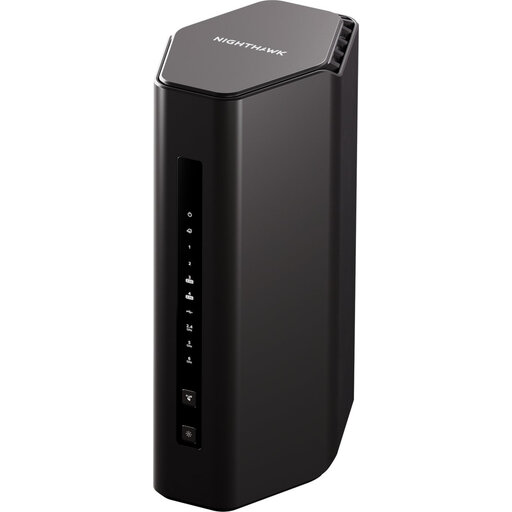
5PT NIGHTHAWK RS300 BE9300 Wi-Fi 7 router
This standalone router is an option to assess if one well-sited unit could serve the rooms you use. Check how it would connect to your ISP equipment and whether a single-router layout addresses the weak spots you identified.
Joybuy
Common questions
Do I need new Wi-Fi equipment or help from my broadband provider?
Check for an outage and compare Ethernet at the main router with Wi-Fi in the affected rooms. Ofcom recommends testing at different times and reporting service faults to the provider. If wired performance is also poor, new Wi-Fi equipment alone will not resolve the cause.
Can mesh connect wirelessly to my existing router like an extender?
Do not assume it can. TP-Link says the primary Deco unit must connect physically by Ethernet to a router, modem or internet connection and cannot act as a wireless repeater for the existing router. Check the instructions for the exact system you are considering.
Should a new system use router mode or access-point mode?
Choose according to which device will manage the network: access-point mode keeps the existing router as the gateway, while router mode assigns that role to the new system. TP-Link says some gateway-dependent functions are unavailable in access-point mode. Check both the new system’s features and your ISP hub’s setup instructions; eero’s Vodafone UK guidance, for example, documents Double NAT and eero bridge mode for the hubs it covers.
Will Wi-Fi 7 benefit every device already in the home?
No: a newer router does not give every existing device access to its newer features. TP-Link says 6 GHz requires a Wi-Fi 6E or Wi-Fi 7 client. Check the specifications of the laptops, phones and adapters that matter most before making those features a deciding factor.


