Buying priorities
Start with the main screen route, then confirm host-laptop compatibility before adding charging, peripherals and meeting accessories.
| Priority |
What to check |
Your needs |
| Screen and input placement |
Check monitor stand adjustment or laptop-stand height; allow space for a separate keyboard and mouse; confirm desk depth and monitor-base stability. |
I want to position the display separately from my typing and pointing devices, rather than relying on one fixed laptop position. |
| External-display compatibility |
Confirm HDMI, Thunderbolt or video-capable USB-C output; check the exact laptop’s supported display count; match monitor, dock and cable connections. |
I need to know that my laptop can send video to the planned monitor or dock, including the number of external displays I intend to use. |
| Docking and charging |
Compare dock host-power delivery with the laptop’s charging requirement; verify the documented display configuration; list the USB and Ethernet ports already needed. |
I want one repeatable desk connection only when reconnecting power, displays and peripherals would otherwise be inconvenient. |
| Calls and desk peripherals |
Check webcam mounting and connection type; confirm headset connection and charging method where relevant; verify keyboard layout, mouse connection and receiver requirements. |
My meetings, audio environment, typing workload or laptop placement may make separate call equipment or input devices useful. |
Joybuy product options
Joybuy product options for the external-monitor route, plus a meeting accessory for home and hybrid work.
 No image available
iiyama ProLite XUB2792UHSU-B6 27-inch 4K UHD Monitor
For a regular fixed desk needing a separate screen and independent display positioning.
27-inch 3840 × 2160 IPS display with HDMI 2.0, DisplayPort, USB-C, USB hub, VESA mounting and 150 mm height adjustment, plus pivot, swivel and tilt.
Check the laptop’s intended USB-C video mode and the 614.5 × 209 mm desk footprint before buying.
Joybuy
 No image available
ASUS ProArt PA278CV IPS WQHD Monitor
For a fixed home desk where a separate 27-inch display and adjustable stand are the priority.
27-inch 2560 × 1440 IPS panel with HDMI, DisplayPort, USB-C power delivery, two USB hub ports, VESA compatibility, height, tilt, swivel and pivot adjustment.
Verify USB-C video and charging compatibility with the laptop, and allow room for the stated 614.6 × 528.8 × 210.7 mm monitor-and-stand arrangement.
Joybuy
 No image available
Dahua 32-inch 4K Curved OLED Monitor
For a fixed desk with room for a larger separate display and compatible laptop connectivity.
31.5-inch 3840 × 2160 curved display with HDMI 2.1, DisplayPort 1.4, Type-C 65 W, USB hub, VESA mounting and 120 mm height adjustment.
Check the 713.9 mm width, preferred curved-screen viewing arrangement, Type-C video mode and the laptop’s charging and resolution support.
Joybuy
 No image available
ASUS ZenScreen MB166CR Full HD Portable Monitor
For hybrid workers who want an additional screen without moving a full-size desk monitor.
15.6-inch 1920 × 1080 IPS display with anti-glare surface, USB-C with DisplayPort Alternate Mode, 780 g weight and 11.8 mm thickness.
This model has no HDMI input; confirm that the laptop provides compatible USB-C DisplayPort Alternate Mode and that the portable format suits the intended desk position.
Joybuy
 No image available
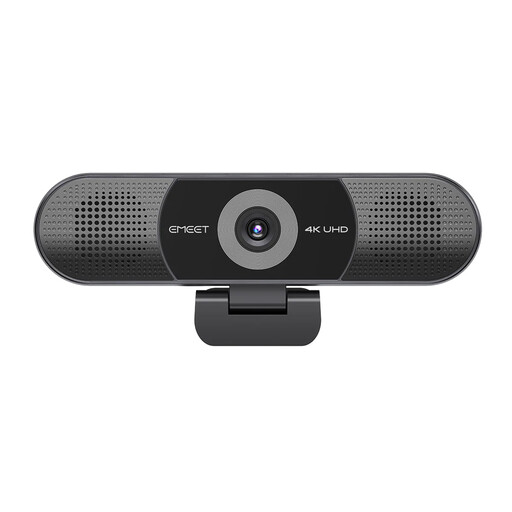
EMEET All-in-One 4K Webcam with 4-Mic Array
For recurring video calls once the main display and laptop connection setup is resolved.
Stated 4K camera, four-microphone array, dual speakers, fixed focus, 98° adjustable field of view and plug-and-play USB connection.
Check the mounting method, USB connector, cable length and software requirements for the monitor, laptop and call platform.
Joybuy
Frequently asked questions
Do I need an external monitor for home working?
Not automatically. An external monitor can suit regular work at a fixed desk when you need more visible workspace or want to position the display separately from the keyboard and mouse; if one laptop screen is sufficient, a laptop stand with separate input devices can be a simpler route.
Does a USB-C port guarantee that a dock or monitor will work?
No. Check the exact laptop’s USB-C video protocol and charging capability before buying. Lenovo states that its USB-C and Thunderbolt docks require compatible USB-C Alt Mode, DisplayLink or Thunderbolt support, and functionality can vary by host system.
What should I verify before buying a dock for two monitors?
Confirm the laptop or graphics adapter’s supported external-display count, the dock’s documented display configuration, monitor inputs, cable requirements, resolution and refresh-rate limits, and operating-system support. Microsoft notes that when one display works but additional displays do not, the graphics adapter may not support more than one monitor.
Can a dock replace my laptop charger?
Only when the dock and its supplied power adapter provide a charging level supported by the specific laptop. Compare the laptop manufacturer’s charging requirement with the dock’s stated host-power delivery for the intended display and peripheral configuration.
Are there workplace DSE rules for home and hybrid workers in the United Kingdom?
For employees, display screen equipment obligations can apply to regular home and hybrid work. HSE guidance applies in Great Britain, while HSENI states that Northern Ireland’s Display Screen Equipment Regulations (Northern Ireland) 1992 can apply to permanent, long-term and hybrid home working; this is not employer-specific legal advice.


