Who this setup is for
The useful starting point is how and where you work, rather than a standard list of equipment to buy.
Desk-based hybrid workers
If you regularly work at one home desk, consider whether the screen and input devices can be positioned for your sustained work. The Great Britain Health and Safety Executive says DSE rules can apply to long-term home workers and people who routinely split work between home and a workplace.
Laptop users building a one-cable desk
If you want one connection for a display, accessories and possibly laptop charging, check the exact laptop port before choosing a dock or USB-C monitor. Dell’s connection guidance distinguishes USB-C ports that carry display video from those limited to other functions.
Workers with frequent video meetings
If calls are a substantial part of your work, check the organisation’s meeting software and device rules before selecting a webcam or headset. Logitech’s webcam documentation shows that operating-system and optional-software support can differ by model.
What to check before buying
Identify the workstation issue first, then check connections and any accessories the work actually requires.
| Concern |
Buying checks |
Who this matters to |
| Workstation fit |
Ask about the employer’s DSE process and identify whether screen placement, separate input devices or another part of the workstation needs attention. |
If I spend long periods working at one desk, I want to address the actual workstation problem before choosing accessories. About 36% of consumers put workstation fit and assessment first. |
| Laptop and display compatibility |
Check the laptop’s video output against the monitor or dock inputs; for USB-C video, confirm DisplayPort Alt Mode or Thunderbolt and compare any charging output with the laptop’s needs. |
When I connect a laptop to a desk display, I need to know that the connection will carry the video I require. Laptop and port compatibility comes first for about 29% of consumers. |
| Flexible input setup |
Check keyboard and mouse connection types, available ports and operating-system support, particularly if you raise the laptop on a stand. |
If I move between home and office or lift my laptop screen, I want input devices that work in both arrangements. About 21% of consumers primarily need that flexibility. |
| Remote collaboration |
Match a proposed webcam or headset to the required meeting platform, operating system, ports and employer device policy. |
With frequent calls, I need my meeting equipment to work with the software my organisation uses. That is the primary concern for about 14% of consumers. |
Brands to consider
These brands have relevant monitor or peripheral lines; the features to check depend on the particular model.
Dell
Relevant when comparing a conventional desk monitor with an adjustable or USB-C hub-monitor arrangement.
- Dell UK lists monitors with adjustable stands and models with USB-C connectivity; its P2726HE listing specifies up to 100W of power delivery for that model.
- Check the chosen monitor’s inputs, adjustment options and charging output against your laptop. These features do not apply to every Dell display.
Logitech
Relevant when comparing external keyboards, mice and business webcams for a home-and-office setup.
- Logitech publishes model-specific operating-system and connection information for its peripherals and Brio webcams.
- Receiver inclusion and optional webcam-software support vary. Confirm both for the exact product and computer before ordering.
Monitors for a fixed home desk
These Joybuy selections are standalone monitors for adding a screen to a regular home-working desk. Choose a connection and screen arrangement that fits your computer and workstation; a monitor does not replace an employer assessment where one is required.
 Image unavailable
AOC Q32V4 31.5-inch IPS monitor
Consider this separate screen if a 31.5-inch display fits your fixed desk and workstation arrangement. The product name specifies an IPS panel and built-in speakers. Check the required video connection and whether its positioning options meet your needs.
View on Joybuy
 Image unavailable
CRUA 32-inch 1500R curved QHD monitor
This is a separate display to consider if a curved 32-inch screen suits your desk. Its product name specifies 2560 × 1440 resolution, HDMI and DisplayPort connections, and VESA 100 × 100 mm mounting. Check your computer’s video output and the screen-positioning options you require; the listed refresh rate also depends on the connection and cable used.
View on Joybuy
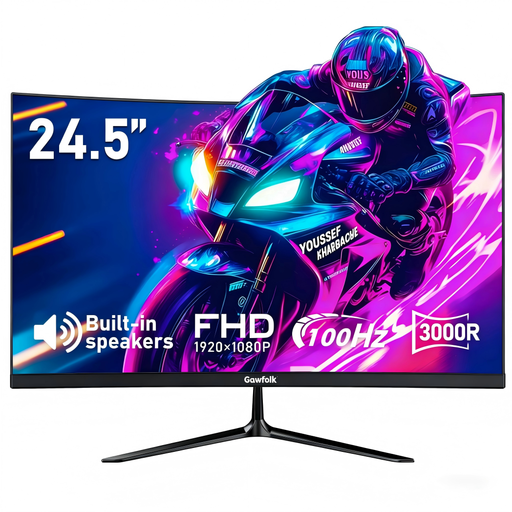 Image unavailable
Gawfolk 24.5-inch 3000R curved FHD monitor
Consider this separate display if its 24.5-inch size fits the space available at your home desk. The product name specifies a curved Full HD screen, HDMI input, built-in speakers and VESA 75 × 75 mm mounting. Confirm the laptop connection and whether its screen-positioning options suit your workstation.
View on Joybuy
Common questions
When does a home worker need a DSE assessment in Great Britain?
The Health and Safety Executive says employers must assess a workstation when a worker uses display screen equipment daily as part of normal work for continuous periods of an hour or more. Its guidance can apply to permanent or long-term home workers and people who routinely split work between home and a workplace.
Can my employer charge me for equipment identified by a DSE assessment?
In Great Britain, the Health and Safety Executive says a worker cannot be charged when a DSE workstation assessment indicates that action, such as providing equipment, is needed. That does not establish that every monitor, dock or accessory a worker would like is required by the assessment.
Will a USB-C monitor or dock work with any USB-C laptop?
No: Dell’s connection guidance says USB-C video needs a laptop port supporting DisplayPort Alt Mode or Thunderbolt. Check the exact laptop port, then compare the monitor or dock’s display connections, cable requirements and any power-delivery rating with what the laptop needs.
Do the same DSE rules apply in Northern Ireland?
Do not apply Great Britain-specific wording unchanged. The Health and Safety Executive for Northern Ireland says DSE requirements cover relevant equipment used for work at home and that employers must assess workstation risks in the circumstances set out in its guidance. Use that guidance and your employer’s DSE process for a Northern Ireland work arrangement.
Should I arrange equipment with my employer before buying it?
Yes, if the purchase is intended to address a regular work need, check the employer’s assessment, IT and approval processes first. Acas advises employers and staff to agree who will provide or pay for home-working equipment and repairs; those arrangements are distinct from Great Britain’s rule against charging workers for equipment identified as necessary by a DSE assessment.


