What to prioritise before buying
Start with the workstation issue, then check employer arrangements and device compatibility before choosing accessories.
| Concern |
What to check when buying |
Who this matters to |
| Screen and input position |
Check the riser’s laptop size and weight limits; plan for a separate keyboard and mouse. |
If I raise my laptop for sustained desk work, I want its screen and input devices positioned independently. Around 33% of consumers put screen-and-input positioning first. |
| Display space |
Match the monitor’s resolution and inputs to the laptop’s video output and supported display count. |
If my regular work involves several documents or applications, I want a separate screen that my laptop can actually drive. Around 33% of consumers prioritise display space. |
| Repeated connections |
Check video support, display limits, charging and any software or workplace approval required. |
If I reconnect several desk devices often, I want a hub or dock that works with my laptop and peripherals. Around 25% of consumers prioritise reliable reconnection. |
| Employer arrangements |
Check the workstation assessment, equipment already supplied and any approval process before spending. |
If I am buying equipment for work, I want to know whether an applicable employer assessment has already identified what is needed. Around 9% of consumers put the employer arrangement first. |
For employees who use display screen equipment daily as part of their normal work, continuously for an hour or more, HSE says their employer must carry out a workstation assessment. HSE also says workers cannot be charged for equipment or other action that the assessment identifies as needed. This does not mean every optional upgrade must be employer-funded.
Joybuy products for laptop workstations
These Joybuy choices cover USB-C port expansion, a laptop riser, external monitors and a separate keyboard-and-mouse set for established laptop workstations.
 No image available
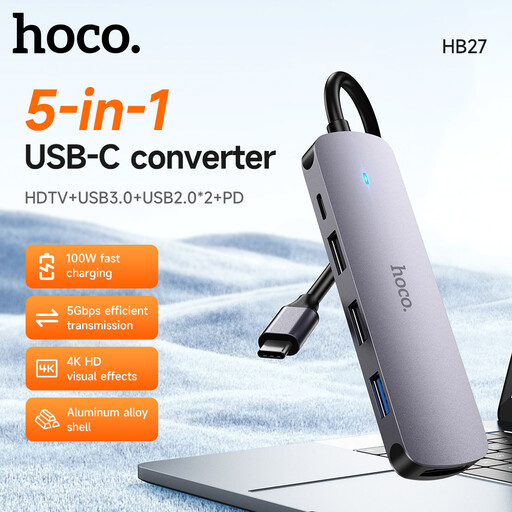
HOCO HB27 USB-C Hub, Metal Gray
Consider this hub when one USB-C connection needs to serve a display and several peripherals.
HDMI video output requires host support for DP Alt Mode. The listing specifies one USB 3.0 port, two USB 2.0 ports and USB-C PD of up to 60 W.
The integrated cable is 135 mm long.
View on Joybuy
 No image available
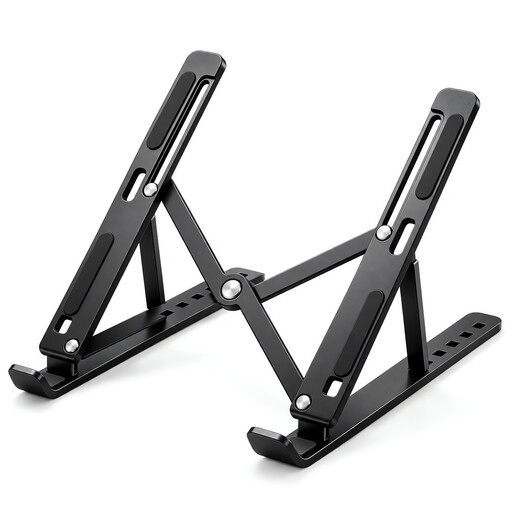
Foldable Laptop Stand, 7 Levels, 10–17-inch
Consider this stand if you want to retain and raise the laptop screen rather than add a separate display.
The listing specifies seven angle settings from 15° to 45°, support for 10–17-inch laptops and a fold-flat design.
For prolonged laptop use, plan for a separate keyboard and mouse so the input devices can sit independently of the raised screen.
View on Joybuy
 No image available
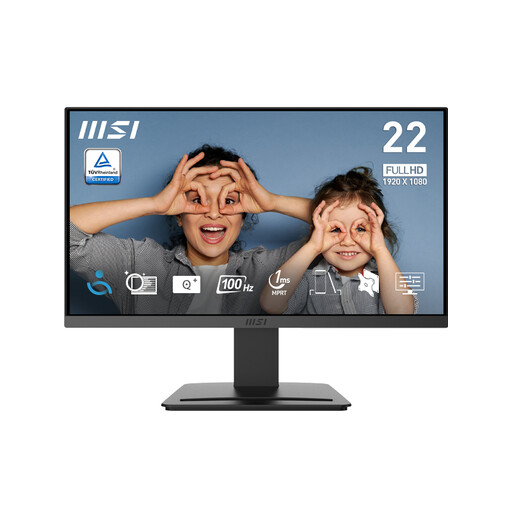
MSI PRO MP223 E2 21.45-inch Full HD Monitor
Consider this external monitor if you want a separate screen and your laptop supports its video connection.
The listing specifies a 1920 × 1080 display, 100 Hz refresh rate, tilt adjustment, an anti-glare surface and 75 mm VESA mounting.
Inputs listed are HDMI 1.4b and DisplayPort 1.2a.
View on Joybuy
 No image available
HP 680 CFT Dual-Mode Keyboard and Mouse Combo
Consider this set when you want separate input devices alongside a raised laptop or external screen.
The listing describes wireless keyboard and mouse connections by Bluetooth or dongle, with connections to up to three devices.
Compatibility listed includes Windows, macOS and ChromeOS.
View on Joybuy
 No image available
Lenovo L32p-30 31.5-inch 4K UHD Monitor, IPS, USB-C
Consider this larger external display if you want a 4K workspace and your laptop supports the required USB-C video connection.
The listing specifies a 31.5-inch 4K UHD IPS display, USB-C connectivity for video, data and power delivery, an adjustable stand and integrated speakers.
USB-C video and power delivery depend on the laptop’s supported port capabilities.
View on Joybuy
Frequently asked questions
Should I ask my employer before buying a screen or dock for home work?
If you are an employee who uses display screen equipment daily for continuous periods of an hour or more, ask about the applicable workstation assessment and what equipment your employer will provide or approve. HSE says workers cannot be charged for action the assessment identifies as needed, such as providing equipment; this does not make every optional upgrade an employer obligation.
Does a USB-C socket guarantee that a monitor or HDMI hub will display video?
No. Check the exact laptop’s supported USB-C video functions and the monitor or hub’s input requirements. Dell documents specific laptops whose USB-C ports do not provide video output or power delivery.
Will a dock let my laptop run any number of monitors?
No. The number of supported external displays depends on the laptop model and the proposed connection. Apple Support advises Mac users to check their model’s display specifications, ports and cables; also confirm the dock’s requirements and, on Windows, configure connected displays in Windows settings.
What should I check if my work laptop does not allow third-party drivers?
Ask IT whether the proposed dock needs additional software and whether that software can be deployed. DisplayLink documents corporate deployment procedures, and its macOS setup requires Screen Recording permission, so workplace approval should be confirmed rather than assumed.
Do I need a separate keyboard and mouse with a laptop riser?
For prolonged laptop use, HSE guidance shows a separate keyboard and mouse so the screen can be elevated independently. Check that you have room for both and that their connection methods suit your devices.


