Who needs which setup?
Start with where the laptop will spend most of its working day. That determines whether carrying weight, a desk connection or the condition of a replacement device deserves closer attention.
Room-to-room hybrid workers
If you move between home rooms, shared desks and occasional office days, compare the weight of the exact configuration alongside its screen size and ports. Which? lists differing weights for individual laptop configurations; a range name alone does not tell you what you will carry.
Desk-first multi-window workers
If several documents or peripherals need to stay available at one home desk, decide whether the built-in screen is enough or whether you need a monitor and dock. Lenovo's dock guidance makes port compatibility an exact-laptop check, while Apple lists external-display capabilities by MacBook Air configuration.
Refurbished replacement buyers
If you are replacing an older device with a refurbished laptop, check its operating-system support, stated condition, battery information, included charger, warranty and returns terms. Which? advises treating the seller and condition grade as part of the second-hand buying decision.
What matters when choosing?
For home or hybrid work, establish software and meeting requirements before comparing the physical setup. Then decide whether your main constraint is a connected desk, frequent carrying or the condition of a refurbished device.
| Concern |
What to check |
Who this matters to |
| Work software and calls |
List required applications, operating system, managed tools and meeting browser. For an older Windows device, confirm its supported upgrade path; Microsoft says Windows 10 support ended on 14 October 2025. |
If my replacement cannot run the applications or meetings I need for work, its other features will not solve the problem. About 33% of consumers put software and meeting compatibility first. |
| Desk connections |
Match the exact laptop and dock specifications for display output, monitor requirements and charging. Lenovo says its USB-C and Thunderbolt docks depend on supported laptop-port protocols. |
When I work mainly at one desk, I need my monitor and peripherals to connect as planned without giving up a laptop I can take away. For about 27% of consumers, that desk setup is the primary concern. |
| Portability |
Compare listed weight and screen size for the exact configuration, then check whether its ports still serve your usual workspace. |
Moving between rooms or travelling to an office makes the size and carrying weight noticeable throughout my routine. Portability comes first for about 20% of consumers. |
| Refurbished condition |
Check the complete model, battery information, condition grade, charger, operating-system support, warranty and returns terms. |
If I choose a refurbished replacement, I want to know what condition it will arrive in and how long I can continue using the required software. About 20% of consumers primarily focus on those refurbished-device checks. |
Brands to consider
These ranges provide starting points for checking individual models; the brand name does not establish a laptop's weight, software fit or dock compatibility.
Lenovo
Relevant if you are planning a laptop-and-dock workspace, including a ThinkPad-oriented or universal dock arrangement.
- Lenovo lists docks with options for displays, charging, Ethernet and other peripherals.
- Lenovo conditions compatibility on the laptop port supporting the required USB-C Alt Mode, DisplayLink or Thunderbolt protocol; check both exact devices.
Dell
Relevant when comparing mobile-work configurations in business-oriented Latitude or other compact laptop ranges.
- Dell describes Latitude as a business laptop and 2-in-1 range intended for work on the move.
- Compare the weight, ports and configuration of the particular Latitude, XPS or other model rather than assuming those features are shared across a range.
HP
Relevant when comparing ProBook and EliteBook business-laptop configurations.
- HP presents ProBook and EliteBook as separate business-focused ranges with different configuration choices.
- Check the operating system, memory, storage and ports of the exact SKU; HP's range descriptions do not establish those details for every device.
Apple
Relevant if your required work applications support macOS and you want to plan a portable laptop with external displays.
- Apple's MacBook Air specifications describe Thunderbolt 4/USB-C connections and external-display support for the cited configurations.
- Confirm the display limits of the exact Mac and compatibility with any employer-required applications, management tools and peripherals.
Joybuy laptop selections
These laptops are options for a portable primary computer used across home desks, shared spaces or office days. Compare each configuration against your work software and intended desk connections; the models below are not refurbished-laptop or dock selections.
 Image unavailable
ASUS Vivobook 14 X1407QA-LY003W, Snapdragon X, 16GB RAM, 512GB SSD
Consider this 14-inch model if you move between workspaces but still want a laptop for a desk arrangement. Its listed configuration includes 16GB RAM and a 512GB SSD. Before choosing its Snapdragon X version, confirm that your required applications and peripherals work with Windows on ARM; also check the exact display connections needed at your desk.
View on Joybuy
 Image unavailable
ASUS Vivobook 15 X1504VA, Core 5 120U, 24GB RAM, 1TB SSD
Consider this 15.6-inch configuration if you mainly work at a desk and want a larger built-in display for documents. The product name specifies 24GB RAM and a 1TB SSD. If a dock is part of your plan, confirm the exact USB-C display and charging functions rather than relying on the presence of a Type-C port.
View on Joybuy
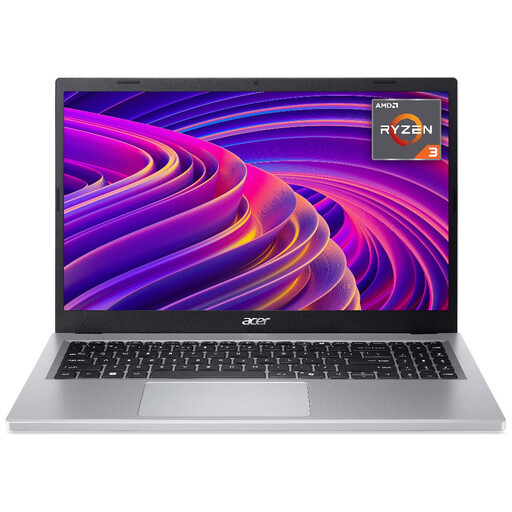 Image unavailable
Acer Aspire Go 15 AG15-21P, Ryzen 3 7320U, 8GB RAM, 256GB SSD
This 15.6-inch Full HD configuration is worth comparing if you want one laptop to move between rooms and use at a desk. Its product name specifies 8GB RAM and a 256GB SSD. Check that those capacities suit your work files and applications, and verify the required monitor or dock connection for your exact setup.
View on Joybuy
 Image unavailable
Lenovo IdeaPad 1, Ryzen 3 7320U, 8GB RAM, 128GB SSD, S Mode
Consider this 15-inch Full HD model only after checking how its stated Windows 11 Home in S Mode configuration fits your work applications. The product name specifies 8GB RAM and a 128GB SSD. Confirm application installation requirements and any intended USB-C dock functions before treating it as a replacement for your current computer.
View on Joybuy
 Image unavailable
Acer Aspire Lite AL15-36P-C29Z, Intel N150, 8GB RAM, 128GB SSD
This 15.6-inch Full HD model offers another configuration to compare for work across rooms. Its product name specifies 8GB RAM, a 128GB SSD and Windows 11 Home. Confirm whether the supplied Windows configuration is in S Mode before ordering: that detail matters if your required applications have particular installation needs. Check dock compatibility separately if you plan to use one.
View on Joybuy
Common questions
Should I use an older Windows 10 laptop for ongoing home work?
Check its supported operating-system path before choosing it as a replacement. Microsoft says Windows 10 support ended on 14 October 2025; for an older or refurbished device, confirm the supplied licence, Windows 11 eligibility and the requirements of your work applications.
Will any USB-C laptop work with my monitor and dock?
No: the connector shape does not establish display or charging support. Lenovo says its USB-C and Thunderbolt docks depend on compatible laptop-port protocols, so check the exact laptop and dock specifications alongside your monitor, cables and charging requirements.
What matters for browser-based Microsoft Teams meetings?
Check both the meeting browser and any applications or management tools your employer requires. Microsoft says Teams meetings are fully supported on the latest Microsoft Edge and Google Chrome versions; that browser guidance does not, by itself, confirm that every other part of a work setup is compatible.
What should I check about returns when ordering a laptop online?
Read the retailer's cancellation, returns and fault-handling terms, and keep the listing's description of the laptop's condition. For UK purchases, GOV.UK says retailers cannot restrict or remove statutory refund rights; a retailer's voluntary policy should not be confused with remedies for faulty goods or goods not as described.


