Fixed-desk laptop workers
You want readable documents and meeting windows on a screen that fits and can be positioned comfortably at a regular home workstation.


Choose a monitor that fits your desk and the way you work, then check that your exact laptop supports its video connection. A compact adjustable screen can suit a limited fixed desk, an ultrawide can help when you regularly arrange several windows side by side, and a portable screen can suit a workspace you clear or move; USB-C charging and built-in meeting features depend on the specific devices and connection.
You want readable documents and meeting windows on a screen that fits and can be positioned comfortably at a regular home workstation.
You keep several windows open and need to decide whether a wider display or built-in call hardware is worth the desk space.
You regularly move or clear your setup, so screen size, the stand and the laptop connection matter alongside the extra display area.
Check the laptop connection and the space available for the screen first, then compare display size, meeting features or colour specifications against the work you actually do.
| Concern | What to check when buying | Who this matters to |
|---|---|---|
| Usable screen space and readability | Compare screen dimensions, native resolution and text scaling with the documents and windows you use. | If I want documents or several work windows to be readable together, I would prioritise usable screen space; about 27% of consumers put this first. |
| Laptop connection and power | Check the exact laptop’s video output against the monitor input and cable; compare USB-C power delivery with your charging needs if you want to charge through the monitor. | If I need a reliable picture and want to know whether one cable can also charge my laptop, I would check both devices’ specifications; about 27% of consumers put connection and power first. |
| Desk fit and positioning | Measure usable desk width and depth with the stand; check its adjustments and the exact model’s mount compatibility if you plan to use an arm. | If my workspace is constrained or needs to be cleared away, I would prioritise a screen that fits and can be positioned comfortably; about 20% of consumers put desk fit first. |
| Meeting hardware and peripherals | Decide whether you need a webcam, microphone, speakers or USB hub, then check the exact model’s features and required connection. | If I want to simplify calls or connect desk peripherals through the monitor, I would check how those features connect to my laptop; about 13% of consumers put meeting hardware first. |
| Detail and colour for creative work | Match the stated resolution and colour specifications to your workflow, and check that your laptop can drive the intended display setup. | If I work with photography, video or design, I would prioritise relevant detail and documented colour characteristics; about 13% of consumers put creative display needs first. |
USB-C describes the connector, not every capability it supports. A monitor’s stated power output also does not guarantee that it meets a particular laptop’s charging needs.
Check the exact laptop’s video-output and charging specifications against the monitor and cable before ordering.
Depending on the setup, you may need a suitable cable or adapter, or continue using the laptop’s charger.
A screen may fit across a desk but leave too little room to position it, the keyboard and the laptop comfortably.
Measure the complete setup and check the monitor’s adjustments and mounting provision before choosing a stand or arm.
If the supplied stand does not suit the workspace, a compatible riser or arm may be an additional purchase.
A listed webcam, microphone or hub may not work through every display cable or laptop connection.
List the call devices and peripherals you need, then confirm how each feature connects on the exact model.
The GW2486TC is a compact home-office option with USB-C and adjustable positioning.
The Series 7 Pro 734pm is an ultrawide conferencing option to consider when the desk can accommodate it.
The ThinkVision M14t Gen 2 is a portable USB-C second-screen option for workspaces that change.
The S2725QC illustrates a 27-inch 4K USB-C option, while the UltraSharp U4025QW is a substantially larger Thunderbolt-hub model.
The ProArt PA279CRV is a 27-inch option with specifications aimed at colour-focused creative work.
These Joybuy listings cover portable second screens, fixed-desk monitors and an ultrawide option for home working. Check each model’s connection and dimensions against your laptop and workspace.
 Image unavailable
Consider it if you want a portable second screen for a workspace you move or clear away.
14-inch Full HD display with USB-C video and power connection; 10-point touchscreen, 100% sRGB and a 180° adjustable stand. USB-C video use requires a device with video output.
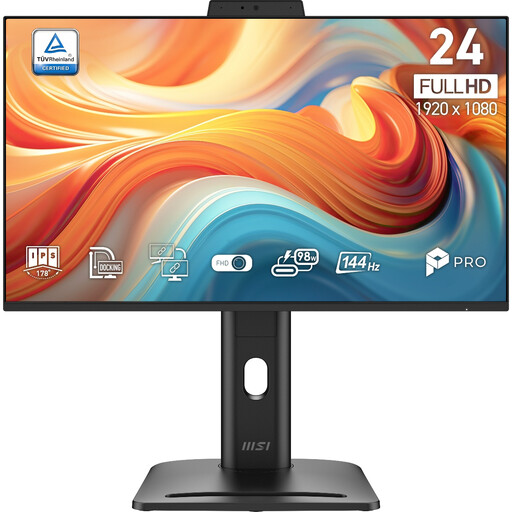 Image unavailable
Consider it for a fixed desk where you want a conventional monitor with several listed video inputs.
Full HD display with HDMI, DisplayPort and VGA inputs; stand adjustment includes height, tilt, swivel and pivot. Built-in speakers are specified.
 Image unavailable
Consider it if you want an ultrawide layout for several work windows and have room for the monitor.
34-inch, 3440 × 1440, 21:9 display; USB-C video, data and up to 98 W power delivery. The listed width with stand is 808.6 mm, so check your available space.
 Image unavailable
Consider it as a portable second screen when you regularly pack away or move your work setup.
15.6-inch Full HD IPS display; USB-C DisplayPort Alternate Mode is specified for compatible devices. The listing gives a weight of 780 g.
 Image unavailable
Consider it for a fixed desk if 4K resolution and flexible screen positioning suit your work.
27-inch IPS display with 3840 × 2160 resolution and 100% sRGB coverage. The stand has height, pivot, swivel and tilt adjustment; HDMI, DisplayPort, USB-C and a USB hub are specified.
No. Check the exact laptop port’s documented video capability, the monitor input and the cable. Dell explains that a USB-C port limited to data or power does not provide the video needed for the connection it describes; Apple also advises Mac owners to check their model’s ports and display support.
Only if the specific monitor, laptop and intended cable or connection support those functions. Compare the monitor’s stated power output with the laptop’s charging requirement, then check call features separately. BenQ specifies that the GW2486TC’s built-in microphone works with an external computer when connected via USB-C.
The Health and Safety Executive advises placing the screen directly in front of you, with its top around eye level and the screen about an arm’s length away. For prolonged laptop use, its guidance recommends a separate keyboard and mouse so the screen can be raised, or a separate display. Adapt the arrangement to your workstation rather than treating a monitor purchase alone as an ergonomic fix.
For an applicable distance sale, GOV.UK guidance says you can notify the seller of cancellation within 14 days of receiving the item and then have another 14 days to return it. Faulty or misdescribed goods have separate consumer rights. Check the seller’s terms for practical return arrangements, while distinguishing any voluntary policy from statutory rights.