Fixed-desk multitaskers
You need more room for documents, meetings or reference windows during regular laptop work, but the screen and stand still need to fit your desk.


For a fixed home-working desk, choose a desktop monitor whose footprint, stand adjustment and laptop video input suit your setup; a USB-C hub is useful only if the laptop supports video through that port and the monitor’s power output meets your needs. Choose a portable display when it needs to move or be stored, accepting less screen area and positioning range. Measure your space and check the exact laptop connection before buying.
You need more room for documents, meetings or reference windows during regular laptop work, but the screen and stand still need to fit your desk.
You connect a laptop and possibly peripherals repeatedly, so dependable video connectivity matters. If you want one-cable charging, check that your laptop and monitor support the required features.
You need a second screen that can move with your laptop or be put away rather than stay on a permanent desk.
Start with the factor that would most affect your setup: space, a confirmed laptop connection, screen positioning or the need to move the display.
| Concern | What to check when buying | Who this matters to |
|---|---|---|
| Screen space and desk fit | Measure desk width and depth; compare the monitor’s assembled dimensions and stand footprint. Consider screen size and resolution together. | If I need more room for documents and work windows, I want the display and stand to fit my desk. Consumers who put screen space and desk fit first make up roughly 31%. |
| Laptop connection and optional charging | Check the laptop’s exact video-capable port and the monitor input, cable or adapter. For USB-C charging, compare the monitor’s stated power delivery with the laptop’s requirements; a USB-C socket alone does not confirm video support. Dell’s USB-C DisplayPort guidance explains that the laptop port must support video over USB-C. | If I want the monitor to work with my existing laptop, I need to confirm video support before choosing a cable or one-cable setup. Consumers who prioritise connection certainty make up roughly 31%. |
| Screen positioning | Check the supplied stand’s height and tilt adjustments first. If considering an arm, confirm its mounting interface and supported weight, as well as the desk-clamp fit. | For prolonged work, I want to position the display appropriately without adding a mount unnecessarily. Consumers who put screen positioning first make up roughly 23%. |
| Moving or storing the display | Compare the portable screen’s size and stand arrangement, then check the laptop’s compatible video and power connections. | If my workspace changes or needs clearing, I need a second screen I can move or put away. Consumers who prioritise portability make up roughly 15%. |
USB-C describes the connector, not necessarily every function it supports. A monitor may not display video or charge a particular laptop through that port.
Check the exact laptop port’s documented video capability, the monitor’s input and power delivery, and the intended cable or adapter before buying.
The assembled monitor and stand need to fit the available desk, and the stand’s positioning range affects where the screen can sit.
Measure the workspace and compare it with the monitor’s assembled dimensions and stand adjustments.
The monitor’s stand may already offer enough adjustment. An arm also needs to match the display and fit the desk.
Check the stand’s adjustment range first. If you still need an arm, confirm the monitor’s mounting pattern and weight and the desk-clamp fit.
The 27E1N1600AE/00 is an example of a QHD desktop monitor with USB-C power delivery for a fixed laptop setup.
The GW2490 is a 23.8-inch Full HD model to consider where a smaller desktop screen is preferred.
The ProLite XUB3293UHSN-B5 is a 32-inch desktop monitor example with a USB-C dock, network connection and KVM switching.
The Pro P2725DE is a 27-inch QHD USB-C hub monitor with a height-adjustable stand.
ViewSonic’s portable monitor range includes the VA1650 and TD1655 for setups where a second screen needs to move.
These Joybuy monitor options cover fixed-desk and portable setups for laptop-based work.
 No image available
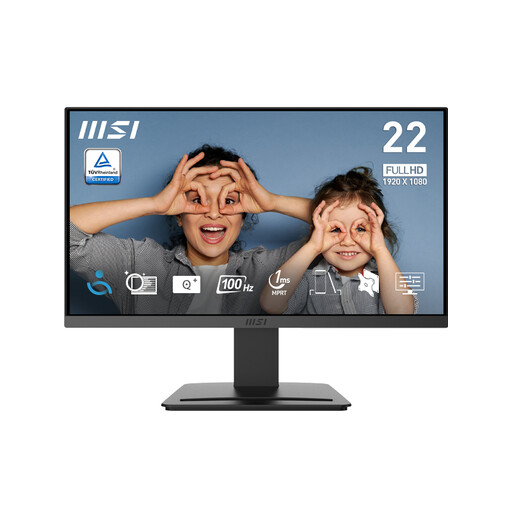
A fixed-desk option for laptop work when its screen size and stand suit the available workspace.
21.45-inch Full HD (1920 × 1080); 100Hz; tilt-adjustable stand; HDMI 1.4b and DisplayPort 1.2a.
 No image available
A portable option if you need a second screen that can move with your laptop.
15.6-inch Full HD display; 780 g; USB-C video requires a laptop port with DisplayPort Alternate Mode. HDMI is not supported.
 No image available
A fixed-workstation option if you want a larger display and several ways to adjust its position.
27-inch WQHD display; height, tilt, swivel and pivot adjustments; HDMI, DisplayPort and USB-C connections.
 No image available
A desktop option for document work and multitasking when its 16:10 screen format suits your tasks.
24-inch WUXGA display; 16:10 aspect ratio; height, tilt, swivel and pivot adjustments; HDMI and DisplayPort inputs.
 No image available
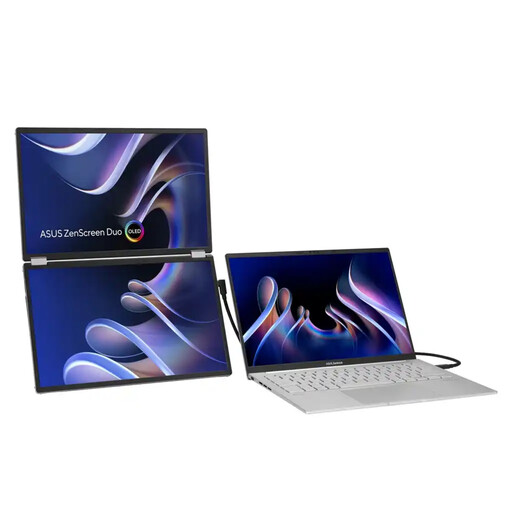
A foldable portable option if you need a second display that can be moved or put away after work.
Dual 14-inch OLED panels; 1920 × 1200 resolution; dual USB Type-C® and mini-HDMI®; kickstand and tripod hole.
No. Check the laptop port’s documented video capability, the monitor input and the intended cable or adapter. If you also want the monitor to charge your laptop, compare its stated power output with the laptop’s requirements.
It may, if the monitor and stand fit the available surface and you can position the screen appropriately. The Health and Safety Executive says home workers do not necessarily need office-type furniture, but whether existing equipment is suitable depends on the individual workstation.
Not if the supplied stand already allows you to position the screen as needed. If you are considering an arm, check the monitor’s mounting interface and weight and confirm that the arm and its clamp fit the desk.
The UK Health and Safety Executive says the Display Screen Equipment Regulations can apply to permanent, long-term or routine hybrid home workers. Where they apply, the employer should arrange an individual DSE assessment; if the assessment indicates that equipment must be provided to address a risk, the worker cannot be charged for it. This is conditional guidance, not a rule that every home worker must buy a particular monitor.
For an applicable UK distance purchase, GOV.UK guidance says you can notify the seller that you wish to cancel within 14 days of receiving the goods, then have another 14 days to return them. Faulty-goods remedies are separate; check the seller’s stated return process and any applicable exceptions.