Laptop screen multitaskers
If you regularly compare documents or keep several windows visible, weigh a desk monitor against a portable second screen, taking your workspace and laptop outputs into account.


Start with your home workstation arrangement and any applicable employer assessment, then choose equipment for the specific issue: viewing space, screen and hand positioning, or repeated connections. A separate keyboard and pointing device let you position a raised laptop independently; a monitor adds screen space, while a dock can simplify compatible connections but cannot increase the laptop’s own supported display limit.
If you regularly compare documents or keep several windows visible, weigh a desk monitor against a portable second screen, taking your workspace and laptop outputs into account.
If you have enough screen space but want to position the screen and your hands separately, consider a riser with separate input devices as well as an external-display setup.
If you reconnect your laptop between work locations, compare a pack-away input setup with an adapter or dock that matches your laptop’s ports and display support.
Choose around the practical limitation you need to address: viewing space, independent screen and hand positioning, repeat connections, or packing the setup away.
| Concern | What to check when buying | Who this matters to |
|---|---|---|
| Usable display space | Measure the desk surface; check monitor size, resolution, adjustment and video inputs against your laptop output and the windows you want to view. | If I need several windows visible at once, I would balance screen space against the room available on my desk; consumers whose main priority is viewing space make up around 31%. |
| Screen and hand positioning | Check the riser’s stability and height range, and whether a separate keyboard and preferred pointing device can connect to your laptop. | If my laptop screen needs raising but I still need to type comfortably, I would plan for separate controls as well; consumers chiefly concerned with positioning and separate input make up around 31%. |
| Repeated connections | Check the exact laptop model, video-capable ports, supported display count and resolutions, charging needs, and the dock’s host requirements. | If I regularly connect displays and peripherals at a fixed desk, I would check that the dock and laptop support the connections I need; consumers whose main priority is repeat connections make up around 23%. |
| Pack-away portability | Compare the equipment you will carry or store, including included controls and cables; for a portable display, confirm video and power compatibility with the laptop. | If I move between work locations or put my workspace away, I would favour equipment that suits that routine over a fixed desk arrangement; consumers chiefly concerned with packing away their setup make up around 15%. |
A USB-C connector alone does not establish that a laptop supports a particular dock’s video mode, display count or charging arrangement.
Check the exact laptop and dock specifications, including video support, the number and resolution of displays, and power requirements, before choosing a dock over a simpler adapter.
Raising a laptop screen also raises its attached keyboard, so a riser on its own does not let you position the screen independently from your hands.
Consider a separate keyboard and pointing device with the riser, or an external monitor if additional viewing space is the main need.
BenQ distinguishes its monitor’s MST daisy-chain route from the Thunderbolt route used by Mac devices, and Apple’s external-display support varies by model.
Check your exact Mac model, the monitor connection method and the number of independent displays you intend to use.
For applicable Great Britain home-workstation assessments, the Health and Safety Executive (HSE) says workers cannot be charged where the assessment indicates action is needed, such as providing DSE equipment.
Discuss the assessment finding and proposed equipment with your employer before placing a personal order.
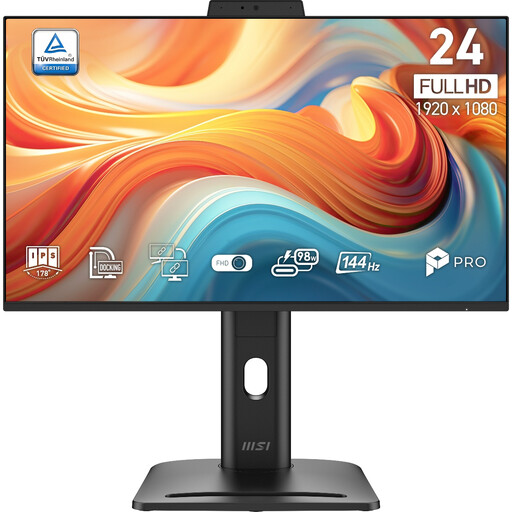
The GW2486TC is a home-office monitor option for a fixed screen with USB-C connections.
Dell offers distinct routes for fixed desk displays, docks and smaller mobile adapters.
The Series 7 Pro 734pm combines an ultrawide display with conferencing and Thunderbolt features for a fixed desk.
The ThinkVision M14t Gen 2 is a portable second-screen option when carrying size matters.
Casa Pop-Up Desk combines a stand, keyboard and touchpad for a laptop workspace that is put away after use.
These options cover external displays for laptop work and a USB-C dock; check each device against your laptop’s ports, display support and charging needs.
 No image available
A portable second screen for laptop work when you want a separate display; the listing describes desktop and travel use.
The listing specifies a 14-inch Full HD touchscreen, 60Hz and a 180° adjustable stand. Its described single-cable USB-C video and power setup requires a connected device with video output.
 No image available
A separate desk display to consider when you want to position a laptop screen independently from your keyboard.
The listing describes a 23.8-inch IPS panel with height, swivel, pivot and tilt adjustments. It lists HDMI, DisplayPort and VGA inputs.
 No image available
A fixed-screen option to consider if you want more viewing space for laptop work.
The listing specifies a 27-inch 4K UHD display, a four-way adjustable stand and USB-C power delivery rated at 65 W. Check that the laptop’s connection and charging requirements suit this arrangement.
 No image available
A dock to consider when you repeatedly connect a laptop to a display and peripherals at a workstation.
The listing specifies 4K at 60Hz HDMI output, USB-C and USB-A data ports, SD and TF card readers, and 3.5 mm audio. The laptop’s USB-C host port must support the video connection needed for HDMI output.
 No image available
A fixed desk display option to consider if its inputs and stand adjustments suit your laptop workstation.
The listing specifies a 32-inch 4K display, QD-OLED panel, HDMI and DisplayPort inputs, and height, tilt and swivel adjustments. USB-C power delivery is rated at 65 W; check it against the laptop’s connection and charging requirements.
No particular device follows automatically from the DSE-use threshold. In Great Britain, where the regulations apply, the employer’s assessment should cover the home arrangement and determine whether changes or additional equipment are needed. A separate display or a raised laptop with separate controls is one possible response to an identified setup need, not a universal purchase requirement.
No; check the exact laptop’s video-capable port, supported external-display count and resolutions, the dock’s host connection, and the operating system. Apple Support describes different external-display capabilities across Mac models; its guidance for M3 MacBook Air and MacBook Pro models specifies a two-external-display arrangement with the lid closed. A DisplayLink-based macOS route also has software and permission requirements.
For prolonged laptop use, put the laptop on a suitable riser and use a separate keyboard and mouse or another pointing device so you can position the screen and controls independently. Check that the riser is stable and that the controls connect with your laptop.
The Health and Safety Executive says workers cannot be charged where a DSE workstation assessment indicates action is needed, such as providing DSE equipment. Discuss the assessed requirement with your employer before privately buying equipment on the assumption that you will be reimbursed.
Northern Ireland has its own Health and Safety (Display Screen Equipment) Regulations (Northern Ireland) 1992. The Health and Safety Executive for Northern Ireland says the rules can cover daily DSE users who work for an hour or more at a time, including permanent or long-term home workers and routine hybrid workers. Its guidance says employers must assess workstation risks and identify individual and additional-equipment needs; Great Britain HSE wording should not be presented as the text of Northern Ireland law.