What to prioritise
Identify the task you need to improve before choosing a device, then check whether your laptop supports the connections that device requires.
| Concern |
What to check |
Who this matters to |
| Screen space and desk connections |
Check the laptop's supported external-display count and match its video output to the monitor or dock input. For several displays, check the intended resolution and refresh rate too. |
When documents, messages and meetings compete for room on my laptop screen, I want more viewing space without reconnecting every desk device separately. Around 36% of consumers put desk expansion first. |
| Video-call image and audio |
Match a webcam or headset connection to the computer, and check compatibility with the operating system and meeting software you use. |
In regular meetings or online seminars, I need others to see or hear me clearly before I need another display. Call image or audio is the first concern for around 29% of consumers. |
| Document work and online study |
List the documents, teaching windows and input devices you use together; choose the accessory that addresses the limiting task. |
For extended reading and writing at home, I would rather improve the part of my setup I use throughout a study session than add connections I rarely use. Roughly 21% of consumers prioritise straightforward document and study tasks. |
| Laptop capability and charging |
Identify the exact laptop model, ports and charging requirement; check its documented video support before planning a display or dock. |
If my current laptop may be the constraint, I need to establish what it can run and connect before buying accessories for it. Laptop capability comes first for around 14% of consumers. |
Joybuy workstation products
These products cover different first upgrades: a dock for a recurring desk setup, a webcam for calls, a replacement laptop, a portable second screen, and separate keyboard and mouse input. Match the product to your main task before checking connections and model-specific details.
 No image available
Targus USB-C Universal Dual HDMI 4K Docking Station, 100W Power Delivery Pass-Thru
Consider this dock if you repeatedly connect a laptop to a desk with two displays and other peripherals.
Its name specifies dual HDMI 4K outputs and 100W Power Delivery pass-through. Check the laptop's video and display support, the power available for charging, and whether the required power adapter is included.
View on Joybuy
 No image available
Targus 2K Webcam with Auto Focus
A separate webcam is worth considering when camera position or privacy control matters more to your calls than extra screen space.
The product information describes a physical privacy slider and mounting options. Its 2K title conflicts with a detailed specification of 1080p at 30fps, so confirm the resolution you will receive and compatibility with your computer and meeting software.
View on Joybuy
 No image available
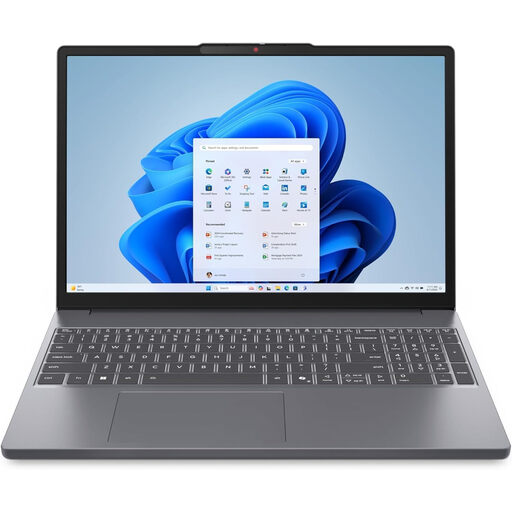
Lenovo IdeaPad Slim 3 83K7009MUK, 15.3-inch WUXGA, Ryzen 5 7535HS
Consider replacing the laptop when the computer itself limits regular work or study, rather than assuming a peripheral will resolve the problem.
This grey Windows 11 Home configuration lists 24GB DDR5 RAM, a 512GB PCIe SSD and Wi-Fi 6. Before planning a monitor or dock around it, confirm this model's ports, charging arrangement and external-display support.
View on Joybuy
 No image available
ASUS ZenScreen MB166C, 15.6-inch Full HD IPS USB-C monitor
This portable monitor is a way to add viewing space for documents or study materials when a fixed-desk screen is not the aim.
The product name specifies an anti-glare surface, flicker-free and blue-light-filter features. It uses USB-C and is listed without HDMI, so check that the intended laptop can provide the video output and power it needs.
View on Joybuy
 No image available
HP 680 CFT Dual-Mode Keyboard and Mouse Combo
A separate keyboard and mouse may be a more direct desk upgrade when sustained typing and navigation are the main tasks.
The product information describes Bluetooth and USB-receiver connection options. Check which connection your computer can use and confirm that the keyboard layout suits your typing needs.
View on Joybuy
Frequently asked questions
Will any USB-C port work with a monitor or dock?
No: USB-C describes the connector, not a guaranteed set of video, charging and data functions. Check the laptop's documented support for the intended connection, such as DisplayPort Alt Mode, Thunderbolt or USB4, then check the dock, cable and monitor. Microsoft also notes that USB-C hardware and software combinations can cause connection problems.
Can every Mac laptop run two external displays through a dock?
No: Apple says external-display support depends on the Mac model. Check your exact model's supported display configuration before buying two monitors or a dual-display dock; the dock's video-port count alone does not establish what the laptop can drive.
Do I need a dock for one monitor and a mouse?
Not necessarily. If the laptop supports the monitor connection and has a suitable way to connect the mouse, a direct cable or small hub may cover those needs. A powered dock is more relevant when you repeatedly connect several devices and need its documented charging or display arrangement.
Can I cancel an online order for a workstation accessory?
For eligible online goods in the UK, GOV.UK says traders must tell customers they can cancel up to 14 days after delivery. Check whether an exception applies and how the seller handles cancellation. A change-of-mind cancellation is a different question from a remedy for goods that are faulty, damaged or misdescribed.


