What to prioritise when buying
Start with the problem you encounter repeatedly, then check that the proposed connection works with your exact laptop. For employer-managed devices, confirm equipment and software rules before choosing a dock, camera or wireless receiver.
| Concern |
What to check when buying |
Who this matters to |
| Screen space for documents |
Check the laptop’s supported video output and external-display count against the monitor’s inputs. If considering an arm, check mounting compatibility and how the stand or screen can be positioned. |
If documents and calls compete for my laptop screen, I want more room to work across them. Consumers putting screen space first make up roughly 30% of this home-workstation scenario. |
| Call audio |
Test the current microphone and speakers in your meeting app. Check the headset’s connector, permitted connection type and, where relevant, the exact meeting-platform variant. |
If I struggle to hear colleagues or be heard, I need to address call audio rather than simply improve the picture. Consumers prioritising call audio make up around 30% of this scenario. |
| Laptop connections and charging |
Confirm the laptop’s USB-C or Thunderbolt video capability, supported displays and charging requirement. Check dock driver needs, any required charger and workplace approval. |
When I reconnect a laptop at a fixed desk, I want the display and peripherals to connect in a way the laptop supports. Connection-first consumers account for about 20% of this scenario. |
| Camera position and framing |
Preview the built-in camera first. For an external webcam, check its connector, mounting options, camera permissions and whether any optional software is allowed. |
If the built-in camera gives me an unhelpful view, I want to improve its position or framing without assuming that a different camera will fix audio. Consumers putting camera view first make up roughly 10% of this scenario. |
| Separate keyboard and mouse |
Check desk space and whether your work laptop permits wired USB, Bluetooth or a wireless receiver. |
If I raise my laptop screen or use a separate monitor for sustained work, I want to position typing and pointing controls separately. Consumers prioritising separate controls make up around 10% of this scenario. |
Joybuy product choices
The selection below covers external displays, a USB-C docking station, a webcam and call-audio devices for a fixed home workstation.
 No image available
MSI MD272UPSW 27-inch 4K UHD Smart Monitor, USB-C 65W
Consider this external-display route if documents and calls compete for your laptop-screen space; check your laptop’s video support and the connection you plan to use.
The product name specifies a 27-inch 4K UHD IPS display, Google TV, Dolby Audio, USB-C 65W and Multi-Control. Check the exact USB-C functions against your laptop before relying on it for display or charging.
Joybuy
 No image available
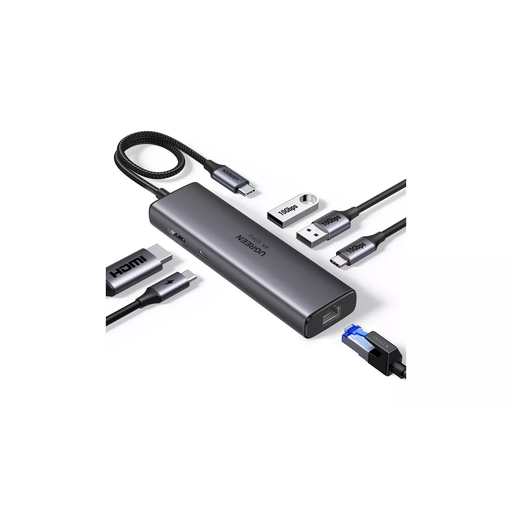
UGREEN USB-C Multi-function Docking Station, HDMI, USB-A, USB-C, RJ45, PD 4K/60
Consider a dock if reconnecting a laptop to a display and peripherals is the main inconvenience; first confirm your laptop supports the required video and power functions.
The product name lists HDMI, 2 × USB-A 3.2, 1 × USB-C 3.2, RJ45 and PD 4K/60. Check those connections against your laptop and the equipment you intend to use.
Joybuy
 No image available
Targus 2K Webcam with Auto Focus
Consider an external webcam if the built-in camera’s position or focus is not suitable for calls; check that its connection and any required permissions work with your laptop.
The product description lists USB-C connectivity, autofocus, an adjustable mount, a built-in microphone, a privacy slider and supplied adapters. Check whether its mounting options suit your desk.
Joybuy
 No image available
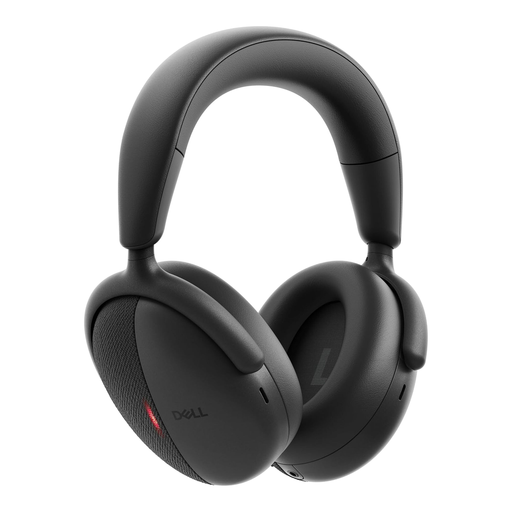
DELL Premier Wireless ANC Headset WL7024
Consider a headset if calls call for personal listening and a microphone rather than open-room audio; check which connection your work laptop permits.
The product description lists Bluetooth, a USB-C wireless adapter, a 3.5 mm audio input, seven microphones and ANC. It also lists certification for Teams and Zoom; check that the connection suits your device.
Joybuy
 No image available
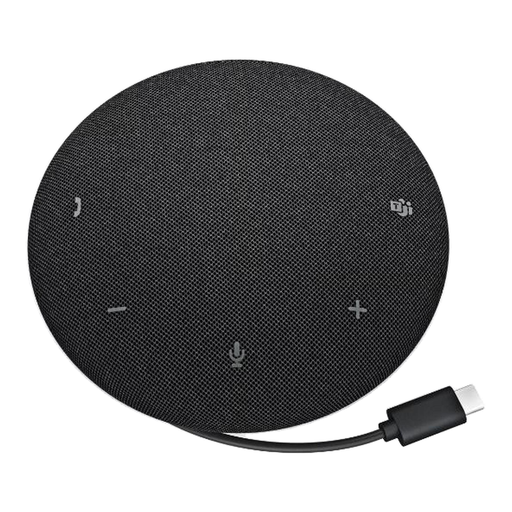
DELL Pro Wired Speakerphone SP325
Consider a speakerphone if you prefer open-room audio to wearing a headset; check that USB-C is permitted on your work laptop and that speaker use suits your space.
The product description lists USB-C, four microphones, a speaker, onboard mute and volume controls, and a 2.50 m microphone pickup range. It also lists Teams and Zoom certification.
Joybuy
Home workstation FAQs
Should I check what my employer supplies or permits before buying equipment?
Yes, if you use a managed work laptop, check the rules for docks, USB receivers, cameras, headsets, storage-capable hubs and optional software before buying. The Health and Safety Executive says that where an applicable display-screen assessment identifies equipment an employer must provide to address a risk, the worker cannot be charged for it; that does not mean every preferred home accessory must be supplied. The Information Commissioner’s Office also advises organisations to assess the security of new home-working IT arrangements.
Will any USB-C dock run my monitor and charge my work laptop?
No: the connector alone does not establish video or charging compatibility. Check your exact laptop’s video output and external-display support, the dock’s operating-system and driver requirements, and whether its available power suits the laptop. Apple Support notes that the number of displays supported varies by Mac model.
How can I tell whether a new webcam or headset will help my calls?
Test the existing camera, microphone and speakers separately in your meeting app or a test call, then choose equipment for the problem you identify. On a Windows work laptop, check camera permissions if a connected camera is unavailable, as well as any workplace restrictions. A new device will not necessarily resolve room noise, lighting or connection issues.
Does UK home-working guidance mean I must buy an external monitor?
The Health and Safety Executive’s guidance does not establish a universal requirement to buy an external monitor. Where display-screen rules apply, HSE guidance discusses assessment of the home setup and action on identified risks; for prolonged laptop use, it also discusses a separate display or separate keyboard and mouse.
What if an online-purchased accessory is faulty or unsuitable?
For a consumer purchase, GOV.UK says faulty or misdescribed goods carry refund rights, while distance purchases generally have a 14-day period after receipt to notify the seller of cancellation and a further 14 days to return the item. The precise circumstances matter, and these statutory rights are distinct from an optional manufacturer’s warranty or equipment purchased by an employer.


