What should you check before buying?
For a screen-based home desk built around an existing laptop, establish what the laptop can drive and charge before choosing between a direct monitor connection and a dock. Then consider how often you reconnect equipment and how the screen and input devices will be positioned.
| Concern |
What to check |
Who this matters to |
| Laptop compatibility |
Match the exact laptop model and port capabilities to the dock’s video protocol and charging requirements. Lenovo says its relevant docks require support for USB-C Alt Mode, DisplayLink or Thunderbolt through the laptop’s Type-C port. |
If I connect everything through one laptop port, I need to know that the display and charging functions will work with my machine. Around 31% of consumers put compatibility first. |
| Independent screen space |
Check the laptop’s supported external-display count and the intended monitor connections. Microsoft Support explains that a signal splitter duplicates an image rather than creating two independent displays. |
When I compare spreadsheets with reference documents, I want enough separate screen space for both tasks. Around 31% of consumers make display workspace their primary concern. |
| Daily reconnection |
List the monitor, USB devices, network connection and charging you would reconnect each day, then check the hub or dock’s ports against that list. |
I move my laptop between workplaces and want my home peripherals ready without reconnecting each one separately. Roughly 19% of consumers prioritise that routine. |
| Screen and input position |
Check whether the screen can sit at a comfortable height and whether raising the laptop calls for a separate keyboard and mouse. For applicable home display-screen work, the Health and Safety Executive advises assessing the home setup as well as the workplace setup. |
If I spend long periods working at home, I need a screen and input arrangement I can use comfortably. For about 19% of consumers, that is the main concern. |
Joybuy products for a hybrid home desk
These products cover three parts of a laptop-based home setup: hubs or docks for desk connections, external monitors for screen space, and a separate keyboard and mouse. Check each choice against your laptop and the connections you intend to use.
 No image available
Targus USB-C Universal Dual HDMI 4K Docking Station, 100W PD Pass-Thru (Retail Packaging)
Consider this for a home desk where you want to connect monitors through a USB-C dock, subject to the laptop’s video and independent-display support.
- Dual HDMI 4K connections and 100W power-delivery pass-through are stated in the product name.
- Check whether your laptop supports the intended display setup and what power supply the pass-through arrangement requires.
Joybuy
 No image available
Baseus Metal Gleam Series II 10-in-1 USB-C Hub, Cosmic Black
This hub is relevant if your desk needs display, USB and wired-network connections from a laptop with suitable USB-C video output.
- The named connections include two HDMI ports, USB-A and USB-C data ports, RJ45, SD/TF and a USB-C power-delivery port.
- Check the laptop’s video support and independent-display limit; the HDMI modes in the product name do not guarantee that both will be available together.
Joybuy
 No image available
ASUS ZenScreen MB166CR FHD Monitor
Consider this external screen if you want additional display space alongside your laptop.
- FHD is identified in the product name.
- Before choosing a connection, confirm which video outputs your laptop and this monitor can use together.
Joybuy
 No image available
Dahua 32-inch 4K 165Hz Curved OLED Monitor with USB Hub
This is a larger-screen option for a fixed home desk; check both your available space and your laptop’s intended display connection.
- The product name states 3840 × 2160 resolution, 165Hz, a curved OLED screen, Type-C 65W and a USB hub.
- Confirm the Type-C video and charging functions before relying on that port for a one-cable laptop setup.
Joybuy
 No image available
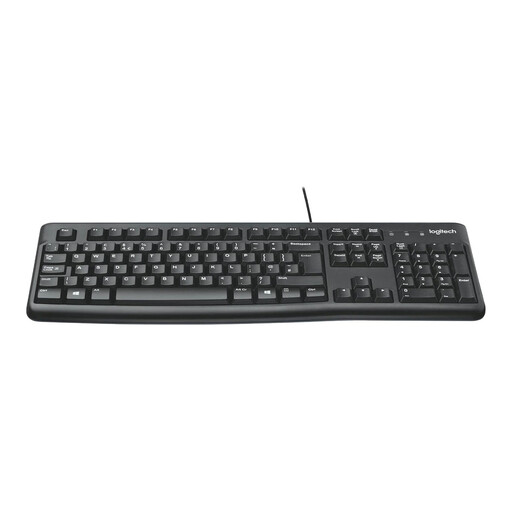
Logitech MK120 Wired Keyboard and Mouse Set, Black
A separate keyboard and mouse can be useful when the laptop screen is raised or an external monitor becomes the main screen.
- The product name identifies a wired keyboard-and-mouse set.
- Check the available connections and operating-system compatibility for your laptop or dock.
Joybuy
Common questions
Will any USB-C laptop port run an external monitor through a dock?
No: the laptop port must support the connection method required by that dock and display setup. Lenovo identifies USB-C Alt Mode, DisplayLink and Thunderbolt as relevant protocols for its docks, so check the exact laptop and dock specifications rather than the connector shape alone.
Can two HDMI sockets on a dock give me two extended screens?
Only if the complete laptop-and-dock configuration supports two independent external displays. Microsoft Support explains that a splitter duplicates one signal rather than creating two independent screens; check the laptop’s display limit and the dock’s supported configuration.
Will a dock give a MacBook Air (M1, 2020) two native external displays?
Not by itself. Apple specifies one external display at up to 6K and 60Hz for the MacBook Air (M1, 2020); check Apple’s specifications for your exact Mac model before planning additional native displays.
Must my employer provide a particular monitor, dock or stand for home working?
There is no automatic entitlement to a particular accessory in the Health and Safety Executive guidance cited here. Where display-screen equipment rules apply to long-term home work or routine work split between home and the workplace, an individual assessment should cover both locations; if it indicates that equipment is needed, the worker cannot be charged for it.
What else do I need to check before raising my laptop on a stand?
Check the resulting screen position and whether you can use a separate keyboard and mouse comfortably. A stand changes the laptop’s position but does not add display outputs or ports; for applicable regular home display-screen work, the Health and Safety Executive advises an individual assessment of the arrangement.


