For prolonged laptop work at home, choose a setup you can put away if the work surface is shared, or an external monitor if equipment can stay on a desk. The Health and Safety Executive advises using a separate keyboard and mouse when raising a laptop screen; an external monitor still needs an independently placed keyboard and mouse. Consider a monitor arm only after checking the monitor and desk mounting requirements, and treat a headset for calls as a separate choice.
Who each setup suits
Compact-space laptop worker
If you work at a dining table or shared desk that must be cleared afterwards, a laptop riser and separate input devices are worth considering together. The Health and Safety Executive advises separating the keyboard and mouse when elevating a laptop screen; check how much equipment you can comfortably put away.
Desk-based long-session worker
If equipment can remain in place, an external monitor lets you position the display independently of the laptop. A separate keyboard and mouse remain part of the arrangement; a monitor arm is an additional option if the monitor and desk meet its mounting requirements.
Shared-home video caller
If calls are a regular part of your day around other people, assess a headset for its connection and calling-software compatibility. It addresses call audio, not the placement of your screen, keyboard or mouse.
What to check before buying
Decide whether the workspace must be cleared after use, then choose how to position the screen and separate input devices. A headset is an additional decision when calls are a priority.
| Concern |
What to check |
Who this matters to |
| Screen height and input |
Check the stand’s stated laptop size and weight limits, and plan space for a separate keyboard and mouse. |
If I rely on my laptop screen for long sessions, I need to raise it without typing on the elevated keyboard. Around 36% of consumers would put screen height and separate input first. |
| Permanent display |
Confirm the laptop’s display output, the monitor’s input and the available desk depth. |
A desk I can leave set up makes independently placing a monitor more useful to me. Around 29% of consumers would prioritise a permanent display arrangement. |
| Storage and movement |
If you need a folding stand, compare its packed size with its stated laptop fit and stability requirements. |
When my work surface has to be cleared, I need equipment I can move and store between sessions. Compact storage would come first for around 21% of consumers. |
| Calls in a shared home |
Check the headset connection against your laptop and the calling software you use. |
Frequent calls around other people make a compatible microphone headset my immediate accessory need. Around 14% of consumers would prioritise call audio. |
Common buying mistakes
-
Buying a laptop stand on its own for prolonged work
Raising the screen also raises the laptop’s attached keyboard. The Health and Safety Executive advises using a separate keyboard and mouse so the screen can be elevated independently of the typing position.
Choose the stand, keyboard and mouse as one arrangement, checking laptop fit and input-device compatibility before buying.
Separate input devices also mean more items to connect and put away.
-
Assuming any monitor fits any arm
Ergotron’s monitor-arm guidance identifies the display’s VESA mounting interface and weight as compatibility checks. Screen size and the space around the desk can also affect the available movement.
Check the monitor’s exact model, mounting pattern and weight against the arm’s stated capacity, mounting method and clearance requirements.
-
Choosing a fixed monitor for a table that must be cleared
An external monitor allows separate screen placement, but it takes space and is less convenient to put away than a portable laptop-riser arrangement.
Decide whether the equipment can remain assembled before choosing between a fixed display and accessories you will pack away.
A setup that is cleared daily also takes time to disconnect, move and reconnect.
Brands to consider for workspace accessories
Kensington
Kensington makes laptop risers and monitor stands relevant to both compact and desk-based arrangements.
- Its SmartFit Laptop Riser has published laptop size and weight limits, giving you figures to compare with your own laptop.
- The limits of that SmartFit model do not apply to every Kensington riser; check the exact model you intend to use.
Logitech
Logitech offers keyboards, mice and headsets across portable, home-working and video-call product lines.
- Its separate product categories can help narrow a search for input devices or call equipment.
- Connection type, operating-system support and calling-platform compatibility depend on the individual model.
Ergotron
Ergotron’s monitor mounts and arms are relevant when a desk setup needs adjustable display placement.
- Its mounting guidance identifies VESA compatibility and monitor weight as selection checks.
- An arm remains a model-specific choice: the monitor, arm and desk mounting arrangement must fit together.
Joybuy product choices
These products cover portable and desk-based external displays, separate keyboard-and-mouse sets, and a wired option for calls. Choose the screen and input arrangement for your workspace first, then assess call equipment separately.
 No image available
ASUS ZenScreen MB166C portable USB monitor, 15.6 inch
Consider this portable external display if your laptop setup needs a separate screen that can be put away.
Its listed features include a 15.6-inch Full HD IPS screen, USB Type-C connection and anti-glare surface.
Check that your laptop’s USB-C port can provide the video connection and power the monitor requires. Plan for a separate keyboard and mouse if needed for your working arrangement.
View on Joybuy
 No image available
AOC Q32V4 31.5-inch IPS monitor
Consider this external monitor where a larger display can remain on a regular desk.
The product name lists a 31.5-inch IPS screen and built-in speakers.
Check your laptop’s display output, the monitor connection and the desk space available before choosing cables or other accessories.
View on Joybuy
 No image available
Philips 3000 Series SPT6318B/05 wireless keyboard and mouse, UK English
This set provides separate typing and pointing devices for a raised laptop screen or external-monitor arrangement.
It is a wireless keyboard-and-mouse combination with a UK English keyboard layout.
Check how it connects to your laptop and whether a port or adapter is needed. Screen positioning requires a separate stand or display decision.
View on Joybuy
 No image available
HP 680 CFT Dual-Mode keyboard and mouse set
Consider this separate keyboard-and-mouse set when you want to position the laptop or external display independently of your input devices.
The product name identifies it as a dual-mode combination; check the connection options and keyboard layout against your laptop and typing preferences.
It does not take the place of a screen-positioning accessory.
View on Joybuy
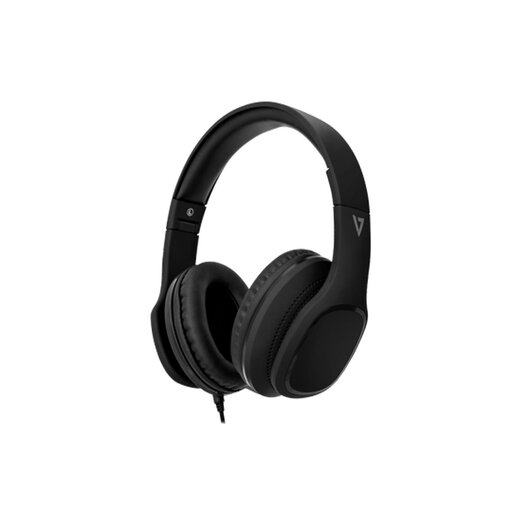 No image available
V7 HA701-3EP wired over-ear headphones with inline microphone
Consider this call-audio accessory if you take regular calls in a shared home.
The product name specifies a wired design, 40 mm drivers and an inline MEMS microphone.
Check that your laptop’s audio connection supports the microphone and that the headset works with your calling setup. It does not address screen or input-device placement.
View on Joybuy
Questions about home laptop setups
Does every home worker need to buy a laptop stand or monitor?
No particular accessory is necessary for everyone. The Health and Safety Executive identifies separate input devices and an elevated laptop screen as considerations for prolonged laptop use; what you choose depends on your existing screen position, work surface and whether the setup must be put away. If you are employed, discuss workstation equipment needs with your employer.
Is a laptop riser enough on its own for prolonged work?
A riser alone does not separate the screen from the laptop’s attached keyboard. For prolonged laptop use, the Health and Safety Executive advises a separate keyboard and mouse so the screen can be elevated on a riser or similar support. Check the stand’s fit alongside the space needed for those input devices.
What should I check before buying a monitor arm?
Check the monitor’s VESA mounting interface and weight against the arm’s stated specifications. Ergotron’s guidance also points to adjustment clearance, particularly with larger or multiple displays; confirm that the arm’s desk mounting method suits your work surface.
Can I cancel an online order if a workspace accessory does not suit me?
For eligible online orders in the UK, GOV.UK says customers generally have 14 days from receiving an item to tell the seller they want to cancel. Check the applicable cancellation steps and handling conditions before extended use; change-of-mind cancellation is distinct from remedies for faulty or misdescribed goods.


