Laptop-first remote workers
If a laptop needs to stay powered throughout the working day, establish its charger and cable requirements before deciding whether one shared charger can also serve a phone or peripherals.


Choose a charger that meets your laptop’s verified charging requirements when keeping it powered is the priority; choose a suitably rated, fused extension lead when you need more mains outlets. A multi-port charger can consolidate compatible smaller devices, while surge protection is an additional feature—not a way around load limits or charger compatibility. Check the output available with all intended ports in use, and connect only one extension product directly to the wall socket.
If a laptop needs to stay powered throughout the working day, establish its charger and cable requirements before deciding whether one shared charger can also serve a phone or peripherals.
A shared charger may reduce separate adapters for compatible devices. The deciding detail is how its output is divided when those devices charge at the same time.
When existing equipment needs more accessible mains outlets, a suitably rated extension product addresses distribution. It must not be overloaded or connected to another extension product.
Identify whether the immediate problem is device-compatible charging or access to mains outlets. Consider surge protection and cable routing only after the charger and connected load are suitable.
Choose when: Your laptop’s requirements have not been confirmed against a shared charger.
Trade-off: Separate chargers may occupy more sockets and desk space.
Choose when: Each intended device works with the available ports and their simultaneous output.
Trade-off: The maximum shown for one port may not be available when other ports are in use.
Choose when: Suitable existing chargers and office devices need additional mains outlets.
Trade-off: Additional sockets do not increase the lead’s marked current limit.
| Concern | What to check | Who this matters to |
|---|---|---|
| Laptop charging compatibility | Check the exact laptop’s charging method and power requirement, plus the charger’s available output and cable rating. | If my laptop must stay powered during work, a matching connector alone is not enough to settle the charger choice; around 36% of consumers put laptop compatibility first. |
| Safe mains distribution | Check the extension product’s marked current rating against the combined load. Use one fused UK extension product directly from the wall socket. | With too few accessible sockets, I need space for existing equipment without exceeding the lead’s rating; safe outlet expansion comes first for around 29% of consumers. |
| Shared device charging | Match the port types to your devices and check the manufacturer’s output allocation for the number connected at once. | When several compatible portable devices need charging at my desk, I would rather assess one shared charger than rely on its advertised single-port maximum; around 21% of consumers prioritise consolidated charging. |
| Cable routing | Choose organisers that fit the cables and keep leads clear of walking routes without trapping or concealing damage. | If loose leads obstruct my workspace, I need a clearer route for them without mistaking tidiness for electrical protection; cable organisation is the primary concern for around 14% of consumers. |
The connector does not establish that the device, charger and cable support the required charging method and power. On a multi-port charger, available output can also change when another device is connected.
Check the exact laptop model, its charging requirements, the cable rating and the charger’s output for the ports you intend to use together.
An extension product’s marked current limit still applies when several outlets are occupied. Electrical Safety First warns that overloading sockets can cause overheating.
Check the rating and combined connected load before use. If considering a cable reel, check its rating in the wound and unwound positions.
Electrical Safety First warns that daisy-chaining extension leads can overheat the wall plug and increase overload risk.
Connect one suitable extension product directly to the wall socket. If it cannot reach safely, reconsider the workstation or equipment position rather than adding another lead.
Neither feature makes an incompatible charger suitable or permits an extension product to exceed its rating. An organiser should not conceal a damaged or hot cable.
Resolve charging compatibility and loading first. If choosing a surge-protection strip, check its protection indicator and the instructions for that model.
Anker lists multi-port chargers for people considering shared charging after checking their devices’ requirements.
Belkin lists surge-protection strips that combine mains outlets with USB charging ports.
UGREEN lists Nexode multi-port chargers and USB-C cables for shared desk charging.
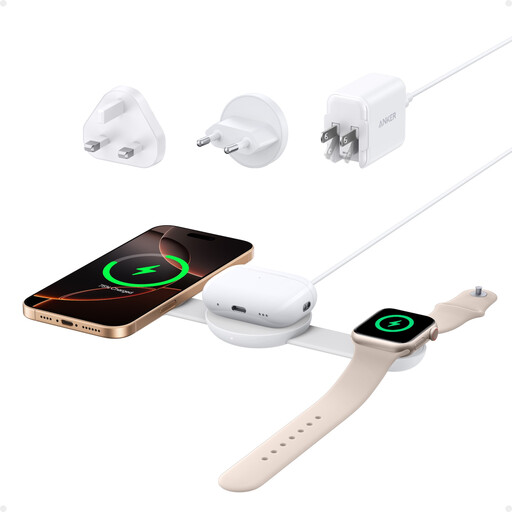
This wireless charging pad is relevant to a desk with compatible smaller devices. Laptop charging and the need for extra mains outlets are separate decisions.
 No image available
For a desk where compatible smaller devices need wireless charging, check your exact iPhone, Apple Watch and AirPods models before choosing this pad. The product details state that phone use requires a MagSafe-compatible case. If you also need to power a laptop, check its charger requirements separately.
No: the exact laptop must support charging through that connection, and the charger and cable must meet its requirements. Check USB Power Delivery support where relevant and the output available when other ports are occupied.
No. Electrical Safety First advises against connecting extension leads together because of overheating and overload risk. Use one suitable product directly from the wall socket and stay within its marked rating.
Compare the reel’s marked current rating with the combined connected load, including the rating that applies while it is wound. Electrical Safety First notes that a reel’s wound rating can be lower than its unwound rating.
An RCD plug is worth considering where the socket lacks RCD protection: Electrical Safety First advises using one in that situation. It does not replace a compatible charger, sound equipment or checks on the connected load.
Follow the instructions and protection indicator for your particular model. For its SRB003af2M, Belkin advises replacement if the protection light is off and recommends replacement after three years even if it remains on; that interval is Belkin’s recommendation for that model, not a rule for every strip.