Listeners with limited desk space
If you want separate left and right speakers without finding room for an amplifier, start by measuring where a compact powered pair could sit around your monitor and work equipment.


For jazz albums at a home-office desk, a compact powered stereo pair is a practical starting point if you can place two speakers: it needs no separate amplifier and lets you position the left and right channels apart. Choose its inputs around the sources you use. If you play vinyl, check the turntable’s LINE/PHONO output before relying on an auxiliary socket; passive speakers need an amplifier.
If you want separate left and right speakers without finding room for an amplifier, start by measuring where a compact powered pair could sit around your monitor and work equipment.
Your connection choice depends on the turntable’s output. Check whether it supplies LINE level, needs an external phono preamp or can use a speaker system with a compatible moving-magnet phono stage.
If most albums come from a computer, phone or streaming service, choose a speaker pair with a connection your devices can actually use, such as USB audio, Bluetooth, a supported network service or a line input.
Choose it when: You can place two speakers and want to play music without adding a separate amplifier.
Allow for: Two speaker positions, power and model-specific inputs; an auxiliary socket is not necessarily a phono stage.
Choose it when: You already have a suitable amplifier or want to choose the speakers and amplification separately.
Allow for: An amplifier, additional connections and a suitable phono stage if your turntable supplies PHONO-level output.
Choose it when: Finding positions for two cabinets matters more to you than a separately placed stereo pair.
Allow for: One cabinet cannot be positioned as separate left and right speakers; check its connections against your music sources.
| Concern | What to check | Who this matters to |
|---|---|---|
| Source compatibility | Match your laptop or streaming device to a listed input. For vinyl, check LINE or PHONO output and whether a compatible phono stage is needed. | If I switch between a laptop and a turntable, both sources need a connection at the right signal level. Around 36% of consumers put source compatibility first. |
| Desk fit and stereo placement | Measure both speaker positions, including depth for plugs and routes for power and the connection between speakers. | I want left and right speakers around my work position without crowding the desk. For roughly 29% of consumers, fitting a stereo pair is the primary concern. |
| Everyday playback | Check the exact model for the computer input, Bluetooth connection or network service you intend to use. | When I move between work audio and albums, an easy connection from my usual device matters most. Around 21% of consumers prioritise straightforward digital playback. |
| Future expansion | Look for an expressly listed subwoofer output if you intend to add a compatible subwoofer later. | I may want to add a subwoofer without replacing my main speakers, provided I can accommodate another powered unit. Future expansion comes first for roughly 14% of consumers. |
A PHONO-level turntable needs a phono stage before a normal line input. A turntable set to LINE should not be connected to a PHONO input, where the level can cause distortion.
Check the turntable’s PHONO/LINE setting, its internal preamp and the speaker’s specified input before connecting them.
A separate phono preamp and suitable cables may be necessary.
A single cabinet cannot take the place of two speakers positioned to the left and right of your desk. A powered pair avoids a separate amplifier, but still needs space for both cabinets.
Decide where each speaker would sit before choosing between a pair and a single-box system.
Bluetooth does not establish whether a model also accepts USB audio, optical input, network streaming or a turntable connection. For example, Q Acoustics lists USB computer audio for the M20, while Edifier lists Bluetooth, optical, coaxial and RCA inputs for the R1280DBs.
Make a list of the devices you will connect and match each one to the exact speaker model’s published inputs.
A stereo pair needs two positions as well as workable power and cable routes. Cabinet measurements alone do not account for plugs behind the speakers or other equipment on the desk.
Measure both locations and leave room for the connections before deciding whether the speakers belong on the desk, nearby shelves or stands.
Stands, longer cables or a change to the desk layout may add to the setup.
The LSX II is a compact powered stereo system to consider if network streaming and several wired sources need to share a home-office setup.
The powered M20 pair suits a setup centred on computer audio and Bluetooth without a separate amplifier.
The MR1 Mk3 is a compact desktop pair worth considering when a direct connection for a suitable moving-magnet turntable is important.
The R1280DBs is a powered bookshelf pair for listeners looking for Bluetooth and conventional wired connections.
This powered desktop pair is a choice for home-office listening from a laptop or Bluetooth source. Check your turntable connection separately if vinyl is part of the setup.
 No image available
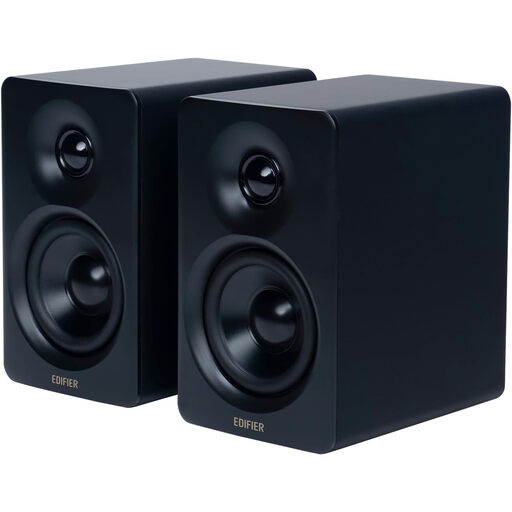
For music from a laptop or phone at a desk, this powered pair offers USB-C and AUX inputs alongside Bluetooth 5.3.
It is specified at 66 W RMS, with a 3-inch mid-bass driver and 1-inch tweeter. Before connecting a turntable, check whether its output needs a phono preamp; if you plan to add a subwoofer, confirm the speaker’s available connections.
Powered speakers do not need a separate amplifier; passive speakers do. Audio-Technica’s turntable-connection guidance distinguishes passive speakers, which have no built-in amplifier or power source. Whichever route you choose, check that the amplification and inputs suit your music sources.
You can connect it directly when the turntable supplies line-level output to a suitable line input, or when the speakers have a phono stage compatible with the turntable. A PHONO-level output needs a phono stage before an ordinary line input; check the turntable’s PHONO/LINE setting before making the connection.
Match the computer’s available output to an input on the exact speaker model. Q Acoustics lists USB computer audio and Bluetooth for the M20, while KEF lists USB-C, optical and 3.5 mm auxiliary inputs alongside streaming options for the LSX II. Choose the route your computer and listening setup can use.