For recurring colour or mixed-document printing, consider an ink-tank multifunction printer; for mostly black-text documents, a mono laser multifunction printer offers the speed and sharp text highlighted by Which?, but gives up colour output. A cartridge inkjet can suit lighter colour-and-scan use, provided you check its replacement cartridges. If you handle multi-page paperwork, look for an automatic document feeder (ADF), and check two-sided scanning separately from automatic two-sided printing.
Who this choice affects
Households printing documents regularly
If forms, coursework or work documents keep coming, replacement ink or toner and stated page yield deserve attention alongside the printer itself. Which? highlights consumables as an important part of choosing a home printer.
Households scanning multi-page paperwork
If several sheets need scanning or copying at once, an ADF can feed them without placing each page on the scanner individually. Which? distinguishes this from scanning an isolated sheet on a flatbed.
Text-first home-office users
If most output is black-text work or study documents, a mono laser printer is worth considering for its text output and speed. Which? notes those strengths, but a mono model will not print colour documents.
What matters when choosing
Start with the documents you print most often, then decide how you need to scan them. Check the exact model's consumables and document-handling features before choosing between cartridge inkjet, ink-tank and mono laser devices.
| Concern |
What to check |
Who this matters to |
| Replacement consumables |
Check the exact model's replacement ink or toner, stated yield and availability. |
If I print forms or coursework repeatedly, I want to know what I will need to replace and how often; around 36% of consumers put that ongoing consumables question first. |
| Black-text output |
Compare text output and rated speed; check maintenance guidance if the printer may sit unused. |
When most of my work is black-text documents, I care more about getting those pages out promptly than printing in colour. Around 29% of consumers prioritise that text-first need. |
| Paperwork handling |
Check for an ADF and its capacity; verify printing and scanning on both sides separately. |
If I scan several-page forms or make two-sided document packs, I want less manual page handling; around 21% of consumers put that workflow first. |
| Colour and scanning |
Confirm colour printing and scan/copy functions on the exact model; check paper compatibility if needed. |
I still need colour worksheets or graphics as well as occasional scans, so a mono-only printer would not cover my documents. Colour-and-scan flexibility comes first for around 14% of consumers. |
Mistakes to avoid
-
Choosing a printer without checking its consumables
For repeated printing, the replacement supplies matter long after the printer is set up. Which? notes that cartridge replacement can be a significant consideration for a low-cost printer.
Find the original replacement cartridges, bottles or toner for the exact model, and compare stated yields on a like-for-like basis.
-
Assuming an ADF also scans both sides
An ADF feeds a batch of sheets, while automatic duplex printing concerns printed pages. Neither feature alone establishes automatic two-sided scanning.
Check the model's ADF capacity, scan path and two-sided print and scan specifications separately.
-
Choosing mono laser when colour is still needed
Which? identifies speed and sharp text as laser strengths, but a mono model cannot produce colour documents. Laser printers also cannot use standard glossy photo paper.
List the documents you print regularly before deciding whether black-only output covers the household's needs.
-
Treating stated page yield as your own page count
Manufacturer yields are based on specified tests; document coverage and printing patterns can change household results.
Read the test basis and use stated yields to compare relevant consumables, not as a promise of how many pages you will print.
Relevant brands to consider
Epson
Epson's EcoTank multifunction line is relevant when refillable ink, scanning and document handling are priorities.
- Epson lists printing, copying, scanning, automatic two-sided printing, a 250-sheet tray and a 35-page ADF for the ET-5150.
- Those specifications apply to the ET-5150; check the features of any other EcoTank model separately.
Brother
Brother's mono laser multifunction range is relevant to households printing mainly black-text documents and scanning paperwork.
- Brother specifies automatic two-sided printing, a 50-sheet ADF and separate drum and toner units for the MFC-L2800DW.
- These are features of that mono model, not of every Brother printer.
Canon
Canon's MAXIFY MegaTank line is relevant to households considering refillable ink and multifunction document handling.
- Canon lists a 35-sheet ADF, automatic two-sided printing and a 250-sheet cassette for the MAXIFY GX2051.
- Canon's included-ink yield for that model uses its stated test method; household output can differ.
HP
HP has colour all-in-one inkjet and Smart Tank models to consider when comparing scanning and document-handling features.
- HP's UK range includes models listed with an ADF and automatic two-sided printing.
- Check those features on the exact model rather than assuming they apply across the range.
Joybuy products for these needs
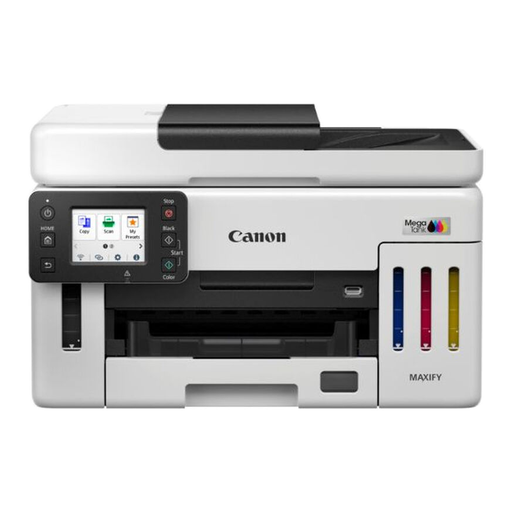
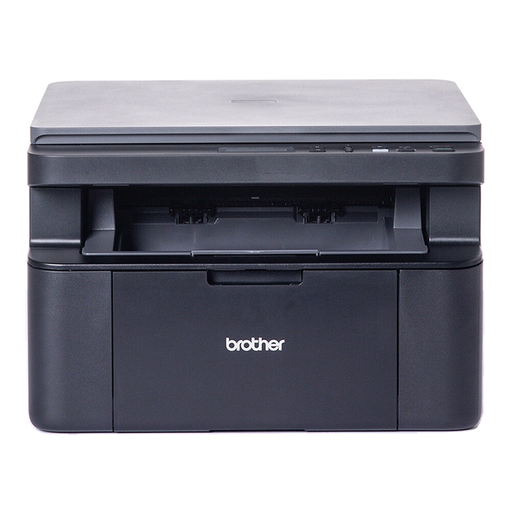
These two multifunction printers address different document needs: the Canon MAXIFY GX6150 is an ink-tank option for recurring printing and batch scanning, while the Brother DCP-L1640W is a mono laser option for black-text output and occasional flatbed scanning.
 No image available
Canon MAXIFY GX6150
Consider this ink-tank model for recurring documents and multi-page paperwork. Joybuy describes a 50-sheet ADF for the GX6150; if you scan both sides of a batch, confirm whether its ADF can do that automatically.
Check the matching replacement ink and its stated yield for your printing pattern.
View on Joybuy
 No image available
Brother DCP-L1640W Mono Laser Printer
Consider this mono laser model when black-text documents and occasional scanning matter more than colour output. Its flatbed scanner requires individual page handling, and two-sided printing is manual rather than automatic.
Check the matching replacement toner and its stated yield before choosing it for regular printing.
View on Joybuy
Frequently asked questions
Which printer type suits regular household documents?
Consider an ink-tank multifunction printer if you repeatedly print colour or mixed documents, or a mono laser multifunction printer if most pages are black text. Which? highlights laser speed and sharp text; a cartridge inkjet remains an option for lighter colour-and-scan use if its replacement consumables suit you.
When is an automatic document feeder useful?
An ADF is useful when you regularly scan or copy several sheets in one batch. If you mostly scan single forms or items that need to lie flat, a flatbed may be enough; check the ADF capacity and two-sided scanning specification if batches are part of your routine.
Does automatic two-sided printing include two-sided scanning?
No. Automatic two-sided printing turns the paper over for printing, but does not establish that the scanner can capture both sides automatically. Check the exact model's scanning specifications and ADF type.
How should I compare replacement ink or toner?
Identify the consumables made for each exact model, their stated yields and the test methods behind those figures. Check whether suitable replacements are available, and do not treat a stated yield as a guaranteed household page count.


