What should you check before choosing?
Start with the audio sources you actually use, then decide whether broadcast reception, phone playback or network-based controls fit the rooms and people involved.
| Priority | What to check | Your needs |
|---|
| Radio and services |
For broadcast radio, check the required DAB/DAB+ or FM tuner and reception. For internet listening, check the exact device's support for each station, podcast or music service, including accounts and subscriptions. |
I mainly want a particular live station to be easy to reach, or I regularly switch between named apps and services. |
| Playback controls |
Compare physical buttons and presets with app, Bluetooth and voice controls. Check whether a desired voice command works with the specific service; Bluetooth playback alone does not establish voice integration. |
Several people may use the speaker, so the way we start and change audio matters as much as the source itself. |
| Rooms and movement |
Check power arrangements before moving a device between rooms. For multi-room playback, confirm that the speakers, control method and home network support the intended grouping. |
I may carry one speaker around the house, or I may want compatible speakers playing in more than one room. |
| Existing equipment |
For a streaming adapter, compare its outputs with the inputs on your amplifier or powered speakers. Check the network and control device needed for setup. |
I would rather keep my current speakers if a compatible adapter can add the streaming controls I use. |
| Accounts and privacy |
On connected devices, review account linking, microphone controls, app permissions and published security-support information. The Information Commissioner's Office has highlighted concerns about how smart products collect and use personal information. |
If a device sits in a shared room, I want to understand who can use its linked accounts and whether voice control is worth having. |
Joybuy speaker options
These two speakers represent tabletop multi-room and portable Bluetooth routes. Compare their intended playback methods with your radio, service and room requirements; neither listing alone establishes that a particular broadcast tuner or native service is available.
 No image available
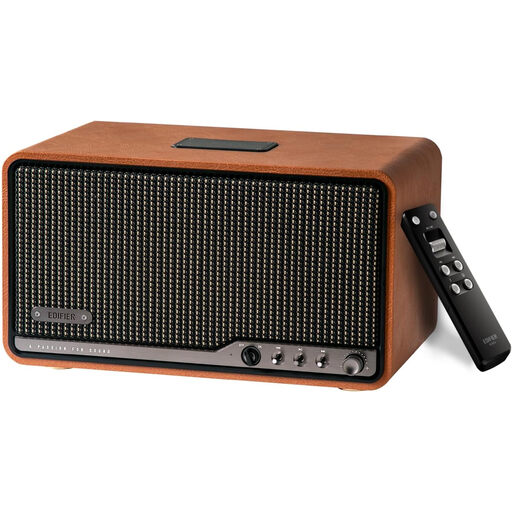
Edifier S300 wireless multi-room tabletop speaker, brown
A tabletop option if you want to explore playback across rooms. Check the compatible devices and additional speakers needed for your intended setup, as well as your preferred services, broadcast reception and power arrangements.
View on Joybuy
 No image available
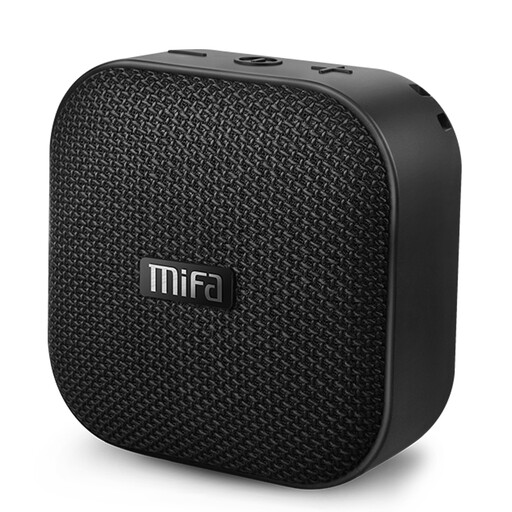
MIFA A1 portable Bluetooth speaker, black
A portable route for playing podcasts or music from a nearby Bluetooth device. Check whether that source-based approach suits everyone who will use it, and confirm battery life and broadcast-radio features if either matters to you.
View on Joybuy
Home audio questions
Should I choose a DAB radio or an internet-connected speaker for live radio?
Choose a DAB/DAB+/FM radio if live broadcast radio, physical controls and suitable local reception are your priorities. Choose an internet-connected speaker if supported on-demand programmes, music services or app controls matter more, and check that it carries the stations you use. Ofcom's Media Nations 2025 reports that DAB remains the largest radio platform by listening share, while radio listening through smart speakers continues to grow.
Will BBC Sounds work on every smart speaker?
No: support and controls depend on the platform and setup. Amazon's UK BBC Sounds Alexa Skill requires a linked BBC account, while Sonos provides a BBC Sounds service for its system. Check the exact device and the way you want to start playback.
Is Bluetooth enough for podcasts and streamed music at home?
Bluetooth can suit you if you are happy to play audio from a nearby compatible phone, tablet or computer. It does not, by itself, establish DAB reception, native service browsing or Wi-Fi multi-room grouping, so check those separately if you need them.
Can I add streaming to speakers I already own?
A streaming adapter is an option if your amplifier or powered speakers have a compatible input. WiiM lists AirPlay 2 and Spotify Connect for its Mini; compare its outputs with your existing equipment and check the network and control method you plan to use.
What privacy checks matter for a connected speaker?
Check linked accounts, microphone controls where fitted, app permissions and the manufacturer's security-support information. The Information Commissioner's Office has highlighted both the personal information smart products can collect and concerns about users' control over it.


