For a hospital stay, choose a tablet with a compatible keyboard and pointer if you want to hold the screen and use touch most of the time; choose a detachable 2-in-1 if both tablet use and laptop-style typing matter. A conventional laptop makes more sense when the attached keyboard is your main way of working, while a refurbished device needs additional condition checks whichever format you choose. Before buying, ask the admitting ward about device use, charging, Wi-Fi and bedside storage.
Who is this for?
People planning around ward rules
If charging, storage or device-use arrangements could determine what you can bring, speak to the admitting ward before choosing a larger screen or accessory bundle. Guidance from NHS England Digital and individual hospital trusts shows why local arrangements matter.
People who rely on a keyboard and pointer
If touch alone is awkward for forms, messages or browser-based activities, check the complete keyboard-and-pointer setup. A hospital-stay question on the MoneySavingExpert Forum illustrates the specific combination of touch, a physical keyboard, a mouse and a larger screen.
People mainly watching and browsing
If streaming and online leisure come before typing, consider how comfortably the screen can be positioned and whether the complete kit is manageable at the bedside. Apple, Microsoft and Lenovo list tablet and detachable options with different screen sizes and keyboard arrangements.
What matters when choosing?
Choose the form factor around the way the device will be used, then check the complete setup against the ward’s arrangements.
Tablet with keyboard accessories
Choose it when: Holding the screen and using touch matter more than keeping a keyboard attached.
Trade-off: The compatible keyboard and pointing method add to the kit you must carry and position; check the exact model and accessory pairing.
Detachable 2-in-1
Choose it when: You need both a touch-first screen and a physical-keyboard workflow.
Trade-off: A detachable keyboard may be optional, and a kickstand needs a position that works where the patient will sit or recline.
Conventional laptop
Choose it when: Typing on an attached keyboard is more important than removing the screen for tablet use.
Trade-off: Check bedside storage and confirm touch capability separately if it is essential.
| Concern |
What to check |
Who this matters to |
| Ward arrangements |
Ask the admitting ward about personal-device use, mains charging and Wi-Fi access. Hospital-trust rules can differ. |
If I cannot charge or connect the device where I will stay, its other features will matter less. Around 33% of consumers put ward arrangements first. |
| Keyboard and pointer |
Check the exact keyboard compatibility, whether it is included and how cursor control works with the intended services. |
For forms, messages or online games, I need familiar physical controls rather than touch alone. Around 27% of consumers make keyboard-and-pointer use their primary concern. |
| Screen and streaming |
Compare display size and viewing position; check that the chosen services work on the device. |
When I spend time watching or browsing, I want a screen I can position comfortably. Screen-and-streaming comfort comes first for around 20% of consumers. |
| Carrying and storage |
Check the size and weight of the device with its case, keyboard and charger, and ask about bedside storage. |
I need to move and put away the whole kit without it becoming a burden. Around 20% of consumers prioritise portability and storage. |
What should you avoid overlooking?
-
Assuming every ward allows bedside charging
A suitable device may still be inconvenient if its charger needs checking or use is restricted in the clinical area. University Hospitals Coventry and Warwickshire NHS Trust says ward staff visually check patient-owned electrical equipment, adaptors and leads before use.
Ask the admitting ward about personal devices, charging, Wi-Fi, sockets and storage before deciding what to buy or bring.
-
Comparing a tablet without its input accessories
A touchscreen on its own may not meet the needs of someone who relies on physical keys and pointer control. Apple and Microsoft describe model-specific keyboard accessories for their respective tablet and detachable ranges.
Check the exact compatible keyboard, whether it includes a trackpad, and what else the complete setup requires.
A separately sold keyboard or pointing accessory adds another item to carry and keep with the device.
-
Choosing screen size without checking the whole kit
A case and keyboard change how much space a device takes up. Nottingham University Hospitals NHS Trust asks patients to pack belongings in a small soft bag that fits their bedside locker.
Compare the device with its accessories attached, ask about locker space and set up a screen lock and backup before admission.
-
Treating a refurbished device like a new one
Used electrical goods may have worn components or modifications that are difficult to spot. The Office for Product Safety and Standards advises checking their condition, instructions and recall status.
Confirm the exact model, supplied charger, battery condition and seller terms, then test charging and the activities you intend to use before admission.
Brands to consider
These brands illustrate different device formats; check the exact model and configuration rather than assuming a feature applies across a range.
Apple
An iPad Air may suit someone who wants a separate touchscreen but also needs physical typing and trackpad control.
- Apple lists 11-inch and 13-inch iPad Air options and describes a compatible Magic Keyboard with physical keys and a trackpad.
- Check keyboard compatibility against the exact iPad generation and compare the weight of the complete setup.
Microsoft
Surface Pro is relevant when switching between touch use and keyboard-led work is central to the choice.
- Microsoft describes 12-inch and 13-inch Surface Pro options and laptop mode with an optional keyboard and touchpad.
- The keyboard is a separate accessory; assess whether the kickstand works in the intended seating or bed position.
Lenovo
Lenovo offers detachable and convertible formats for people weighing touch use against physical typing.
- Lenovo describes the IdeaPad Duet 5i as a 12.35-inch detachable 2-in-1 with a removable Bluetooth keyboard.
- Confirm the exact configuration, keyboard inclusion and warranty for the model under consideration.
ASUS
A conventional ASUS laptop may be worth considering when an attached keyboard matters more than detachable tablet use.
- ASUS lists 14-inch laptop models with integrated touchpads in its UK catalogue.
- Weight, touch capability and charger size vary by model, so check the particular configuration for bedside use.
Joybuy products for these needs
These devices cover a tablet bundle, touch-capable convertible or dual-screen computers, and a conventional Chromebook. Compare each complete setup against the patient’s input needs and the ward’s arrangements.
 No image available
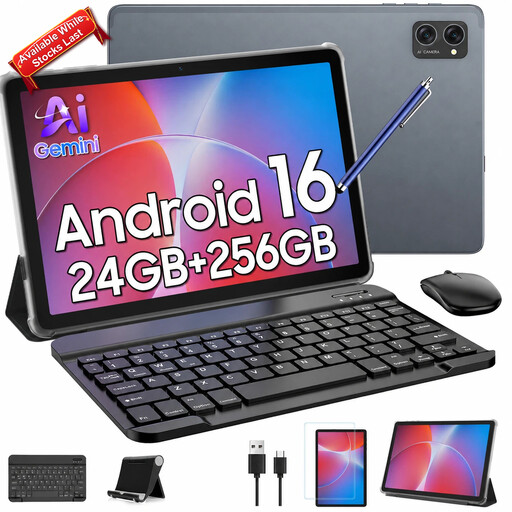
TABWEE T20 10.1-inch tablet with keyboard, mouse and stylus
Consider this bundle if touch, typing and a mouse are all part of the intended routine.
The product name lists a 10.1-inch display and 5000 mAh battery. Check whether that screen size suits extended viewing, and confirm the software version and required app compatibility before ordering.
View on Joybuy
 No image available
HP OmniBook Ultra Flip 14-fh0006na 2-in-1, 16GB RAM, 1TB SSD
Consider this 2-in-1 if an attached keyboard is important alongside a convertible format.
It is listed with Windows 11 Home. Check its touch and pointing controls, unplugged runtime and the space needed to use it at the bedside.
View on Joybuy
 No image available
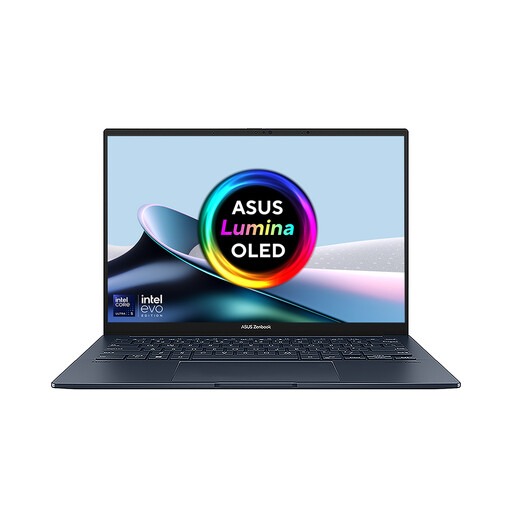
ASUS Zenbook DUO UX8406CA-QL135W 14-inch dual OLED touch laptop
Consider the dual-screen format only if there is room to position the complete device comfortably.
The product name lists an Intel Core Ultra 7 255H, 16 GB LPDDR5X RAM and 1 TB SSD. Confirm the exact display resolution and pointing method if either affects the intended use.
View on Joybuy
 No image available
Acer Chromebook Plus 514 CB514-5H, 14-inch WUXGA, 8GB RAM, 512GB SSD
Consider this conventional laptop if keyboard-led browsing matters more than a detachable screen.
The product name lists a 1920 × 1200 display and Intel Core 5 120U. Confirm touch capability, the pointing method and compatibility with the services you intend to use.
View on Joybuy
 No image available
HP OmniBook X Flip 16-as0004na 16-inch touchscreen 2-in-1
Consider the larger touch display if viewing space matters and the complete device will fit where it is used and stored.
The product name lists an Intel Core Ultra 5 226V, 16GB RAM, 512GB SSD and Windows 11 Home. Check its weight, unplugged runtime and pointing method before relying on it during a stay.
View on Joybuy
Frequently asked questions
Can I use my own tablet or laptop in hospital?
Often, but check with the admitting ward before relying on it. NHS England Digital encourages patient use of mobile devices in hospitals while noting restrictions near sensitive equipment; local arrangements can differ by ward and clinical area.
Will ward Wi-Fi be suitable for streaming?
Do not assume it will support the services you want. NHS England Digital describes Wi-Fi provision across patient-care centres in England, but access conditions are local; Royal Papworth Hospital NHS Foundation Trust says its Wi-Fi access may be restricted. Ask the ward about connection and login arrangements.
Can I charge my device at the bedside?
Ask the ward rather than planning around a bedside socket. University Hospitals Coventry and Warwickshire NHS Trust says staff visually check patient-owned electrical equipment, adaptors and leads before use; Royal Cornwall Hospitals NHS Trust says damaged chargers or devices may need to be taken home.
Is a refurbished device worth considering for the stay?
It can be if you have time to check its condition and test the activities you need before admission. The Office for Product Safety and Standards notes that used products can have worn components or modifications; check the supplied charger, battery condition, recall status and seller terms for the exact device.


