Choose a removable drive if you need a local copy that you can disconnect and store separately; choose cloud storage if off-site access and coverage across several devices matter more. For household records that would be difficult to replace, using both gives you different recovery routes, provided you check what the cloud service protects, secure account recovery and test that each copy can be restored.
Who needs a household backup?
Households protecting hard-to-replace files
If photos, identity documents or financial records would be difficult to recreate, keep a recoverable copy away from the original device. The National Cyber Security Centre advises storing backups in a separate safe location.
Households using several devices
When files are spread across phones, tablets and computers, check which devices and folders a cloud service actually covers. Plan account recovery and practise restoring files before depending on that service.
People who want an offline or protected copy
A removable copy can be disconnected between updates. If it holds sensitive documents, check how its encryption is enabled and how you would regain access if a password or PIN were lost.
What matters when choosing a backup?
An external drive and cloud storage solve different parts of the same problem: where the copy is kept and how you regain access to it. The National Cyber Security Centre warns that connected backups can be affected during an incident, so a combined setup still needs a disconnected removable copy and a usable cloud restore route.
Removable storage
Choose it when: You can update a local copy and store the drive away from the computer.
Trade-off: It needs a routine for connecting, updating and disconnecting it; keeping it in the same place does not provide off-site separation.
Cloud storage
Choose it when: You need an off-site copy and a service that covers the devices and files you use.
Trade-off: Recovery depends on account access and the service’s backup, deletion and version-retention rules.
Cloud and removable storage
Choose it when: Losing household records or photos would make a second, independent recovery route worthwhile.
Trade-off: Both copies need maintenance, and each restore route needs testing on its own.
| Concern |
What to check |
Who this matters to |
| Recoverability |
Check where the separate copy is kept and restore representative files. For cloud storage, check deletion and version-retention rules. |
If my device fails or files are deleted, I need to open a usable copy, not merely see that a backup ran. Around 33% of consumers put recoverability first. |
| Multi-device coverage |
Confirm the supported devices and included folders, plus how you would regain account access and restore files. |
With records spread across my devices, I want the files I care about covered without remembering every manual update. Around 27% of consumers primarily need that multi-device coverage. |
| Offline privacy |
Check how a removable copy is disconnected and stored, and verify encryption setup, connectors and PIN or password-loss consequences. |
If I carry sensitive documents or keep them away from my everyday computer, I need a copy I can store securely and still unlock. For around 20% of consumers, protected offline custody is the main concern. |
| Capacity fit |
Measure files across the included devices and allow for growth. Check whether a cloud allowance is shared with other services. |
My photos and records must fit now without leaving future files out of the backup. Capacity and ongoing-cost fit come first for around 20% of consumers. |
Mistakes that can undermine a backup
-
Leaving the only removable backup connected
The National Cyber Security Centre describes incidents in which ransomware affected original files and connected backups. A drive left attached to the computer may not remain an independent recovery option.
After an update completes, disconnect the drive and store it securely; check that you can restore files from it.
-
Assuming synchronised files remain recoverable indefinitely
Cloud recovery depends on the service and the action taken. Microsoft Support gives personal OneDrive accounts a 30-day window for restoring deleted files; Google Drive Help says its Restore file versions tool keeps the last 25 days of revisions.
Check the chosen service’s deletion, version and wider restore options, and keep another independent copy of records you cannot replace.
-
Enabling protection without planning access
Western Digital warns that forgetting a password on supported encrypted drives can mean losing the stored data. Apple warns that losing an enabled Apple Account recovery key can permanently block account access.
Keep the relevant recovery information separately from the protected drive or account, and try the recovery procedure before making it your only route to the files.
-
Choosing capacity from one device’s file total
Files on other devices may be left out, and some cloud allowances cover more than one service. Google says account storage is shared across Drive, Gmail and Google Photos.
Add up the files and device backups you intend to protect, allow room for growth and check what the selected drive or account allowance covers.
Relevant brands and services
These names illustrate different backup routes; a service or product line still needs to fit your devices, file volume and recovery plan.
Apple
iCloud is relevant to households using Apple devices and seeking cloud backup or file access across those devices.
- Apple describes automatic iPhone and iPad backups under its stated power and Wi-Fi conditions, with iCloud Drive access also available on Windows and the web.
- Check which files are covered and plan account recovery carefully: Apple warns that losing an enabled recovery key can permanently block access.
Microsoft
OneDrive is relevant to households using Windows and Microsoft accounts for cloud-stored documents.
- Microsoft Support says deleted files in personal OneDrive accounts can be restored within 30 days.
- That deletion window is not indefinite recovery. Set up account security information and check the restore options available to your account.
Google
Google Drive and Google One are relevant when household files also sit in Google Photos, Gmail or Android-related services.
- Google says account storage is shared across Drive, Gmail and Google Photos, making total account usage the figure to check when choosing an allowance.
- Google Drive Help says its Restore file versions tool keeps the last 25 days of revisions. Keep two-step-verification backup codes somewhere you can access without the protected account.
Samsung
The Samsung T7 Touch line is relevant to portable local copies where its model-specific access controls are useful.
- Samsung describes password and fingerprint-unlock options and AES 256-bit encryption for the T7 Touch.
- Samsung’s stated top transfer performance requires a compatible USB 3.2 Gen 2 host, cable and UASP. Check the exact model rather than assuming these T7 Touch features apply to another Samsung SSD.
Kingston
The IronKey Keypad 200 line suits consideration for a selected set of sensitive files kept on PIN-controlled removable storage.
- Kingston specifies XTS-AES 256-bit hardware encryption for the KP200 line.
- Kingston says repeated incorrect administrator-PIN entries can trigger crypto-erasure. Check the exact device’s connector, capacity and PIN rules before relying on it.
Removable storage choices on Joybuy
These drives offer local-copy options for different household file volumes and portability needs. They do not replace the cloud route discussed above; whichever device you choose, plan how it will be updated, disconnected where appropriate and tested for restoration.
 No image available
Western Digital My Passport Ultra for Mac 5TB, Silver
Consider this removable drive for a sizeable local archive in a Mac-focused household. Its stated capacity is 5TB; check that it fits your files and that your intended backup and restore workflow works with your devices.
View on Joybuy
 No image available
Samsung MU-PE1T0S 1TB USB Type-C SSD, Black
Consider this portable SSD when you want a removable copy to use with compatible devices. The title specifies USB 3.2 Gen 2 (3.1 Gen 2); check your device connection, capacity needs and the exact model’s security and restore procedure before storing sensitive records.
View on Joybuy
 No image available
Western Digital My Passport 2TB, Black
This portable external hard drive is a local-copy option for household documents and media. Check whether its 2TB capacity and the backup software you intend to use fit your devices, then test a restore before depending on the copy.
View on Joybuy
 No image available
Western Digital Elements Portable 4TB USB 3.0, Black
Consider this removable drive for a larger collection of household files. Check that 4TB leaves enough room for growth and confirm whether the drive needs formatting for your operating systems before putting files on it.
View on Joybuy
 No image available
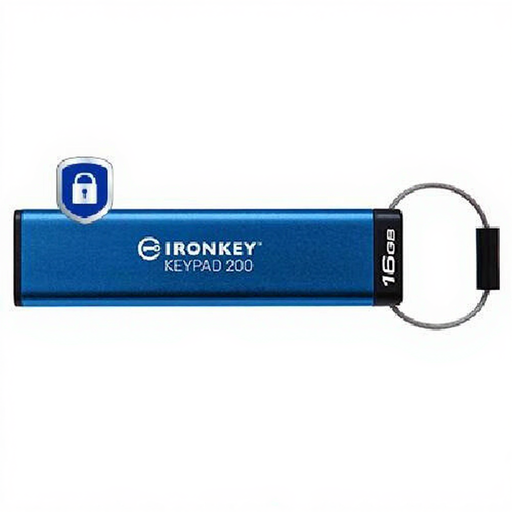
Kingston IronKey Keypad 200 16GB
Consider this keypad-controlled, AES-256-encrypted removable device for a selected set of sensitive documents rather than an unmeasured whole-household archive. Check that 16GB is sufficient, confirm connector compatibility and understand the PIN rules: Kingston warns that repeated incorrect administrator-PIN entries can erase access to the stored data.
View on Joybuy
Household backup questions
Is a file kept only on my laptop or phone a backup?
No. The National Cyber Security Centre defines a backup as a copy of important data stored in a separate safe location; a file kept only on its original device is not a separate recovery copy.
How can I check that my backup will restore?
Restore a small selection of representative files to a separate folder or spare device, open them and check their contents. The National Cyber Security Centre advises testing backups regularly, before you need them in an emergency.
What should I set up before relying on cloud storage?
Confirm which devices and folders are covered, enable two-step verification and prepare an account-recovery route that does not rely on the only device being backed up. Check the service’s restore process and retention rules; Apple also warns that its optional recovery key must be kept safe because losing it can permanently block account access.
Does encryption remove the need for another copy?
No. Encryption controls access to a protected device but does not create a second recoverable copy. Keep your credentials safely apart from the storage device and check its lockout rules before relying on it.


