Who needs a records backup?
The starting point is the same for each household: identify the files that matter, then make sure a copy can be accessed if the original device or account cannot.
Households making their first separate copy
If scans, statements, insurance documents or photos live on one computer, start by copying the folders you would struggle to replace. The National Cyber Security Centre (NCSC) defines a backup as a copy of important data kept in a separate safe location; opening a few copied files helps you check that they are usable.
People carrying sensitive documents
A portable copy can be useful when records need to move between devices. If you choose password-protected storage, understand how access is recovered and keep another copy elsewhere: Kingston says repeated incorrect passwords can lock access or erase data on its IronKey Locker+ 50.
Households using files across devices
Cloud storage can make records accessible through a phone, computer or web account. Check which services share its allowance and how you would regain account or file access; provider rules on inactivity, plan changes and deletion differ.
What should you check before choosing?
Work out what must be copied and where a separate copy will live before choosing a drive or cloud service. Then check capacity, device access and the steps needed to restore a file.
| Priority |
What to check |
Your needs |
| Recoverability |
Choose folders deliberately; keep a copy separate from the original device; open sample files or try a controlled restore. The NCSC describes a backup as a copy in a separate safe location. |
I need my records to remain accessible if my computer is lost, fails or its files are deleted. A drive kept beside that computer would not address every household incident. |
| Access protection |
Check how drive encryption is enabled and recovered. For online storage, protect the account and its recovery route; the NCSC recommends two-step verification for cloud storage and email. |
Some of my documents are sensitive, but I also need a way back in if a password or device is lost. I would not put the only copy on an encrypted USB drive. |
| Capacity and connections |
Measure the folders to be copied and allow for growth. Check the drive connector, computer compatibility and any required formatting; assess an SSD’s stated speed against the host and cable conditions for that model. |
A growing collection of scans and photos calls for room to expand. If I move files often, the drive must also work with the devices I actually use. |
| Cloud continuity |
Check shared storage limits, inactivity rules, plan changes and file-restoration periods. Google says an account’s content can be deleted after two years of inactivity; Microsoft Support describes a 30-day deleted-file recovery period for personal OneDrive accounts in its stated conditions. |
I want an off-site copy I can still reach after changing a plan, filling an account or deleting a file by mistake. I need to know the relevant account and recovery steps before relying on it. |
Relevant brand and service references
These examples illustrate different storage and account conditions; a brand’s features or policies should not be assumed to apply to every product or plan it offers.
Western Digital
Its cited 5TB My Passport portable HDD illustrates a locally held, higher-capacity household archive.
- A portable HDD provides a place for a substantial local file collection.
- Any backup or password features need checking on the exact model; one drive is still one physical copy.
Samsung
The cited portable T7 SSD is an example for people who copy files frequently or carry a drive between compatible devices.
- Samsung publishes transfer-speed conditions for the T7, allowing the connection to be checked before purchase.
- Samsung says reaching that model’s maximum speed requires a USB 3.2 Gen 2-capable host and cable with UASP support. A portable SSD alone is not an off-site copy.
Kingston
Its IronKey Locker+ 50 is an example of password-protected USB storage for a limited sensitive carry-copy.
- Kingston describes hardware encryption and password controls for this line.
- Kingston says repeated incorrect entries can lock access or crypto-erase the drive; plan recovery and retain another copy.
Google
Google account storage is relevant to households using Drive, Gmail and Photos together.
- Files can be held in an online account rather than solely on a household device.
- Google says account content can be deleted after two years of inactivity; it also warns of possible deletion after a prolonged period over the shared storage quota.
Microsoft
OneDrive is a cloud-storage route for households using a Microsoft account.
- Microsoft Support describes a 30-day deleted-file restoration period for personal accounts in the stated conditions.
- Microsoft says subscription expiry and continued over-limit storage can affect file access and may ultimately lead to deletion; check the terms for your plan.
Apple
iCloud Drive is a cloud route for households already using Apple devices and an iCloud account.
- Apple Support describes recovery of deleted iCloud Drive files for 30 days unless they are removed sooner.
- Apple advises downloading or removing content above a new storage allowance before downgrading or cancelling iCloud+.
Joybuy storage options
These portable SSD, HDD and USB options can hold local copies of household files. For records you cannot readily replace, plan where a separate copy will live as well; a local device does not itself provide off-site storage.
 No image available
Samsung T7 Shield 1TB portable SSD, blue
A portable local-copy option if a 1TB drive fits the folders you need to back up. The title specifies USB 3.2 Gen 2; check your computer’s connection and the exact model’s transfer conditions. Keep another copy in a separate safe location.
View on Joybuy
 No image available
Western Digital My Passport Ultra for Mac 5TB, silver
This portable hard drive is a local option for a larger archive if 5TB suits your files. Check compatibility and formatting with the computer you will use for backup and recovery. Confirm the applicable warranty term before buying, and keep another copy separately.
View on Joybuy
 No image available
Samsung MU-PG1T0B 1TB USB Type-C SSD, black
Consider this portable local drive if 1TB accommodates the records you intend to copy. Its title specifies USB 3.2 Gen 2x2; check your host port and cable before relying on any transfer-speed expectation. Important files still need a separate copy.
View on Joybuy
 No image available
Western Digital Elements portable 4TB HDD, black
A 4TB local-drive option for a collection of household files. The title specifies USB 3.0; check the connection and any formatting needed for your devices before moving records onto it. Measure the folders you plan to copy and retain another copy separately.
View on Joybuy
 No image available
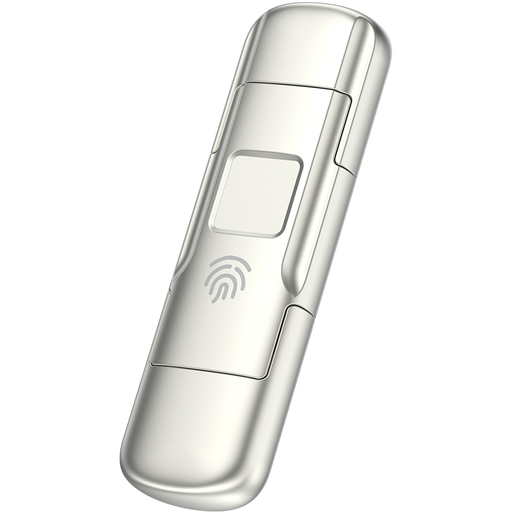
MOVESPEED YSUYC-256GSN 256GB fingerprint USB drive, silver
This 256GB USB-A and Type-C drive is an option for a limited portable copy rather than an assumed fit for a whole household archive. It is described as offering fingerprint access and encryption; confirm setup, device compatibility and recovery behaviour before storing sensitive records. Do not make it the only copy.
View on Joybuy
Questions about household backups
Is a cloud account enough for important household records?
Keep an independent copy for records you cannot readily replace. Cloud storage can hold files away from your computer, but account access, quotas and deletion terms can affect availability; the NCSC recommends two-step verification for cloud storage.
How much capacity should a local backup drive have?
Start with the size of the folders you intend to copy, then allow room for new scans, photos and other records. Check that the selected drive also works with the computer you would use to restore them; a capacity figure alone does not confirm that your backup is complete.
Should I choose an SSD instead of an HDD for documents?
Choose according to how you will use the local copy: a portable HDD can accommodate a larger home-held archive, while an SSD may suit frequent copying between devices. If transfer speed matters, check the exact model’s host and cable requirements; Samsung says its cited T7 needs USB 3.2 Gen 2 and UASP support to reach its stated maximum speeds.
What if I forget an encrypted USB drive’s password?
Recovery depends on the exact drive and how it was set up. Kingston describes an Admin password route for its IronKey Locker+ 50, but also warns that repeated incorrect entries can lock access or crypto-erase the drive. Check the model’s recovery instructions and keep another copy of essential files.
What should I check before changing a cloud-storage plan?
Check the new allowance, which services share it, and what happens to files above the limit. Apple advises downloading or removing content above the new iCloud+ allowance before downgrading or cancelling; Microsoft describes possible restrictions and deletion following subscription expiry under its stated conditions. Save an independent copy before a plan change affects access.


