Households with hard-to-replace records
Scanned documents, photos and account records call for a recoverable copy outside the computer or phone normally used to open them.


For important household records, use a local copy for convenient recovery alongside a separately located copy, rather than relying on one drive, USB stick, NAS or cloud account. Choose the local device by the amount you need to store and whether you will carry it; for an online copy, check account recovery and whether you can restore earlier file versions. Encryption helps protect access but does not create another copy.
The National Cyber Security Centre describes a backup as a copy of important data kept in a separate safe location. The right mix of copies depends on which files you need to recover and what could prevent access to them.
Scanned documents, photos and account records call for a recoverable copy outside the computer or phone normally used to open them.
A local copy can be convenient to retrieve, while another location matters if a drive or the home itself becomes unavailable.
If essential records sit behind an online sign-in, set up another way to regain access before losing your usual phone or device.
Choose where each copy will live before comparing devices. The Northern Ireland Cyber Security Centre identifies external drives, network-attached storage and online storage as backup options; none needs to be your only destination.
| Priority | What to check | Your needs |
|---|---|---|
| Separate copies | Identify the original files, a local backup and a copy kept elsewhere. Confirm that you can open restored files from each destination. | I need my records to remain recoverable if my usual device or the place where I keep a drive becomes unavailable. |
| Local capacity | Compare drive capacity with the files you intend to keep and room for future copies. An external hard drive suits a larger local archive; a portable SSD suits a compact copy moved between compatible devices. | For a growing collection of scans and photos, I need enough space without making a single drive my whole backup plan. |
| Limited portable copies | For a small selection of files, check a USB device's capacity, connection and encryption method. Plan where you will keep it when it is not in use. | I want to carry a few essential documents, not rely on an easily misplaced USB stick as my entire archive. The Northern Ireland Cyber Security Centre notes the loss and capacity limits of USB flash drives. |
| Off-site access | For cloud storage, check the capacity shared with other services and how to retrieve files. For a home NAS, check how it backs up to a separate destination; a NAS in the home is still a local device. | If several household devices use a shared destination, a NAS could serve that local role. I still need a copy elsewhere for a home-location incident. |
| Earlier versions | Check version history, retention, deletion controls and the steps for restoring an earlier copy. Consider whether a local copy can be disconnected or otherwise isolated when not in use. | I need a way back if a synchronised file is changed or deleted. The National Cyber Security Centre warns that neither on-premises nor cloud backups are ransomware-resistant by default. |
| Account recovery | Enable a second sign-in step for an online account and maintain a recovery method available without your primary phone. Follow the provider's instructions for storing recovery codes. | If I lose my phone, I still need a secure way into the account holding my off-site copy. Google and Microsoft both document alternatives to relying on one sign-in device. |
Changes or deletions can affect files you expected to recover. The National Cyber Security Centre says cloud and on-premises backups are not ransomware-resistant by default.
Check the service's version history, retention, deletion controls and restore steps. Keep a separate local or offline copy where it fits your arrangement.
Capacity determines how much a drive can hold, not whether another copy survives a problem affecting that drive or its location.
Use the drive for the local archive it can accommodate, arrange a separately located copy and periodically check that you can restore files.
Losing the phone used for sign-in can complicate access to cloud-held records. Google documents alternative verification methods, while Microsoft advises keeping its recovery code away from a device used to sign in.
Set up an independent recovery route before placing essential records in the account, and keep recovery material securely.
The Northern Ireland Cyber Security Centre notes that USB flash drives can be easily lost and have limited storage space.
Use one for a deliberately limited copy if useful, with fuller recoverable copies maintained elsewhere.
These examples illustrate features to check within particular product lines and services; a brand's inclusion does not establish that every model offers the same features.
Its My Book desktop-drive range is relevant to a large local archive.
The T7 Shield portable SSD is relevant when a local copy needs to move between compatible devices.
BeeStation is a reference for households considering a shared local backup destination.
Google storage is relevant to households already managing files through Drive and a Google account.
Microsoft account guidance is relevant when household records depend on access to OneDrive.
These drives and USB devices can serve as local or removable copies of household records. Choose another destination separately if you also need an off-site copy.
 No image available
A portable hard drive for a sizeable local copy of household files. Check its connection and formatting requirements for each computer you intend to use, and confirm the applicable warranty term before buying. Keep another copy separately located.
 No image available
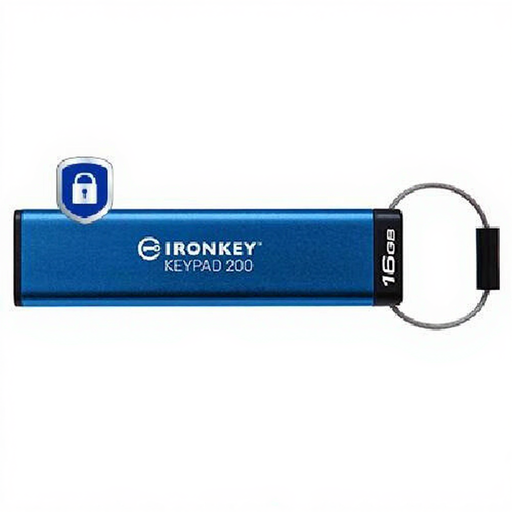
A keypad USB drive for a limited selection of files rather than a full household archive. Its name describes AES-256 encryption and FIPS 140-3 Level 3 status as pending, not completed certification. Check the exact PIN-recovery arrangements before relying on it, and maintain another recoverable copy.
 No image available
A compact 1TB local copy for moving files between compatible devices. Samsung UK identifies MU-PE1T0S as a T7 Shield model and states that its maximum sequential speed figures require a USB 3.2 Gen 2 host and cable with UASP enabled. Check the connection you will use, and keep a separate copy elsewhere.
 No image available
A portable 4TB hard drive for a local collection of documents and other household files. Check formatting requirements before using it with a Mac or another intended device. One drive remains one copy, even if it holds the entire collection.
 No image available
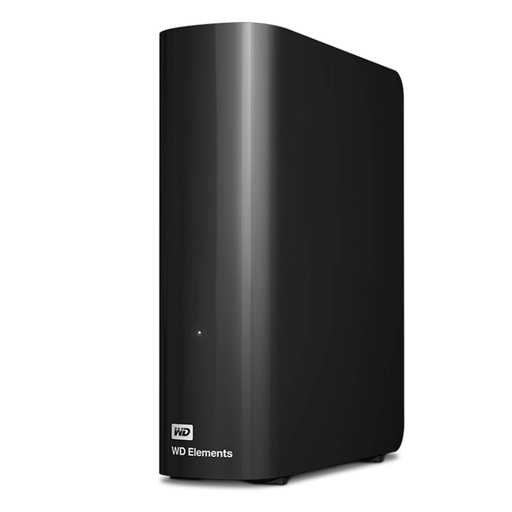
A desktop hard drive for a larger local archive kept beside a computer. Check its power and computer connection requirements, and whether your intended setup requires reformatting. Arrange a separately located copy for records you could not replace.
Do not rely on one portable drive for important records: it can be lost or kept beside the device holding the originals. Use it as a local copy and maintain another recoverable copy in a separate location, consistent with National Cyber Security Centre backup guidance.
No. Encryption can help restrict access to files, but it does not create another copy or another location. Check the exact drive's encryption and access-recovery arrangements, then keep a separate recoverable copy.
Set up a second sign-in step and a recovery method you can use without your main phone. Google documents alternatives including backup codes and another signed-in device; Microsoft advises keeping its recovery code safely away from a device used to sign in. Also check how the storage service restores earlier file versions.
Measure the files you intend to copy and allow space for future scans and versions, then compare the current plan capacity. Google One Help states that a standard Google Account has up to 15 GB shared across Drive, Gmail and Photos, while Google One plans offer 100 GB or more depending on the plan.