What to check when choosing
For household charts beside a bright window, decide where the screen can sit before choosing how much spreadsheet detail it needs to show.
| Concern |
What to check |
Who this matters to |
| Window reflections |
Look for a matte or anti-glare finish, stated typical brightness and enough positioning flexibility to turn the screen away from reflections. |
When daylight hides figures or chart labels, I need to keep the screen readable as the light changes; around 36% of consumers put reflection control first. |
| Spreadsheet detail |
Compare resolution at the same screen size, then check whether your preferred text scaling keeps labels comfortable to read. |
If I keep several accounts and categories open together, I want to see more columns without making the text too small. Around 29% of consumers chiefly prioritise spreadsheet detail. |
| Laptop connection and positioning |
Check USB-C video support and charging power against your laptop, plus the stand’s height and angle adjustments. |
I want a tidier laptop desk but still need to move the screen when daylight shifts; for around 21% of consumers, laptop integration and adjustability are the main concern. |
| Everyday budgeting needs |
Match the resolution and inputs to your usual charts and computer before choosing additional hub or display features. |
If I mostly review monthly totals and occasional spreadsheets, I need a clear, workable display rather than features my task will not use. Around 14% of consumers put that straightforward fit first. |
Joybuy monitors for household charts
These monitors cover several ways to view household charts: a 27-inch WQHD screen, 27-inch 4K screens, a wider layout for columns and a larger Full HD screen. Check screen finish and positioning against your window before deciding which layout suits your sheets.
 Image unavailable
ASUS ProArt PA278CV IPS WQHD
Consider this WQHD option for ordinary budget sheets when you do not need the denser workspace of 4K.
The product name specifies an IPS panel and WQHD resolution. Check the screen finish, stand adjustment and USB-C charging power against your window position and laptop before relying on those features.
View on Joybuy
 Image unavailable
iiyama ProLite XUB2792UHSU-B6 27-inch 4K UHD
The 27-inch 4K format is worth considering if small chart labels and dense spreadsheet columns are regular parts of your budgeting work.
Check the screen coating and comparable typical brightness for your bright-window position. Try your preferred text scaling to make sure the extra resolution remains comfortable to use.
View on Joybuy
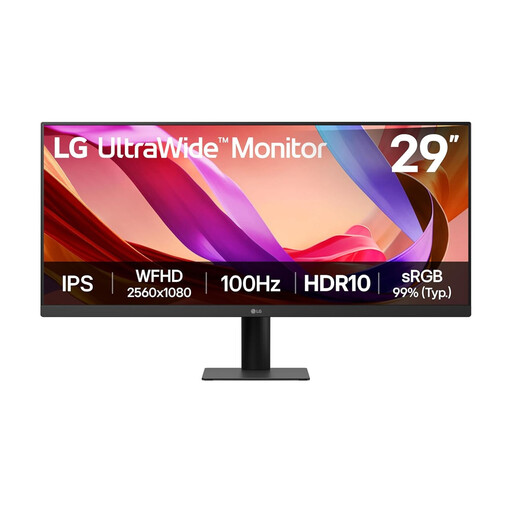 Image unavailable
LG UltraWide 29U511A 29-inch IPS 1080p
Consider the wider format if viewing budget columns side by side matters more to you than the vertical detail of a QHD or 4K screen.
The product name specifies a 29-inch IPS monitor with DisplayPort and HDMI. Check whether the available screen-positioning adjustments and brightness suit your window and whether your charts fit comfortably within its 1080p height.
View on Joybuy
 Image unavailable
ASUS Eye Care VY27UQ 4K UHD 60Hz
Its stated 4K resolution makes this a candidate for detailed household charts, provided the screen can be positioned for comfortable reading beside your window.
Check its screen coating and typical brightness, as well as whether the available stand movement suits your desk. If you need another mounting position, confirm compatibility before choosing an arm.
View on Joybuy
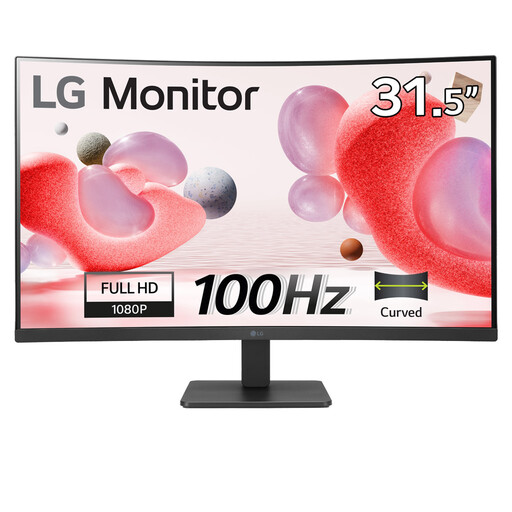 Image unavailable
LG 32MR50C-B 32-inch curved Full HD
Consider this larger screen for straightforward household dashboards, but check whether Full HD provides enough detail for your usual chart labels and spreadsheet columns.
The product name specifies a curved VA panel, anti-glare finish and HDMI connection. Check its typical brightness and stand-positioning range for your particular window and desk layout.
View on Joybuy
Frequently asked questions
What matters most for a monitor beside a bright window?
Start with screen placement and reflection control, then compare the finish and stated typical brightness. The Health and Safety Executive advises arranging screens and lighting to avoid glare in display-screen work; no screen specification guarantees readability with a direct window reflection.
Do household-spending charts need a 4K monitor?
No: QHD can suit ordinary dashboards and monthly spreadsheets. Consider 4K if you regularly need dense columns or small chart labels visible together, and check that your preferred text scaling is comfortable.
Can one USB-C cable show my laptop screen and charge it?
Yes, if the laptop supports video through its USB-C port and the monitor supplies suitable charging power. LG specifies charging up to 90W for the 27UP850K-W, while BenQ specifies 65W for the GW2790QT; check your laptop’s video support and power requirement before choosing either connection.
How should I dispose of an old monitor in the UK?
Check your local authority’s electrical-waste collection options or your retailer’s current take-back service before disposing of it. UK waste electrical and electronic equipment guidance from the Office for Product Safety and Standards and the Department for Environment, Food & Rural Affairs addresses recovery, reuse and recycling, but the available collection route depends on the service you use.


