Buying priorities
Start with the household's essential tasks, then check software support, the complete setup and the help needed to use it day to day.
| Priority |
What to check |
Your needs |
| Supported software |
Confirm the installed operating system and browser are supported. For Windows PCs, check Windows 11 eligibility; Microsoft says Windows 10 support ended on 14 October 2025. For Chromebooks, check the exact model's update date. |
I need to use accounts, forms and communications without relying on an unsupported operating system. |
| Connection and charging |
Check working Wi-Fi, the charging arrangement and the connection you will actually use at home, through a hub or via a hotspot. Confirm whether internet access and setup help are affordable. |
A computer only helps if I can keep it powered, connected and usable for essential tasks. |
| Typing and input |
For lengthy forms, CVs and schoolwork, look for a physical keyboard and trackpad or mouse. With a tablet, check the included or required keyboard, stand, charger and adapters. |
I want a comfortable way to type, upload documents and complete online forms. |
| Refurbished condition |
Read the seller's own condition definition. Check the exact unit's screen, keyboard, ports, webcam, charger, battery policy, functional testing, data sanitisation, warranty and return process. |
I need more than a cosmetic grade to understand whether a refurbished computer is ready for household use. |
| Complete setup |
For a desktop, confirm the monitor, keyboard, mouse and any webcam or speakers. For all routes, include the charger, internet connection and any local support needed for setup. |
I want to avoid buying a base unit that cannot comfortably handle the household's actual tasks. |
Joybuy product options
These Joybuy options cover new laptops and tablets with input accessories for households comparing a primary computer with a lighter portable alternative.
 No image available
ASUS Vivobook 15 X1504VA, Core 5 120U, 24 GB, 1 TB SSD
A Windows 11 laptop option for household forms, job tasks, learning and video calls.
Listed with a 15.6-inch Full HD IPS anti-glare display, 24 GB DDR5 memory, 1 TB SSD, Wi-Fi 6, webcam, microphone, HDMI, USB-A and USB-C ports.
Battery information is given as up to 8 hours of standby time rather than task-based runtime; check expected use away from mains power, keyboard layout, charger details and return terms before buying.
Joybuy
 No image available
Lenovo IdeaPad 1 15-inch, Ryzen 3 7320U, 8 GB, 128 GB SSD
A portable Windows laptop for forms, schoolwork and everyday communication with a physical keyboard and numeric keypad.
Listed with Windows 11 Home in S Mode, a 15.6-inch Full HD display, 8 GB memory, 128 GB SSD, Wi-Fi 6, 1 MP camera, USB-C and microSD reader.
Windows 11 Home in S Mode can restrict software installation choices, and 128 GB storage may require active file management. Check required applications, charger details and return terms before buying.
Joybuy
 No image available
Acer Aspire Lite AL15-36P-C29Z, Intel N150, 8 GB, 128 GB SSD
A Windows laptop route for essential online services, documents and video calls, with a UK English keyboard listed.
Listed with Windows 11 Home in S Mode, a 15.6-inch Full HD display, 8 GB DDR4 memory, 128 GB SSD, Wi-Fi 5, HD webcam, microphone, speakers, HDMI and USB-C.
Check whether the required applications work in S Mode. The 128 GB SSD may be restrictive for large local files or several user accounts; confirm charger details and return terms before buying.
Joybuy
 No image available
TECLAST ArtPad Pro 12.7-inch 2K tablet, 256 GB, Android 15
A tablet option for lighter browser-based communication and portable tasks where the included keyboard is suitable for the workload.
Listed with a 12.7-inch 2K display, Helio G99 processor, 8 GB physical memory, 256 GB storage, Android 15, Wi-Fi, dual-SIM 4G LTE, Bluetooth keyboard, case and stylus.
Check essential websites, document uploads and authentication methods on Android before purchase. A tablet keyboard does not establish laptop-equivalent comfort for prolonged forms or spreadsheets.
Joybuy
 No image available
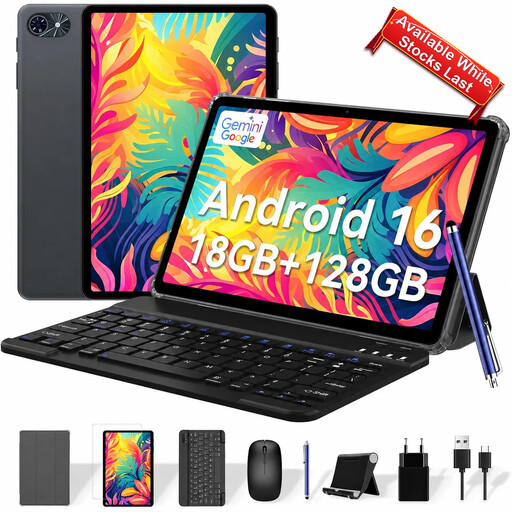
TABWEE T80 10-inch tablet, 6 GB, 128 GB, Android 16
A smaller tablet option for portable lighter online tasks with a keyboard listed for occasional text entry.
Listed with a 10-inch 1280 × 800 display, 6 GB physical memory, 128 GB storage, Android 16, Wi-Fi, GPS, front and rear cameras, and a keyboard.
Check required websites, document uploads, authentication tools and applications before purchase. The 10-inch display may be less practical for prolonged form filling, spreadsheets or split-screen work.
Joybuy
Frequently asked questions
Is a Windows 10 laptop still suitable as a household's main essential-access computer?
Not by default. Microsoft says Windows 10 support ended on 14 October 2025, so normal free security updates, technical assistance and feature updates are no longer provided. Before buying a primary device for accounts and online services, check that it can run a supported Windows version or has an appropriate supported-update route.
What should be checked before buying a refurbished laptop?
Check the exact model number, installed operating system, support eligibility, charger, screen, keyboard, touchpad, ports, camera, Wi-Fi, storage, battery policy, grade definition, warranty and return process. Ask how data was erased rather than treating a factory reset or a generic refurbished label as proof of secure sanitisation.
Do online purchases of refurbished computers have a cancellation period in the UK?
For most distance sales, the Consumer Contracts Regulations provide a 14-day cancellation period beginning when the consumer, or a nominated person other than the carrier, receives the goods. Separately, GOV.UK says goods must be refunded if they are faulty, not as described or do not do what they are supposed to do.
Can a household apply directly to the National Device Bank or National Databank?
Good Things Foundation states that both services work through local participating organisations rather than providing devices or data directly to individuals. Contact a local participating organisation to ask about current availability, eligibility, devices, lending, data packages or training.
How should a refurbished Chromebook be checked for software support?
Check the exact Chromebook's update schedule in ChromeOS or against Google's device-specific update information. Google says that a Chromebook showing a final-update notification no longer receives ChromeOS and browser updates, including security updates.


