Who needs a household backup?

Households protecting essential records

If you need to recover financial documents and personal files after device failure, deletion or malware, keep a copy separately from the original. The UK National Cyber Security Centre recommends backing up important data and knowing how to restore it.

Families with growing photo libraries

When documents and photos share storage, check that your backup covers the whole library and that your routine will include new files. Seagate's Expansion Portable range includes variants of 2TB and larger; check the exact model's connection and terms.

People carrying sensitive copies

If you take selected records between computers, consider the device's portability, compatible connection and access protection. Make sure you can still unlock and recover the copy if you lose a password.

What matters when choosing a household backup?

Concern What to check when buying Who this matters to
Independent recovery Keep a copy in a separate location, set a repeatable schedule and test opening or restoring files. If my computer fails, I want a separate copy I can restore without relying on the same device. Around 36% of consumers put independent recovery first.
Capacity for the whole archive Total the folders and devices to protect, allow for growth, then compare with the capacity of the specific drive or cloud plan. When documents and photos are growing together, I want the full archive included in the routine. Around 29% of consumers put capacity first.
Privacy and account recovery Check how a portable drive is unlocked and recovered, or how cloud-account access and protected files can be restored. If I carry financial or personal records, I need access protection that I can still recover if credentials are lost. Around 21% of consumers put privacy and recoverable access first.
A manageable routine Check which folders and devices are covered, how often copies are made, and whether the drive's connection works with your computer. For several household devices, I want new files captured regularly without a routine that is easy to forget. Around 14% of consumers put a manageable routine first.

Backup buying pitfalls

  • Treating a synced folder or connected drive as a complete backup

    A copy that changes or is lost alongside the original may not provide a separate recovery path. The UK National Cyber Security Centre describes a backup as a copy kept in a separate safe location.

    Keep at least one copy separately, disconnect removable media after copying and test that you can restore files.

  • Choosing a drive by advertised speed or resistance alone

    Samsung's stated maximum speeds for the T7 Shield depend on a compatible host, cable and enabled UASP mode. Its resistance ratings come from controlled testing and do not guarantee against data loss.

    Check the exact model, computer port and cable, and keep another recoverable copy.

  • Encrypting a copy without planning credential recovery

    Kingston says ten consecutive incorrect administrator-password attempts on its IronKey Locker+ 50 G2 can erase access to data. Apple says it cannot supply the keys needed to recover end-to-end encrypted iCloud data when Advanced Data Protection is enabled.

    Set up and retain the applicable recovery method, practise accessing the files and keep another recoverable copy.

  • Comparing cloud storage with a drive without checking the routine

    Cloud capacity and recovery features vary by plan, while a local drive needs a continuing copying routine. A plan or drive that covers only today's files may leave later additions outside your backup.

    Measure the complete archive, check the specific plan or drive capacity and choose a routine you can maintain.

Brands to consider for household backups

Western Digital

My Passport portable HDDs and My Book desktop drives are options to compare for local household archives.

  • My Passport models can suit a portable copy, while My Book variants include higher-capacity desktop options.
  • Check the exact model, connection, included software and warranty; features vary by variant.

Samsung

The T7 Shield portable SSD line may suit people who regularly carry or transfer sizeable copies and want a model with stated physical-resistance features.

  • For MU-PE2T0S/EU, Samsung specifies 2TB, USB 3.2 Gen 2, password protection and an IP65 rating from controlled testing.
  • Maximum sequential speeds require a compatible host and cable. Samsung's stated warranty conditions do not cover liquid, dust or drop damage.

Seagate

Expansion Portable drives are a local-HDD option to compare when archive capacity and a removable copy are priorities.

  • Seagate's support information includes Expansion Portable variants of 2TB and larger, along with manuals and troubleshooting.
  • Connections and warranty terms can vary by variant, so check the precise model.

Kingston

IronKey Locker+ 50 G2 is a specialist encrypted-USB option for a limited set of portable records, rather than a large archive.

  • Kingston specifies 32GB–256GB variants, USB-A, Windows and macOS compatibility and a limited five-year warranty for this line.
  • The administrator-password failure rule can remove access to data, so keep a separately recoverable copy.

Microsoft

OneDrive is an off-site option to assess when you want cloud access across devices.

  • Microsoft lists 100GB for Microsoft 365 Basic in the UK.
  • Microsoft says whole-OneDrive restoration is available to Microsoft 365 subscribers for actions within the preceding 30 days; permanently deleted recycle-bin files cannot be recovered with that feature.

Apple

iCloud+ is a cloud-capacity option to assess for households already managing files and photos through Apple devices.

  • Apple's UK plans offer several storage capacities.
  • With Advanced Data Protection enabled, Apple says it cannot supply the keys needed to recover end-to-end encrypted data; establish a usable recovery method first.

Joybuy products for local household backups

These Joybuy options cover removable local storage, from portable drives and an SSD to a desktop drive and encrypted USB storage. Choose capacity and connection around the files and computers you need to protect.

Samsung MU-PE1T0S 1TB external SSD

Samsung MU-PE1T0S 1TB external SSD

A portable local copy for compatible household devices.

1TB capacity; USB Type-C connectivity. The product information names PC, Mac and Android compatibility.

Joybuy

Western Digital My Book 22TB desktop external hard drive

Western Digital My Book 22TB

A desktop option for a sizeable local household archive.

22TB capacity; USB 3.0; password protection and hardware encryption. The product name specifies PC and Mac compatibility.

Joybuy

Western Digital My Passport 2TB portable external hard drive

Western Digital My Passport 2TB

A portable local copy for documents and photos you may need to carry.

2TB capacity; USB connection; hardware encryption. The product information names Windows and macOS use.

Joybuy
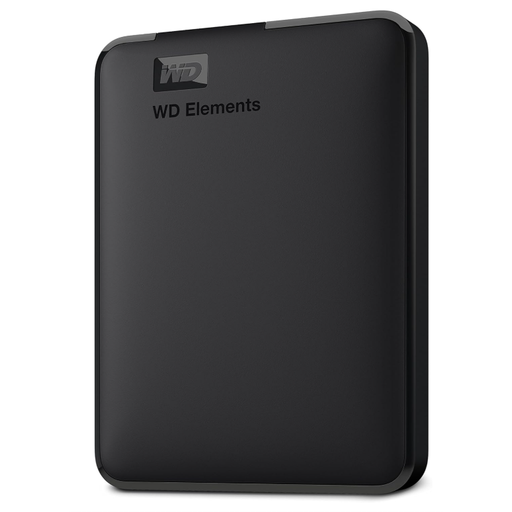
Western Digital Elements Portable 6TB external hard drive

Western Digital Elements Portable 6TB

A larger portable local copy for photos, videos and documents.

6TB capacity; USB 3.2 Gen 1; powered by the host computer. The product information states that hardware encryption is not included, so do not treat it as an encrypted copy for sensitive records.

Joybuy
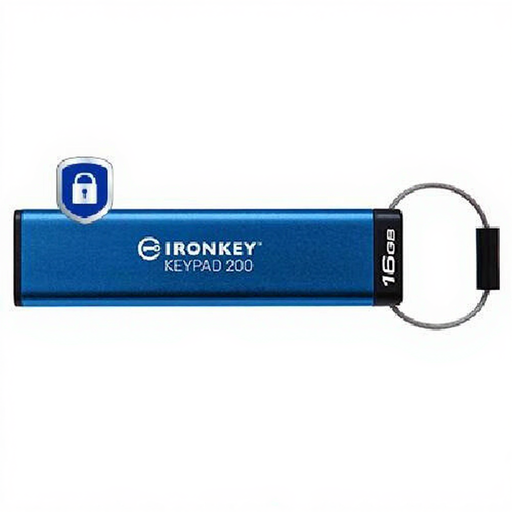
Kingston IronKey Keypad 200 16GB encrypted USB drive

Kingston IronKey Keypad 200 16GB

A small portable copy for selected sensitive records, rather than a complete household archive.

16GB capacity; USB Type-A; keypad access and hardware encryption. Check the unlocking procedure for the computers you use.

Joybuy

Frequently asked questions about household backups

Does moving files into a cloud folder mean I have a recoverable backup?

Not necessarily. Check which folders upload, whether another copy remains and what the service can restore after deletion or unwanted changes. Microsoft documents a whole-OneDrive restore feature for Microsoft 365 subscribers that covers actions within the preceding 30 days; permanently deleted recycle-bin files cannot be recovered with that feature.

How do I maintain a removable-drive backup?

Copy the files you need, check that representative files open, then disconnect the drive and store it separately. Repeat regularly, based on how often the files change; the UK National Cyber Security Centre recommends regular backups and checking that you know how to restore them.

What should I check before paying for cloud storage?

Measure the files you want covered, compare them with the exact plan capacity and check its recovery features. Confirm which folders and devices upload, how deleted or altered files can be restored, and how you will regain account access.

Can a provider restore files if I forget an encryption password or lose account access?

Do not assume that it can. Kingston says repeated incorrect administrator-password attempts can erase access to data on its IronKey Locker+ 50 G2. Apple says it cannot supply the keys needed to recover end-to-end encrypted iCloud data when Advanced Data Protection is enabled, so set up an account recovery method and keep another recoverable copy.

Do UK data-protection rules require a household to buy encrypted storage?

The ICO says processing purely for personal or household activity, without a professional or commercial connection, falls outside the UK GDPR's scope. That does not remove the practical need to consider access protection: choose it according to the sensitivity of the records you carry or upload. This household-only scope does not apply to professional or commercial activity.

Do UK tax rules require me to keep every household record for the same period?

No single retention period applies to every type of household file. For Self Assessment records, HMRC says the period depends in part on whether a return was submitted on time: its guidance says to keep records for at least 22 months after the end of the relevant tax year for an on-time return, or at least 15 months after submission for a late return; business-income records can require longer. Check the relevant record category rather than treating the backup device's lifespan as a retention rule.