The right arrangement depends on whether your priority is a local copy, access across devices or a shared household library: removable drives, cloud storage and NAS serve different roles. For irreplaceable files, the UK National Cyber Security Centre advises keeping a separate backup; check permissions, capacity, compatibility and account recovery, and test that you can restore a file.
Who this guidance is for
People safeguarding irreplaceable files
If family photos or important documents would be difficult to replace, plan a separate copy and a routine for checking that files can be restored. The UK National Cyber Security Centre recommends keeping important data in a separate location.
Households sharing files across devices
When several people need selected files, check how folders or libraries are shared and who can view, edit or delete them. Google One and Apple describe different sharing arrangements for their services.
Households with growing photo libraries
Consider how much space your current collection and future files need, then compare removable storage, installed NAS drives and cloud allowances. Check the terms of the specific account or device before deciding how to maintain copies.
What to consider before choosing
Removable drive or SSD
Choose when: you can regularly copy and check files and want a local copy that can be disconnected.
Trade-off: a removable drive does not automatically give several people access to one current library, and it should not be your only copy.
Network-attached storage (NAS)
Choose when: several household devices need a managed shared location and someone can maintain the accounts, drives and backup routine.
Trade-off: a NAS needs compatible installed drives and setup; its shared location is not, by itself, an independent backup.
Cloud storage
Choose when: access and invited sharing across supported devices matter most, and the service’s allowance and account arrangements fit your household.
Trade-off: check ongoing plan terms and permissions; sharing a storage allowance does not necessarily share each member’s files.
Local and cloud copies
Choose when: you want cross-device access as well as a separately maintained copy of files that would be hard to replace.
Trade-off: you need to maintain both workflows, and a synchronised folder or permanently connected drive alone may not protect against deletion or account compromise.
For any route, start by deciding who needs access, which files should stay private and how you would restore a copy if the working device or account became unavailable.
| Concern |
What to check when buying |
Who this matters to |
| Recovering irreplaceable files |
Identify the originals and separate copies; check backup scope, version recovery and how to test a restore. |
If I could not replace family photos or important documents, I want a copy I can restore independently. Around 29% of consumers put recovering irreplaceable files first. |
| Sharing across devices |
List the people and devices that need access; check folder permissions, supported apps and who can edit or delete. |
If several people need selected files but not everything, I want to choose exactly what is shared. Around 23% of consumers prioritise shared access across household devices. |
| Capacity for a growing collection |
Check the size of your current library and planned growth against drive capacity, NAS configuration or the account’s storage allowance. |
If my photo and video collection is growing, I want enough room for the files and the copies I plan to keep. Around 18% of consumers put capacity first. |
| Restricted access |
Decide who may view or edit each folder; check encryption settings, account recovery and the availability of any advertised cloud feature. |
If some household documents or photos are sensitive, I want to control who can see or change them. Around 18% of consumers prioritise restricted access. |
| Ongoing cost and upkeep |
Compare the complete drive-and-backup setup with current subscription, storage and renewal terms for the account you will use. |
If I need an arrangement I can maintain over time, I want to understand both the equipment and recurring commitments. Around 12% of consumers put ongoing cost and upkeep first. |
Backup and sharing pitfalls
-
Treating a synchronised photo library as an independent backup
Apple says iCloud Photos changes and deletions propagate across enabled devices. The UK National Cyber Security Centre also warns that connected backup drives and network storage can be affected by ransomware.
Keep a separately maintained copy of irreplaceable originals and test that you can restore files from it.
-
Assuming a shared storage plan gives everyone access to every file
Google says family members can share a storage quota without seeing one another’s files unless access is granted. Apple’s shared-library features have their own permissions and allow participants to change or delete shared photos.
Set access for the specific folders or libraries you want to share, and keep sensitive files outside broadly editable spaces.
-
Budgeting for a NAS enclosure without planning its drives
Synology’s DS223j installation guidance requires at least one compatible SATA drive. NAS-held files also need a separately planned backup destination.
Check drive compatibility and plan the NAS configuration and its independent copy together.
-
Choosing by an old cloud allowance or peak drive speed alone
Microsoft’s family storage terms describe pooled storage for new subscriptions from October 2026, while existing subscribers should check their own account and renewal terms. Samsung’s quoted maximum T7 Shield speeds depend on the stated host, cable and UASP conditions.
Confirm the current terms for the account you will use, or the exact drive variant and connection, before relying on a headline figure.
Brands to consider
Seagate
Seagate Expansion Portable illustrates computer-connected removable storage for households prepared to update a separate copy.
- Seagate’s specification describes USB power and drag-and-drop copying for the Expansion Portable range.
- It is not a multi-user network library, and a connected or sole copy remains vulnerable. Check the exact drive variant and computer connection.
Samsung
The T7 Shield 1TB illustrates a portable SSD option for moving files or carrying a local copy.
- Samsung quotes maximum read and write speeds of up to 1,050 MB/s and 1,000 MB/s when its specified host, cable and UASP conditions are met.
- Those figures depend on the connection conditions, and the speed claims do not establish that a file can be recovered from a separate backup.
Synology
The DS223j illustrates a home NAS route for shared storage and supported photo and computer-folder workflows.
- Synology describes mobile photo upload, shared spaces and scheduled computer-folder backup options for supported software and setups.
- Its installation guidance requires a compatible SATA drive, and NAS-held files still need another backup destination.
QNAP
The TS-233 illustrates a home NAS route for centrally storing and sharing household media.
- QNAP describes central media organisation and file sharing for this model.
- Check drive compatibility, account configuration and a separate backup plan; the product description is not an independent performance result.
Google
Google One illustrates cloud capacity sharing for households using supported Google Photos, Drive and Gmail accounts.
- Google says family members share a storage quota but do not gain access to one another’s files without permission.
- Family membership alone does not create a shared photo archive; check plan eligibility, file-sharing settings and account recovery.
Apple
iCloud+ and iCloud Photos illustrate cross-device photo access and an optional shared library for supported devices.
- Apple says an iCloud Photos deletion propagates across devices with the feature enabled, and iCloud+ plans can be shared with family members.
- Apple’s UK support notice says users who had not already enabled Advanced Data Protection cannot enable it in the UK; check the available protection and sharing settings for your use.
Microsoft
OneDrive illustrates cloud file sharing and version history for supported personal accounts.
- Microsoft documents restoring earlier file versions, subject to its stated retention conditions.
- Microsoft’s support pages describe pooled storage for new family subscriptions from October 2026; existing subscribers should check their own account and renewal terms.
Joybuy products for local storage and NAS
These Joybuy product choices cover external drives and a household NAS for storing photos and files locally. They do not replace the need to plan a separate recoverable copy.
 No image available
Samsung MU-PG4T0B 4 TB USB Type-C USB 3.2 Gen 2x2 Black
A portable local-storage option if you want to keep a copy of household files and protect access to sensitive files.
4 TB capacity; USB Type-C; USB 3.2 Gen 2x2; password authentication and AES 256-bit hardware encryption.
Joybuy
 No image available
Western Digital My Book 22TB External Desktop Hard Drive
A high-capacity local drive option for a household storing a large collection of photos, videos and files.
22 TB capacity; USB connectivity; password protection and hardware encryption; described for PC and Mac use.
Joybuy
 No image available
Western Digital My Passport Portable External Hard Drive 2TB Black
A portable computer-based option for keeping a local copy of photos, videos and documents.
2 TB capacity; USB connectivity; password protection and 256-bit AES hardware encryption; scheduled backup software is described for this listing.
Joybuy
 No image available
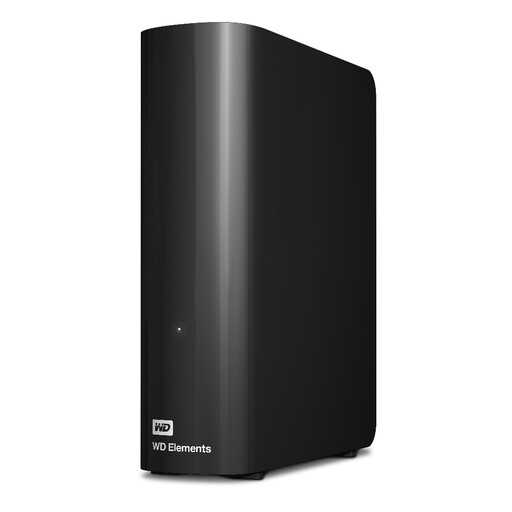
Western Digital 20TB WD Elements Desktop Hard Drive
A desktop-drive option for keeping a large household collection of photos, videos and documents locally.
20 TB capacity; USB connectivity; supplied with a USB-A cable and AC adapter.
Joybuy
 No image available
Synology DS225+ Private Cloud Media Server (2-Bay Diskless NAS)
A NAS option if you want household media accessible across devices and can plan its installed storage and separate backup destination.
Two-bay diskless NAS; storage drives are not included. The listing describes media access and backup destinations including cloud services, external drives and remote NAS devices.
Joybuy
Frequently asked questions
Does a family storage subscription automatically let everyone see my files?
No, not for the Google One family-sharing arrangement described by Google: members share a storage quota, while access to files requires permission. Check the specific folder or library settings before inviting people.
If I delete a photo on one device, can I recover it from iCloud Photos?
Apple says deletion synchronises across devices with iCloud Photos enabled. Apple’s guidance allows recovery from Recently Deleted within 30 days unless an item is permanently deleted, so keep a separate copy of photographs you cannot replace.
What must I install before using a Synology DS223j NAS?
Synology specifies at least one compatible 3.5-inch or 2.5-inch SATA drive. Its installation instructions warn that installing a drive containing data will format it, so copy existing files elsewhere first; then plan an additional backup destination for NAS-held data.
Does a USB connection guarantee an external SSD’s advertised transfer speed?
No. For the Samsung T7 Shield 1TB variant, Samsung conditions its quoted maximum speeds on USB 3.2 Gen 2 support in both the host and cable, with UASP enabled. Actual results depend on the host configuration.
Can new UK iCloud users enable Advanced Data Protection for Photos and Drive?
No, according to Apple’s UK support notice dated 23 September 2025: users in the UK who had not already enabled Advanced Data Protection cannot enable it. Check the protection available for your account before relying on this optional feature.


