Choose cloud storage if access across devices and sharing are the priority; choose an external drive if you need a local copy, with a desktop hard drive for a large archive or an SSD for frequent large-file transfers on compatible devices. For irreplaceable household files, keep independently stored copies, including one away from home: the National Cyber Security Centre warns that connected backups can be affected by the same incident, while synchronised files can carry edits and deletions across devices.
Who needs which kind of backup?
Families protecting irreplaceable memories
If family photos, videos or records cannot easily be recreated, being able to restore a separate copy matters more than simply clearing space on a device. The National Cyber Security Centre advises keeping a backup disconnected so one incident cannot affect every copy.
Households using several devices
If files need to be accessible on phones and computers, cloud access and controlled sharing may matter alongside backup. Check which devices can use the service and who can open shared files; the Information Commissioner’s Office distinguishes private, shared and public cloud access.
People with large photo and video libraries
If you regularly move or archive large files, compare the capacity you need with how often you will carry the drive. Check the connection on each computer too: Samsung says the T7’s stated maximum speeds depend on a compatible host, cable and UASP support.
What matters when choosing a backup?
Decide how you would recover files after a loss before choosing where to store them. Then weigh access across devices, room for a growing library and how often you move large files.
| Concern |
What to check |
Who this matters to |
| Recoverable, separate copies |
Check that you can restore a file from an independent copy, and decide when a local drive will be disconnected and where another copy will be kept. |
If photos or records cannot be recreated, I need a copy I can recover after a device or home incident. Around 33% of consumers put that recovery need first. |
| Access and family sharing |
Check supported devices, account ownership, each person’s storage allocation and whether shared files are private or accessible more widely. |
When our household uses different devices, I want the right people to reach the files without opening them to everyone. That is the primary need for around 27% of consumers. |
| Space for a growing archive |
Compare your current library size with the available capacity and leave room for new photos and videos; check how storage is allocated between family members. |
As our photo and video collection grows, I need enough space to keep the files we value. Around 20% of consumers would make archive capacity their first concern. |
| Transfer speed and portability |
Check the drive and computer interfaces, the cable and any formatting requirements; treat stated transfer speeds as conditional maxima. |
If I move large video files regularly, I want a drive that is practical to carry and connect to my devices. Speed and portability come first for around 20% of consumers. |
Backup mistakes to avoid
-
Treating a synchronised library as the only backup
Edits and deletions can appear across connected devices. Apple says photos held in iCloud Photos are not duplicated in iCloud Backup.
Keep a separately managed copy of irreplaceable files and check that you can restore it.
-
Leaving the only backup drive connected
The National Cyber Security Centre describes incidents in which ransomware affected both original files and connected USB or network backups.
Disconnect a local drive after a completed backup where practical, and keep another copy away from home.
-
Choosing an SSD by its headline speed alone
Samsung says the T7’s maximum read and write speeds require USB 3.2 Gen 2 support from the host and cable, with UASP enabled.
Check your computer’s port and the cable you will use before relying on a stated maximum.
-
Overlooking cloud account and sharing settings
Storage allocations and access permissions affect whether household members can use a service as intended. The Information Commissioner’s Office notes that cloud files may be set to private, shared or public.
Check supported devices, who owns the account and who can access each shared folder before moving household files.
Relevant brands to consider
Western Digital
Portable and desktop hard drives for local household copies.
- Western Digital lists WD Elements Portable capacities from 750 GB to 6 TB and Elements Desktop capacities from 4 TB to 26 TB.
- Formatting depends on the model: Western Digital says its cited Elements Desktop model requires reformatting for macOS.
Samsung
Portable SSDs for moving large files between compatible devices.
- Samsung specifies T7 maximum speeds of up to 1,050 MB/s read and 1,000 MB/s write.
- Those maxima require a compatible USB 3.2 Gen 2 host and cable with UASP enabled; formatting needs can also vary by device.
Apple
iCloud+ provides cloud access for households using Apple devices.
- Apple lists iCloud+ storage tiers from 50 GB to 12 TB and allows storage sharing with up to five other Family Sharing members while keeping files private between accounts.
- Apple says iCloud Photos items are not duplicated in iCloud Backup; keep a separate recoverable copy of an irreplaceable library.
Microsoft
OneDrive and Microsoft 365 support cloud access across PC, Mac and mobile devices.
- Microsoft lists Microsoft 365 Family for one to six people, with 1 TB of cloud storage per person.
- Check the recovery features and time limits for the account you intend to use rather than treating synchronisation as an independent copy.
Google
Google Photos, Drive and Google One offer cloud storage across signed-in devices.
- Google One says Google Accounts include up to 15 GB of storage.
- Google Photos Help lists backup limits of 200 MB or 200 MP per photo and 10 GB per video; check whether your files fit the service’s conditions.
External drives for local copies
These portable SSDs and external hard drives are options for keeping local copies of household files. Choose between a drive you can move and one that stays at home; for irreplaceable files, plan a separate copy away from home as well.
 No image available
Samsung Portable SSD T7 2 TB, grey
Consider this portable SSD if you regularly move large household files between compatible devices.
Its stated capacity is 2 TB and its connection is USB Type-C 3.2 Gen 2. Samsung says the T7’s maximum speeds require a compatible host and cable with UASP enabled; confirm compatibility with the devices you use.
View on Joybuy
 No image available
Western Digital My Passport Ultra for Mac 5TB, silver
This portable hard drive is a local-storage option for a household primarily using Macs.
Its stated capacity is 5TB. If you also need to use it with Windows, check the file-system and driver requirements for your devices before moving files onto it.
View on Joybuy
 No image available
SanDisk Portable SSD 2TB
Consider this portable SSD if you want a local copy that you can carry between locations.
Its stated capacity is 2TB. Check the connection, cable and compatibility with your particular phones or computers before choosing it for transfers between devices.
View on Joybuy
 No image available
Western Digital Elements portable hard drive 4TB, black
This portable hard drive suits a local photo or document archive that you need to move between locations.
Its stated capacity is 4TB and the product name specifies USB 3.0. Check whether it needs reformatting for each operating system you plan to use.
View on Joybuy
 No image available
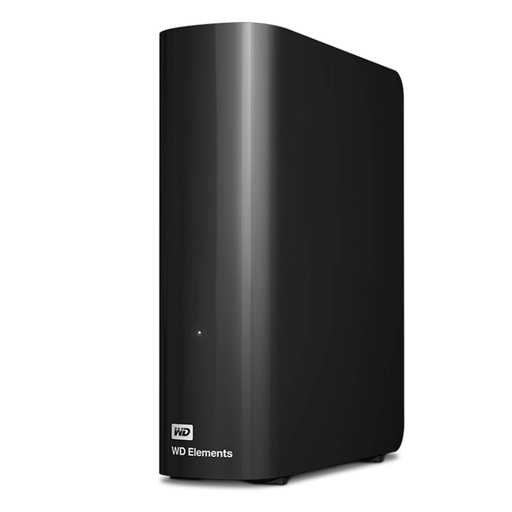
Western Digital Elements Desktop external hard drive 10TB
Consider this desktop hard drive for a large local archive kept at a fixed home location.
Its stated capacity is 10TB. Confirm the power and formatting requirements for your setup, particularly if you plan to use it with a Mac; a drive kept at home still needs a separate copy elsewhere for protection against a home incident.
View on Joybuy
Common backup questions
Is cloud synchronisation an independent backup?
No, not by itself: synchronisation can carry changes and deletions across devices. Apple says iCloud Photos items are not duplicated in iCloud Backup, so keep another recoverable copy of files you cannot replace.
What should I check before sharing household files in the cloud?
Check who controls the account and whether each folder is private, limited to invited people or public. The Information Commissioner’s Office identifies these as distinct cloud access settings; review them before sharing photos or documents.
Should I leave an external backup drive connected?
Disconnecting at least one completed backup reduces the chance that the same incident affects the computer and every copy. The National Cyber Security Centre warns that connected USB and network backups have been affected alongside original files.
Can I restore a deleted OneDrive file?
Microsoft says personal-account users can restore deleted files or folders within the last 30 days. Check the recovery options for your account and retain an independent copy rather than relying solely on a service’s recovery window.


