For household photo and file backup, choose a local drive for a sizeable archive or offline access, cloud storage for automatic uploads and access across supported devices, and both when you need a separately maintained recovery copy as well as remote access. The UK National Cyber Security Centre advises keeping important data backed up; a synced photo library is not necessarily a separate copy, as Apple says iCloud Photos deletions propagate across devices. A combined approach needs upkeep of both copies and continued access to your cloud account.
Who this backup guidance is for
Families protecting irreplaceable photos
If you want to recover memories after losing a device or deleting files by mistake, keep a separate copy rather than relying only on synchronisation. The UK National Cyber Security Centre recommends storing a backup separately from the original.
Households with growing archives
If photos and videos are accumulating on computers, measure the archive and allow for future growth before choosing local capacity and a copying routine. Western Digital’s UK product information gives one example of a 2 TB portable drive.
Multi-device households
If you want files available across supported devices or family accounts, check how storage is shared, which apps are supported and how account access can be recovered. Apple and Google describe different family-storage arrangements and account settings.
What to consider when choosing backup storage
Start with the files you need to restore, then check the storage space, device connections and account access required to keep a usable copy.
| Concern |
What to check when buying |
Who this matters to |
| Recovery after loss or deletion |
Keep a separate copy and test that you can restore a sample file. |
If a device fails or I delete something by mistake, I want a copy I can restore from. Consumers who put recovery first make up about 29% of this audience. |
| Capacity for a growing archive |
Measure the files to protect, allow for growth and compare the total with drive capacity or a cloud plan’s quota. |
When my photo and video collection is growing, I want enough room for the files I intend to keep. Consumers prioritising archive capacity account for roughly 23%. |
| Access across household devices |
Check supported devices and apps, how storage is pooled, and whether files remain private unless shared. |
If several people need access from different devices, I want to understand who can reach each file and how shared storage works. This is the primary concern for about 18% of consumers. |
| Transfers and device compatibility |
Check the exact connector, cable, format and power requirements; treat rated speed as conditional on compatible equipment. |
When I regularly move large files or copy them directly from a device, I want the connection to work with my equipment. Consumers putting transfer convenience first represent around 18%. |
| Ongoing costs and account access |
Review plan allowances and renewal terms, set up account recovery and plan how to retrieve files if you change plans. |
If I rely on cloud storage, I want to manage recurring payments and regain access if I lose my phone. Consumers who prioritise cost and account access make up about 12%. |
Backup storage pitfalls to avoid
-
Treating a synced photo library as a separate backup
Apple says deletions in iCloud Photos are reflected across devices using that library, so synchronisation alone may not preserve a separate copy.
Keep a separately managed copy of files you cannot replace, and open sample files from it before removing anything.
Maintaining a separate copy requires another storage destination and time to check it.
-
Assuming family cloud plans share storage in the same way
Plans can differ in how storage is pooled and who can access files, so an allowance that suits one account setup may not suit the household.
Check the current plan’s total allowance, included services, eligible accounts and renewal terms before relying on it.
A different plan tier may be needed if the household’s files exceed the available shared allowance.
-
Choosing by connector shape or advertised speed alone
A matching connector does not establish that a device can power a drive or use its rated speed. Samsung’s T7 speed ratings depend on a compatible host and cable with UASP enabled.
Check the exact device, cable, power needs and supported file format before choosing a drive.
A compatible cable, adapter or external power arrangement may be needed.
Brands relevant to household backup
Western Digital
WD Elements Portable is a capacity-led local hard drive line; Western Digital’s UK listing identifies a 2 TB variant.
- The manufacturer’s UK listing specifies USB 3.2 Gen 1/USB 3.0 connectivity.
- A local drive does not, by itself, provide an off-site or automatically updated copy.
Samsung
The portable T7 SSD line is relevant when frequent large-file transfers make a speed-oriented local drive worth considering.
- Samsung rates the UK T7 1 TB variant at up to 1,050 MB/s sequential read and 1,000 MB/s write.
- Those are manufacturer ratings; Samsung specifies a compatible host and cable with UASP enabled, so the figures are not guaranteed on every device.
Kingston
DataTraveler Exodia M USB-A flash storage is suited to transferring a limited, defined set of files.
- Kingston lists 64 GB, 128 GB and 256 GB capacities for the line.
- Check that the USB-A interface suits the intended device, and do not rely on a flash drive as the only backup.
Apple
iCloud+ is a cloud-plan option for households using supported Apple devices.
- Apple’s UK information describes family-plan sharing and iCloud Photos.
- Apple says iCloud Photos deletions propagate across devices, and photos synced there are not duplicated in iCloud Backup; keep another copy if you need separate recovery.
Google
Google One adds storage used across Google Photos, Drive and Gmail, with family sharing on eligible plans.
- Google One Help says family members share a quota while files remain private unless access is granted.
- Check the plan’s shared allowance and account-recovery arrangements before relying on it for household files.
Microsoft
OneDrive and Microsoft 365 plans are relevant to households already organising files through Microsoft accounts and supported devices.
- Microsoft’s UK Family offer describes 2 TB of shared storage for one to six people.
- Microsoft says personal OneDrive accounts can restore files deleted within the last 30 days; check the plan and recovery options that apply to your account.
Joybuy products for local backups
These Joybuy listings cover local household storage, from desktop and portable drives to USB flash storage for selected files. A drive still needs a separate backup routine if you need another recoverable copy.
 No image available
Samsung Portable SSD T7 2 TB, Grey
A portable local drive for keeping household files or moving large files between compatible devices.
2 TB capacity, USB-C and USB 3.2 Gen 2. The listing gives rated speeds of up to 1,050 MB/s read and 1,000 MB/s write; actual results depend on compatible host and cable support and UASP.
Keep another backup of important data rather than treating this drive as the only copy.
Joybuy
 No image available
Western Digital My Book 22TB External Desktop Hard Drive
A desktop drive for a large local archive kept with a household computer.
22 TB capacity and USB 3.0. The product name specifies password protection and hardware encryption, and the listing describes PC and Mac use.
Joybuy
 No image available
SanDisk Phone Drive with USB-C, Arctic White, 256GB
A USB-C local copy option for photos and videos on compatible devices.
256 GB capacity, USB 3.2 Gen 1 and a stated read speed of up to 150 MB/s. The listing describes automatic photo and video backups through its app for compatible USB-C iPhones, iPads, Macs and other USB-C devices.
This is not a USB-A drive, so check the intended device and connection before choosing it.
Joybuy
 No image available
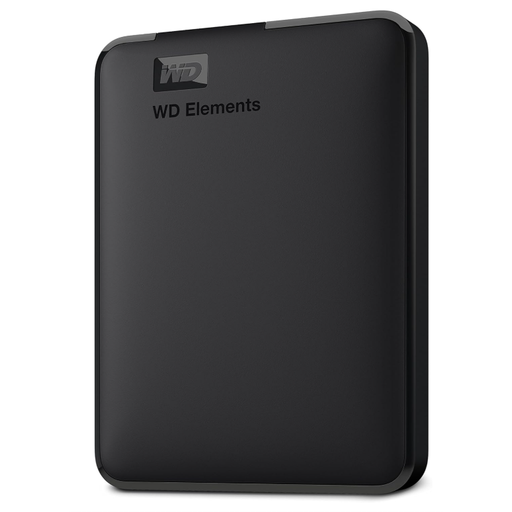
Western Digital Elements Portable External Hard Drive 6TB
A portable local drive for a growing photo or video archive stored with a computer.
6 TB capacity and USB 3.2 Gen 1/USB 3.0. The listing describes bus-powered computer use and says macOS use requires reformatting.
Maintain a secondary backup for critical data rather than relying on this drive alone.
Joybuy
 No image available
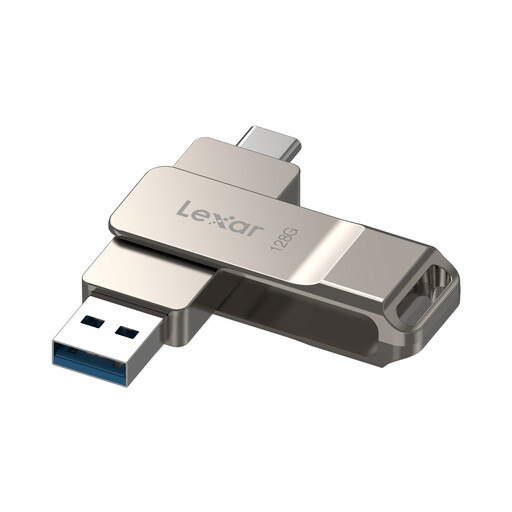
Lexar D40E 128GB Dual USB 3.2 Gen 1 Jump Drive, LJDD40E128G-BNSNG
A compact option for transferring a defined set of files between devices with different ports.
128 GB capacity, USB-A and USB-C connectors, with a stated read speed of up to 100 MB/s. Android file access requires a device that supports USB OTG.
Joybuy
Household backup questions
Does iCloud Photos replace a separate backup of my photo library?
Not if you need an independent copy to guard against mistaken deletion. Apple says deletions propagate across devices using iCloud Photos and synced photos are not duplicated in iCloud Backup, so keep and check a separately managed copy of files you cannot replace.
Can I plug an external drive straight into my iPhone?
Some external devices can be accessed through supported apps, but check your iPhone’s connector, the drive’s format and its power needs first. Apple notes that external hard drives often require an external power source.
What happens if I cancel or downgrade a cloud plan?
Check the provider’s rules and retrieve or move files that exceed the new allowance before changing plans. Apple advises doing this before downgrading iCloud+; Google says ending a paid storage plan removes the additional storage after the billing cycle, which can leave an account over quota.
What should I set up before relying on cloud storage after losing my phone?
Set up an account-recovery method in advance and protect the account itself. Google describes single-use backup codes for signing in when normal two-step verification is unavailable, while Apple offers recovery contacts for eligible accounts.


