For irreplaceable household photos and documents, use both an online copy and a separately stored local drive where practical: the National Cyber Security Centre advises considering both so that losing one backup does not remove every copy. An external HDD suits a substantial archive kept mainly at home, while an SSD is worth considering when you frequently carry or transfer large files. If cloud access across devices matters most, check exactly what the service protects, how family storage is allocated and what changes if you cancel the plan.
Who needs which approach?
Households protecting irreplaceable memories
If losing a computer would also mean losing photos or documents you cannot recreate, focus on whether a separate copy remains recoverable. The National Cyber Security Centre advises considering both online storage and a storage device rather than relying on one backup location.
Multi-device, cloud-first households
If files need to be accessible across computers and phones without routine manual copying, compare the folders and photo libraries each service covers. Family storage rules and the consequences of cancelling a plan also matter.
Portable archive keepers
If you regularly move a photo or document archive between devices, consider the drive's capacity, connection and ease of carrying it. A portable drive still needs a backup routine and a safe place to be stored.
What should you check before choosing?
Start with the copy you would rely on after losing the main computer. Then decide how much local capacity, cross-device access and portability your household needs.
| Concern | What to check | Who this matters to |
|---|
| Recoverable copies |
Check that another copy exists away from the main computer, and that you can restore files from it. Disconnect a local backup when it is not in use. |
If the computer is lost or fails, I need photos and documents to remain recoverable elsewhere; around 37% of consumers put that need first. |
| Access across devices |
Check the exact folders, photo libraries and devices covered, plus how a family plan allocates storage. |
I want selected files available on several household devices without remembering to connect a drive; for around 27% of consumers, that is the primary concern. |
| Local archive capacity |
Compare drive capacity with the archive and its likely growth, then plan where the drive will be stored. |
My growing archive needs a substantial local copy that I can manage without a cloud plan; this comes first for around 27% of consumers. |
| Portable transfers |
Check the ports and cable on each intended computer before relying on an SSD's stated transfer speed. |
I frequently carry the archive and copy large batches of files between devices; around 9% of consumers prioritise that need. |
Backup mistakes to avoid
-
Leaving the only backup drive permanently connected
The National Cyber Security Centre warns that ransomware can affect connected USB and network drives as well as the computer's original files.
After a completed backup, safely disconnect the drive and store it securely. For files you cannot recreate, consider an online or separately located copy too.
-
Assuming all cloud storage is reserved for photos
Google says its account allowance is shared across Gmail, Drive and Photos; Google One family members also share a family storage quota. Other providers use different family allocation rules.
Check what already uses the allowance and how storage is shared before choosing a plan for the household archive.
-
Expecting an SSD's stated speed on every computer
Samsung says the maximum stated speeds for its T7 Shield require a compatible USB 3.2 Gen 2 host, cable and UASP mode. Those conditions should not be assumed for a different SSD model.
Check the connection on each computer you intend to use, and compare the drive's requirements with those connections.
-
Forgetting what happens when a cloud plan ends
Microsoft says cancelling Microsoft 365 Basic or Personal returns storage to its 5 GB free allowance. If stored content exceeds that allowance, new OneDrive uploads, edits and syncing are restricted.
Before cancelling a plan, check its current terms and keep an accessible copy of files you may need to move.
Relevant brands and services
Microsoft
OneDrive is relevant to households using Windows PCs that want selected folders available across devices.
- Microsoft says OneDrive folder backup can protect selected folders such as Desktop and Documents. Microsoft 365 Family can give each of up to five other people 1 TB.
- Storage sharing depends on the plan: Microsoft says Basic and Personal cannot share storage, and cancelling those plans returns the allowance to 5 GB.
Google
Google One is relevant when a household already uses Google Photos, Drive and Gmail.
- Google says a free account has up to 15 GB shared across those services; paid Google One plans increase the allowance according to the selected tier.
- Google One family members share a family quota, and Google says invited members must live in the same country as the organiser. Sharing storage does not automatically make members' files visible to one another.
Apple
iCloud+ is relevant to Apple-centred households storing photos, files and device backups.
- Apple lists 5 GB of free iCloud storage and iCloud+ tiers from 50 GB to 12 TB, with eligible sharing for up to five other family members.
- Apple says iCloud+ is billed monthly. Check the tier and the devices and content you intend to protect before relying on it for a growing archive.
Samsung
Samsung's portable SSD range is relevant when a household frequently carries or transfers a local archive.
- Samsung lists USB 3.2 Gen 2 and stated sequential read and write speeds of up to 1,050 and 1,000 MB/s for its T7 Shield 2 TB model.
- Samsung says that model's maximum speeds require a compatible host, cable and UASP mode. Its T7 Shield protection claims and warranty conditions should not be assumed for other T7 variants.
External drives for a local copy
These HDDs and SSDs offer ways to keep a local copy of household files. Choose capacity and portability around your archive, then arrange a separate copy if losing the drive would leave you without a backup.
 No image available
Western Digital My Passport Ultra for Mac, 5TB, silver
Consider this portable HDD for a substantial local archive used with a Mac.
Check the required setup before using it with a Windows computer. Keep another copy elsewhere if the files cannot be replaced.
View on Joybuy
 No image available
Samsung Portable SSD T7, 4 TB, USB Type-C, grey
Consider this portable SSD if you regularly move a local archive between devices.
The title specifies USB 3.2 Gen 2; check the intended computer and cable before relying on fast transfers. Keep the drive away from liquids and maintain another copy of irreplaceable files.
View on Joybuy
 No image available
Western Digital My Passport portable HDD, 2TB, black
Consider this portable HDD for a local copy that fits within its 2TB capacity.
If you use a Mac, confirm the filesystem and setup needed for your computer before choosing it. A second copy remains important if the drive is lost or damaged.
View on Joybuy
 No image available
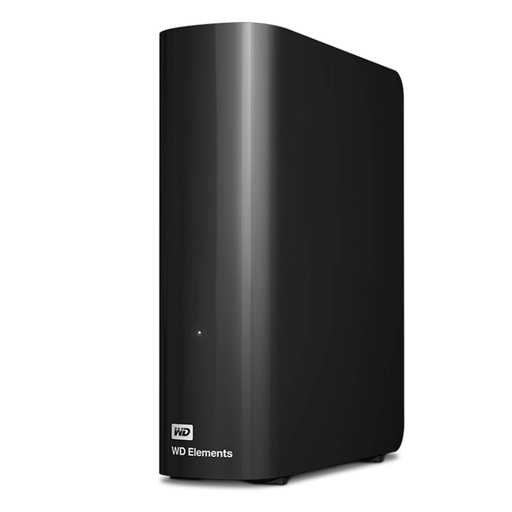
Western Digital Elements Desktop HDD, 10TB
Consider this desktop HDD for a large archive that will usually stay in one place.
It requires an AC power adapter, and macOS use may require reformatting; check that setup before moving files. Plan a separate copy rather than relying on one stationary drive.
View on Joybuy
 No image available
Western Digital Elements Port. 4TB, black, USB 3.0
Consider this portable HDD for a local archive that you need to move between locations.
Check whether your intended Mac or other device requires reformatting. Protect the drive from liquids and impacts, and keep a separate copy of important files.
View on Joybuy
Questions about household backups
Is cloud storage alone enough for irreplaceable photos?
A cloud copy can preserve access after a computer is lost, but relying on one location or account leaves another point of failure. The National Cyber Security Centre advises considering both online storage and a separate storage device; check how you would restore files and keep the local copy safely stored.
Will a cloud service back up every device and folder automatically?
Do not assume that it will. Microsoft says OneDrive folder backup protects selected folders such as Desktop and Documents; check each computer, phone, folder and photo library you want covered, then test restoring a non-critical file.
Do family cloud plans give everyone separate storage?
The allocation depends on the provider and plan. Microsoft says Microsoft 365 Family gives each of up to five other people 1 TB, while Google One family members share a quota and must live in the organiser's country; Apple offers eligible iCloud+ sharing with up to five other family members.
What should I do before cancelling a cloud plan?
Make sure you can still access and retain the files you need under the remaining allowance. Microsoft says cancelling Microsoft 365 Basic or Personal returns storage to 5 GB and restricts new OneDrive uploads, edits and syncing if the account exceeds that allowance; check the terms of your particular provider and move files where necessary.


