
24/7 Customer Support

Free returns

Same-day & Next-day Delivery

Quality Guaranteed

Unlock Your Welcome Offers: FREE Delivery | Up to 80% OFF | Free 30-day JoyPlus trial
Download the APP
A computer mouse seems like a simple purchase, but the market is filled with confusing jargon and features that often don't deliver on their promises. Many UK shoppers end up with a device that's uncomfortable, unreliable or simply over-priced for their needs. Before you click "buy," it's crucial to understand the common pitfalls that lead to buyer's remorse.
As a Joybuy Product Recommendation Officer, my role is to help you navigate these choices by focusing on what truly matters for your daily use, whether that's for work, gaming or general browsing. Let's look at the most frequent traps and how to avoid them.
To make an informed decision, focus on these three fundamental parameters. They will have a far greater impact on your experience than inflated marketing numbers.
The way your mouse connects to your computer is a critical choice that affects portability, latency and convenience.
Instead of chasing the highest DPI number, look for a mouse with an adjustable DPI range. This allows you to change the cursor sensitivity on the fly.
Comfort is personal. The physical design of the mouse should match your hand and how you use it.
Here are a few options that align with specific user needs, helping you sidestep the common purchasing traps.

Why This Fits Their Persona: This user spends long hours at their desk and is concerned about wrist strain. The vertical "handshake" grip is specifically designed to reduce pressure on the forearm and wrist, making it ideal for preventing discomfort during extended workdays in a home or corporate office.
It sidesteps the vague "ergonomic" label by offering a specific, purpose-built vertical design that directly addresses the biomechanics of wrist strain, rather than just being a slightly contoured standard mouse.
Dual-mode wireless (2.4GHz and Bluetooth) offers versatile connectivity. The design promotes a natural arm and wrist posture to reduce muscle strain.
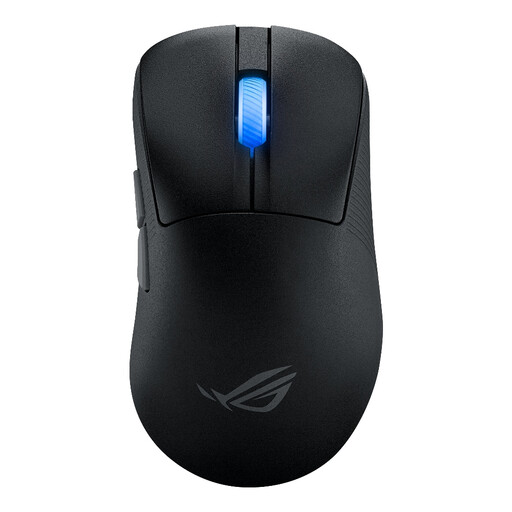
Why This Fits Their Persona: This user demands precision, speed and reliability for competitive online games. They need a mouse that feels like an extension of their hand, with zero perceptible lag and a lightweight frame for rapid movements. The Keris II Ace is engineered for exactly this purpose.
It proves that a wireless mouse can be tournament-grade, countering the outdated fear of latency with its ROG SpeedNova wireless technology. It also focuses on a practical, ultra-lightweight design (54g) rather than just a high DPI number.
Features a high-precision ROG AimPoint Pro optical sensor and optical micro switches for instant actuation. The ergonomic shape was tested with professional players for comfort and control.

Why This Fits Their Persona: This user needs a reliable, versatile and quiet mouse for use in shared spaces like an open-plan office, library or lecture hall. They value practicality and a clutter-free setup, often switching between a laptop and other devices.
It focuses on genuinely useful features for its target audience—silent clicks and multi-device connectivity—instead of over-hyped specs like extreme DPI, which are irrelevant for office and student work.
Features quiet click mechanisms to avoid disturbing others. Dual-mode (2.4GHz + Bluetooth) allows seamless switching between up to 3 devices.
We have compiled a complete, real-time list of products that fully satisfy these strict selection criteria and UK safety regulations.
The lifespan of a computer mouse generally ranges from 3 to 5 years for a well-made model. The most critical component affecting longevity is the switch mechanism under the buttons, which is rated for a certain number of clicks (e.g., 20 million). A high-quality gaming mouse often has more durable switches. Build quality and usage intensity also play significant roles, with budget models sometimes lasting only 1 to 2 years under heavy use.
For most standard wired and wireless mice, no software is needed. They are "plug-and-play," meaning they will work as soon as you connect them to your computer. However, to access advanced features on a gaming mouse or customisable office mouse—such as programming buttons, adjusting RGB mouse lighting or creating fine-tuned DPI profiles—you will need to download and install the manufacturer's specific software.
For the vast majority of players, the answer is no. Modern 2.4GHz wireless technology has advanced to the point where its latency is virtually identical to that of a wired connection. While a fractional, measurable difference might exist at the absolute highest level of professional esports, it is imperceptible to over 99% of gamers. A quality wireless mouse is more than capable of handling fast-paced, competitive gaming without any noticeable lag.