
24/7 全天候客户支持

免费退货

当日/次日达

品质保障

开启新人专享福利: 全场免邮 | 低至 2 折 | 免费试用 30 天 JoyPlus 会员
下载 Joybuy
There are few things more frustrating than your printer flashing a "Low Ink" warning right before you need to print an important document, a school project or a cherished family photo. The rush to buy a replacement can lead to costly mistakes. As your Joybuy Product Recommendation Officer, my role is to help you navigate the market and find the right product without falling into common traps.
When it comes to printer ink, many UK shoppers encounter a few recurring issues. Understanding these can save you both money and hassle:
To ensure you get reliable performance and vibrant, lasting prints, focus on these two non-negotiable factors when selecting your replacement cartridge.
The single most important factor is ensuring the cartridge is designed specifically for your printer. A genuine HP 305 ink cartridge is engineered to work perfectly with a specific range of printers, preventing the clogs and errors common with ill-fitting alternatives.
If you own a printer from the HP DeskJet 2700, 2800, 4100 or 4200 series, or the HP ENVY 6000e or 6400e series, you need a cartridge with the model number 305. The tri-colour version is specifically identified by the product code 3YM60AE. Using a genuine cartridge ensures the internal chip communicates correctly with your printer, providing accurate ink level alerts and optimising print quality.
Not all inks are created equal. The HP 305 tri-colour ink cartridge uses a sophisticated dye-based ink formulation. This is crucial for producing the vivid, rich tones needed for photographs and colourful graphics. It is designed to be absorbed into the paper fibres smoothly, resulting in a brilliant, glossy finish without smudging.
Furthermore, a key feature to look for is fade-resistant photo ink. This means the chemical composition of the ink is stable and designed to resist degradation from light and air, ensuring your printed memories and important documents maintain their colour and clarity for years to come.
To simplify your choice, here are our recommendations matched to different printing needs.
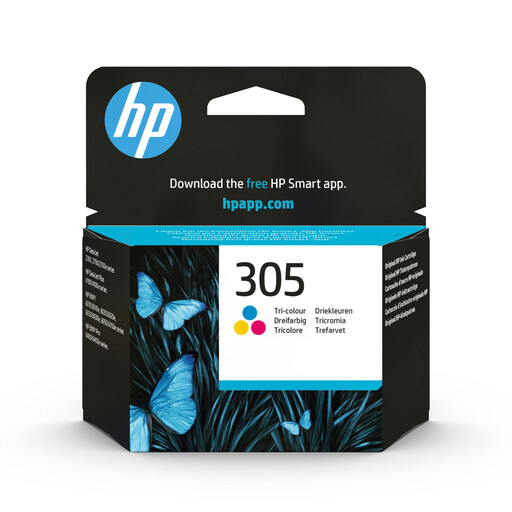
Why This Fits Their Persona: This is the go-to choice for families and students in the UK who need a reliable replacement colour ink cartridge for schoolwork, printing online forms and creating vibrant family photos without any fuss.
As a genuine HP product, it eliminates the risk of incompatibility and potential printer damage associated with third-party cartridges. The fade-resistant formulation prevents the disappointment of discoloured photos.
Delivers consistent, vivid colour output from the first page to the last. It also integrates with your printer's software to provide accurate low-ink alerts, so you are never caught out unexpectedly.
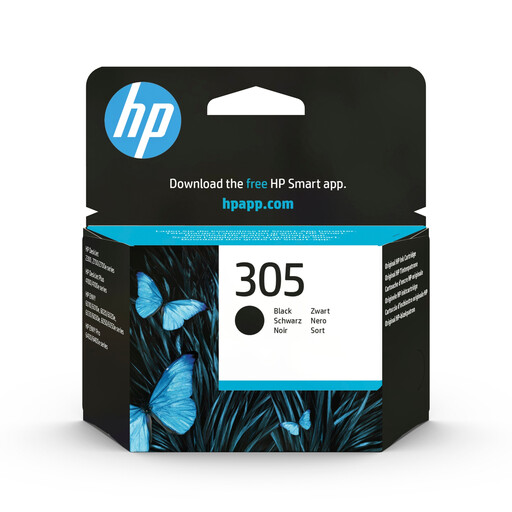
Why This Fits Their Persona: For those working from home who primarily print text-based documents like reports, invoices and letters, this black ink cartridge is an essential companion to the tri-colour one.
Its pigment-based ink is specifically formulated to resist smudging, a common issue with cheaper inks, ensuring professional-looking documents that can be handled or highlighted immediately after printing.
Produces sharp, laser-quality black text that is highly readable and durable. It offers the same easy, click-in installation and reliability as its tri-colour counterpart.
Whether you're stocking up on essentials or exploring new creative avenues, finding the right supplies is key.
We have compiled a complete, real-time list of products that fully satisfy these strict selection criteria and UK safety regulations.
The most reliable way is to check your printer's model number. The HP 305 series is designed for specific HP DeskJet 2700 ink and HP ENVY 6000e ink models, among others. You can usually find the model number on the front or top of your printer. Alternatively, open the ink access door; most printers have a sticker inside that lists the correct cartridge numbers.
The only difference is the amount of ink inside. The 'XL' version contains more ink and therefore has a higher page yield, meaning it can print more pages before needing to be replaced. If you print frequently, the 305XL can offer better value over time. The physical size of the cartridge is identical, so both will fit in the same printers.
Most HP printers will allow you to continue printing in black and white for a limited time after the colour cartridge is empty. However, for optimal performance and to prevent the print heads from drying out, it is recommended to replace the empty colour cartridge as soon as possible. Some printer functions may be limited until a new cartridge is installed.