Start with the problem that most often interrupts work at home: limited screen space, awkward laptop connections, unclear calls, background noise or an uncomfortable input setup. Before buying a dock or USB-C monitor, check what the exact laptop can support; choose call equipment for your meeting platform and room, and consider the whole workstation rather than assuming everyone needs the same devices.
Who this setup is for
Laptop-first hybrid workers
If you carry a work laptop between home and the workplace, a repeatable way to connect your home display and peripherals may matter more than adding several separate devices. Check the laptop's permitted connections before planning the desk around a hub or dock.
Home workers with frequent video calls
If calls occupy much of your home-working day, work out whether the difficulty is camera framing, microphone pickup, room noise or the network connection before choosing a webcam or headset.
Long-session workers with limited desk space
If you regularly work at a screen for sustained periods, balance display placement and input-device fit against the space available. The Health and Safety Executive advises that relevant display screen equipment assessments cover both home and workplace arrangements.
What to prioritise
Choose the addition that addresses your main interruption first, then check whether it works with the laptop and space you already have.
| Concern | What to check | Who this matters to |
|---|
| Laptop connections |
Check the exact laptop's USB-C or Thunderbolt video and charging support, plus the connections required for your display and peripherals. |
If reconnecting a work laptop disrupts each move to the home desk, a dependable display, power and peripheral connection comes first; about 24% of consumers would put this need first. |
| Remote calls |
Check camera placement, microphone connection and any meeting-platform certification you need. Test the home connection before replacing call hardware. |
When people struggle to see or hear you in meetings, clear communication takes priority over desk expansion; about 23% of consumers would make call clarity their primary concern. |
| Screen workspace |
Check screen size and resolution, stand adjustment and an input your laptop or dock can use. |
If documents and meeting content compete for room on a laptop screen, a separate display may be the first addition; about 23% of consumers would prioritise screen workspace. |
| Portability and space |
Check the device's size, display-output limits and whether the charger and cables you need are included. |
With a small home desk or equipment that moves between locations, keeping the setup manageable matters most; about 18% of consumers would put portability and space first. |
| Input-device fit |
Check hand-size and handedness options, connection method and compatibility with the intended computer. |
If sustained mouse use or limited movement space is the main difficulty, a differently shaped input device is worth assessing; about 12% of consumers would prioritise input-device fit. |
Purchasing pitfalls
-
Assuming every USB-C port does the same job
A USB-C connector alone does not establish that a laptop can send video to a monitor, accept the intended charging power or use a Thunderbolt dock.
Compare the exact laptop model and any employer connection rules with the hub, dock or monitor's display and power requirements.
A compatible charger or cable may also be needed for the planned connection.
-
Replacing call equipment before checking the connection
A new camera or headset will not address call lag caused by a congested home connection. Ofcom advises that an Ethernet connection can provide a faster, more reliable computer connection than Wi-Fi.
Test calls from your usual room at your usual meeting time. If the connection is the problem, assess Wi-Fi placement or a wired connection before buying call peripherals.
-
Treating an ergonomic label as a personal fit guarantee
Mouse shape, hand size and desk layout affect suitability; an input device or monitor feature is not a substitute for assessing the workstation. The Health and Safety Executive advises assessing home and workplace screen setups where applicable.
Use any relevant workstation assessment to guide the choice, then check handedness, fit and computer compatibility.
-
Expecting a compact hub to act like a full dock
The Anker compact hubs reviewed for this topic specify particular HDMI and charging limits, while Dell's WD25TB4 Thunderbolt dock specifies different display and power capabilities. Neither device's port count alone tells you whether it meets your laptop setup.
Write down the number of screens, their connections and the charging arrangement you need, then check those requirements against the exact device and laptop.
Brands to consider
Dell
Dell has monitor, USB-C hub monitor and Thunderbolt dock models relevant to a fixed home desk.
- Dell's published specifications let you check model-specific display connections and power delivery.
- Dock and monitor functions still depend on the particular laptop and chosen model.
Logitech
Logitech's Brio 505 webcam, Zone Wireless 2 headset and Lift mouse illustrate options for calls and input-device fit.
- Logitech lists a physical privacy shutter for Brio 505 and a small-to-medium-hand fit with a left-handed option for Lift.
- A platform certification or manufacturer noise feature does not guarantee call quality in a particular room.
Anker
Anker's reviewed USB-C hubs are options for laptop connections that need to remain portable.
- The published hub specifications identify display-output and pass-through charging limits to compare with a laptop.
- Check model-specific laptop exclusions and whether the required charger and cables are supplied.
BenQ
BenQ's GW2490 is a 23.8-inch Full HD monitor with a stated 100Hz refresh rate and selectable display modes.
- Its published specifications give screen and setting details for a conventional monitor choice.
- Display settings do not establish that an individual's discomfort will improve or replace a workstation assessment.
Kensington
Kensington's reviewed Pro Fit Ergo vertical mouse is a shape alternative for desk-based input.
- Kensington states a 46.7-degree slope for the reviewed model, giving buyers a specific shape to assess.
- Check hand fit and operating-system support rather than treating the shape as a universal comfort solution.
Joybuy products for different needs
These products cover call audio and video, an external screen, laptop connections and a vertical mouse. Choose according to the task you need to improve, rather than treating them as a set you must buy together.
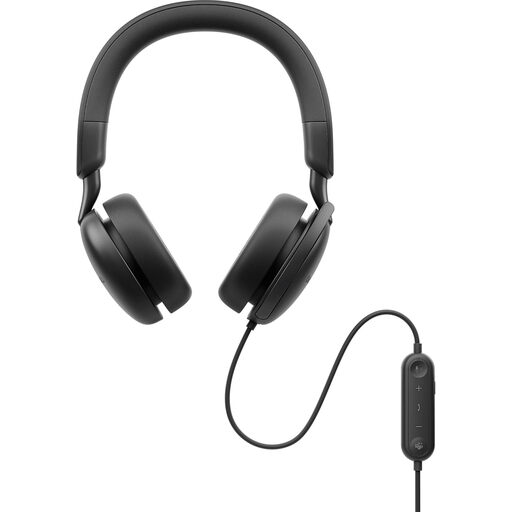 Image unavailable
DELL Pro Plus Wired ANC Headset WH5024
Consider this wired headset if frequent work calls make microphone placement and call controls a priority. The listing specifies a boom microphone, USB-C connection, USB-A adapter and Teams and Zoom certification. Check that a suitable port is available; its stated noise-handling features do not establish performance in every room.
View on Joybuy
 Image unavailable
Targus 2K Webcam with Auto Focus
Consider a separate webcam if laptop-camera placement or a physical privacy cover matters for calls. This listing describes autofocus, a privacy slider, USB-C connection and a USB-A adapter. Its title says 2K, but its detailed specification says 1080p at 30fps; confirm the actual video resolution before choosing it on that basis.
View on Joybuy
 Image unavailable
ASUS ZenScreen MB249C IPS USB-C monitor
For a home desk where laptop-only screen space feels restrictive, this listing specifies a 23.8-inch Full HD IPS display, HDMI and USB-C video input, and USB-C power delivery up to 60W. Check the laptop's video and charging support before planning a single-cable setup. The listing gives conflicting weights, so confirm the weight if you intend to move the monitor regularly.
View on Joybuy
 Image unavailable
MOVESPEED DK5A1 USB-C 10-in-1 docking station
Consider this connection accessory if a compatible laptop needs one HDMI display and extra desk connections. The listing specifies HDMI output up to 4K at 60Hz, USB data ports, SD/TF readers and a 3.5 mm audio connection. Confirm the laptop supports USB-C video output; do not assume the listed USB-C power output charges the host laptop.
View on Joybuy
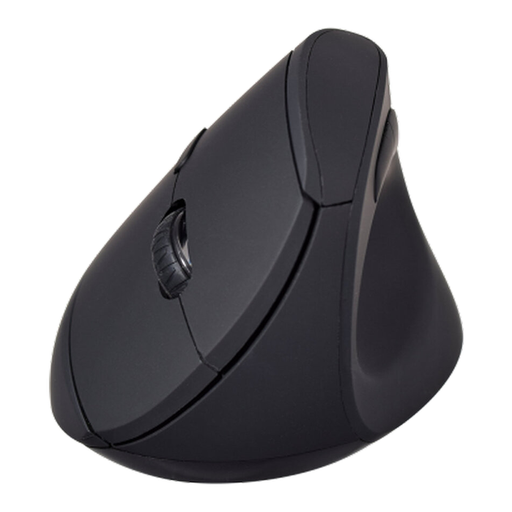 Image unavailable
V7 MW500BT Bluetooth vertical mouse
If you want to assess a different mouse shape for regular desk work, this listing specifies a vertical design, Bluetooth and 2.4GHz wireless connections, six buttons and adjustable DPI settings. Check hand fit and the stated Windows 10/11 or macOS 13.6-and-above compatibility. Personal comfort cannot be established from the shape alone.
View on Joybuy
Common questions
Do I need a dock for a hybrid-work laptop?
Only if the connections you need justify one. List your required display, charging, Ethernet and USB connections, then confirm that the exact laptop supports the dock or hub's required USB-C or Thunderbolt functions. A single external display and a few peripherals do not automatically call for a full workstation dock.
When is a Teams-certified webcam or headset useful?
It is relevant if Teams is your regular calling platform and tested device integration matters to your work. Microsoft says certified devices offer plug-and-play operation and Teams call controls where applicable; certification cannot resolve a poor home connection or every source of room noise.
Will a new webcam or headset fix poor video calls?
It can address a camera-position or microphone problem, but not an unstable network connection. Test a call from your usual workspace first; Ofcom advises that a wired Ethernet connection can be more reliable than Wi-Fi for a computer.
Should a hybrid worker assess both home and workplace screen setups?
Yes, where a display screen equipment assessment applies to work in both places. The Health and Safety Executive advises that assessments cover home and office situations for relevant workers in Great Britain; the Health and Safety Executive for Northern Ireland separately notes that its display screen equipment rules can apply to workers who routinely split their time between home and the workplace.


