What should you check before buying?
For routine home or hybrid work, establish whether the workstation needs an employer DSE assessment before choosing equipment. Then decide whether screen position, display space, reconnection or portability is the primary need.
| Concern |
What to check |
Who this matters to |
| Workstation suitability |
Check whether an employer DSE assessment applies and what action it identifies for your work and setup. |
If I work on a laptop for long stretches, I need to know whether changing its position alone will make the whole workstation workable. Around 31% of consumers put assessment-led suitability first. |
| Display and desk fit |
Check available desk space, stand adjustment, resolution and whether the laptop supports the intended display connection. |
At a regular desk, I want enough usable screen area without choosing a monitor that is awkward to position. Display and desk fit come first for around 25% of consumers. |
| Connection compatibility |
Check the laptop’s port protocol, intended display configuration and the dock’s charging requirements. |
When I reconnect a screen and peripherals, I need those functions to work with my actual laptop, not merely a matching connector shape. Around 25% of consumers make compatibility their primary concern. |
| Portability |
Check stand stability, laptop fit and whether separate input devices and cables can be moved between locations. |
If I pack the setup away or carry it between desks, I need it to remain practical for sustained work when reassembled. Portability comes first for around 19% of consumers. |
Monitor and connection options on Joybuy
These products cover separate displays and a USB-C adapter for connecting one external display and peripherals. Choose the workstation arrangement first, then check desk fit and laptop compatibility for the individual product; a monitor or adapter does not include the separate keyboard-and-mouse decision.
 No image available
ASUS ZenScreen MB166CR FHD display
Consider this external display if you need a screen you can move between work locations. It is an FHD model; check that your laptop supports the required USB-C DisplayPort Alt Mode connection, and confirm how the screen will be supported and what comes in the package.
Joybuy
 No image available
AOC Q32V4 31.5-inch 2K IPS monitor
This separate display is an option for a regular desk where a 31.5-inch screen fits. Check the desk space, computer output and the stand’s adjustment range against the screen position you need.
Joybuy
 No image available
CRUA 32-inch 1500R curved QHD monitor, black
Consider its curved 32-inch format for a fixed desk if the screen and viewing position fit your space. The stated resolution is 2560 × 1440, with HDMI and DisplayPort inputs; check your computer’s output and connection requirements before relying on the advertised 165 Hz refresh rate.
Joybuy
 No image available
V7 V7UC-U3CRJ45HDVG-BLK USB-C adapter
This adapter suits a compatible laptop that needs to reconnect one external display and peripherals. Its stated connections include 4K HDMI, VGA, Gigabit Ethernet and two USB 3.0 ports; the 100 W power delivery is pass-through charging. Check USB-C Alt Mode support, the intended display output and the charger your laptop requires. It is for single-display operation, not multiple independent displays.
Joybuy
 No image available
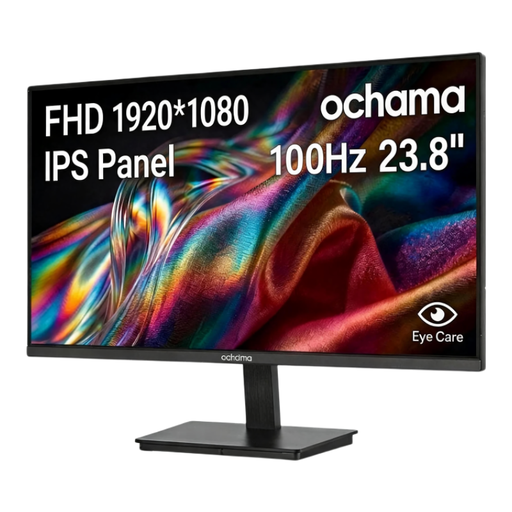
ochama 23.8-inch 1080p 100 Hz monitor
This separate screen may suit a home desk where its 23.8-inch size fits the intended arrangement. Confirm its video inputs against your laptop, and check the dimensions and stand adjustment needed for your desk position.
Joybuy
Frequently asked questions
Does working from home mean I need to buy a monitor?
No. For permanent, long-term or hybrid home work, the existing arrangement and any applicable DSE assessment determine what action is needed. The HSE notes that some home equipment may be suitable, while other arrangements need changes; neither finding automatically calls for a monitor.
When does an employer need to assess a home workstation?
For workers in Great Britain who use display screen equipment daily for continuous periods of an hour or more, the HSE says employers must carry out a workstation assessment. The Health and Safety Executive for Northern Ireland also identifies daily use for an hour or more at a time and covers home workers under its guidance.
Can my employer charge me for equipment identified by a DSE assessment?
In Great Britain, the HSE says workers cannot be charged when a DSE workstation assessment identifies action that the employer needs to take, such as providing DSE equipment. The assessment determines what action is needed for the individual arrangement.
What should I confirm before buying a USB-C dock?
Confirm that the exact laptop supports the dock’s required connection protocol, displays and charging arrangement. Lenovo’s dock guidance also advises checking supported display configurations and any relevant drivers or firmware; a USB-C connector alone does not establish those functions.
Is a laptop stand enough for prolonged work?
A stand is only part of the arrangement. The HSE’s guidance for prolonged laptop use pairs an elevated screen with a separate keyboard and mouse, so check that there is space to position all three comfortably and consider the workstation as a whole.


