Buying priorities
Work from the laptop outward: establish a comfortable screen and input position, confirm connection limits, then solve the specific video or audio issue affecting calls.
| Priority |
What to check |
Your needs |
| Screen and input position |
Check that the screen can sit directly in front of you, with its top around eye level and roughly an arm’s length away. For prolonged laptop use, plan for a separate keyboard and mouse if the laptop screen is raised. |
I need to adjust the screen height separately from where I type and point, rather than working for long periods on a low laptop screen. |
| Dock and display compatibility |
Match the exact laptop’s USB-C or Thunderbolt capability, video mode, maximum display count, resolution, refresh rate and charging needs to the dock or monitor. Check operating-system support and required cables or adapters. |
I want the home connection to provide the display, peripherals and charging arrangement I actually use, not simply fit the laptop port. |
| Video-call image |
Compare camera resolution, mounting position, USB connection and any software needed for framing features. Treat light-correction and microphone statements as model-specific manufacturer claims. |
I need a better camera angle, more suitable framing or more dependable visibility in the lighting where I take calls. |
| Call audio and privacy |
Check the connection type, microphone arrangement and platform compatibility for the exact headset or speakerphone version. Consider whether open speaker audio is appropriate for the room. |
Private listening and clearer calls matter in a shared or noisy home. A speakerphone only suits me if the room is quiet and private enough for open audio. |
Joybuy product options
Joybuy options for the webcam and call-audio parts of a hybrid home-work setup. Choose between a webcam, headset or speakerphone according to the meeting problem and your laptop’s connections.
 No image available
Targus 2K Webcam with Auto Focus
For recurring one-person calls where laptop framing or lighting needs improvement.
The listing states a 67° field of view, rotating monitor or laptop clip, tripod thread, USB-C connection, auto-focus, auto lighting correction and compatibility with Windows, macOS, Android and ChromeOS.
Verify the delivered video resolution before buying: the title says 2K while the technical table states Full HD 1080p at 30 fps. Also check that the supplied USB-C cable and adapter suit the work computer.
Joybuy
 No image available
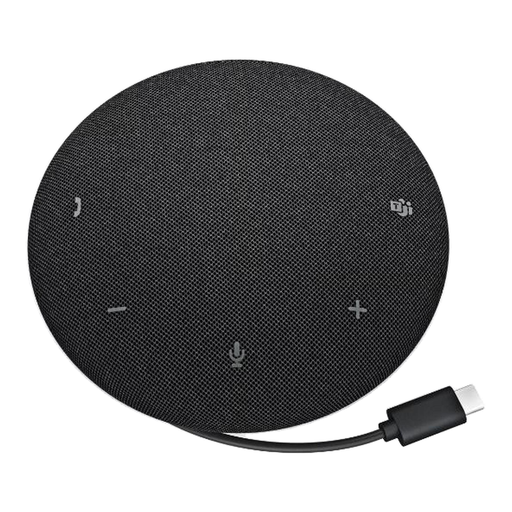
DELL Pro Wired Speakerphone SP325
For shared call audio in a quiet, private home office or small room.
The listing states USB-C connectivity, onboard mute and volume controls, four omnidirectional microphones, a 2.5 m pickup range, Teams and Zoom certification, and compatibility with listed desktop operating systems.
It is not a substitute for a headset where confidentiality or avoiding disturbance to others is important. Check that its 75 cm cable reaches the computer and that USB-C or a suitable adapter is available.
Joybuy
 No image available
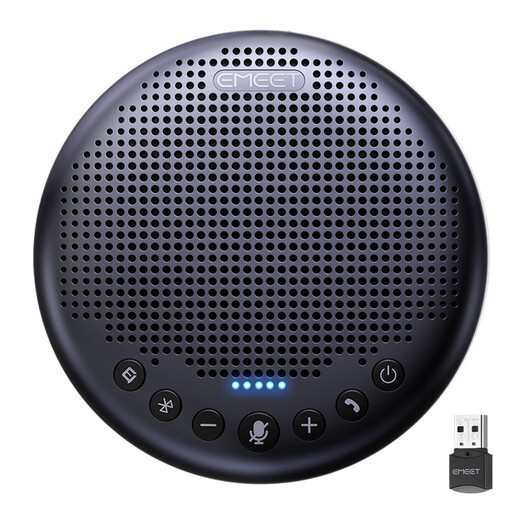
EMEET Lunaplus 8-Mic Conference Speaker
For occasional small-group calls or shared listening in a quiet private room.
The listing states an eight-microphone array, 360° pickup, AI noise reduction, USB-C and Bluetooth connection, dual-device connection, daisy-chain capability and up to 10 hours of talk time.
Open speaker audio is unsuitable for confidential calls, persistent household noise or rooms where others may be disturbed. Confirm conferencing-platform compatibility and any EMEETLINK firmware requirement for the work computer.
Joybuy
 No image available
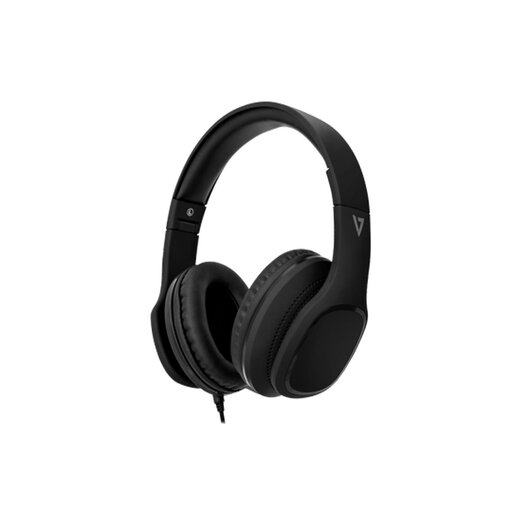
V7 HA701-3EP Wired Over-Ear Headphones
For private calls at a desk when a wired personal-audio connection is preferred.
The listing states a 3.5 mm connection, detachable 1.8 m braided cable, adjustable padded headband, memory-foam earcups, passive noise isolation, integrated MEMS microphone and inline call controls.
Check that the work laptop has a compatible combined audio jack or approved adapter. Confirm platform compatibility and whether the microphone suits the room’s noise level.
Joybuy
 No image available
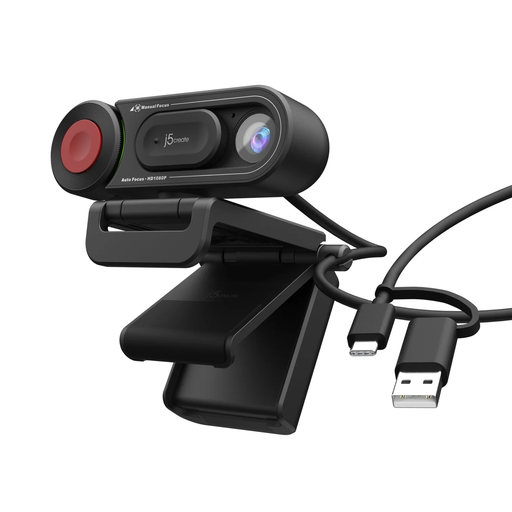
j5create JVU250 HD Webcam
For simple individual calls or close-up demonstrations needing a camera above the laptop or monitor.
The listing states USB-A plug-and-play connection, monitor or laptop mounting, Windows, macOS and ChromeOS compatibility, 720p HD video, a built-in microphone, and selectable auto or manual focus.
Check whether 720p is sufficient if Full HD video is required, and confirm that lighting, microphone handling and platform requirements suit the intended room and workplace.
Joybuy
Frequently asked questions
What should I check before buying a USB-C dock?
Check the exact laptop model’s USB-C or Thunderbolt capability, video output, maximum external-display count, supported resolution and refresh rate, charging needs and operating-system support. Then compare those limits with the dock’s host connection, display outputs, power delivery and peripheral ports; a USB-C connector alone does not confirm that video, charging or multiple displays will work.
Can a dock give my laptop more external displays than it supports?
Do not assume so. Apple Support states that the number of external displays depends on the Mac model and the displays’ resolution and refresh rate; a supported hub or daisy-chain arrangement does not increase the maximum number of displays the computer can connect.
Do I need both a laptop stand and an external monitor?
Not necessarily. Choose an external monitor when you need more screen space at a fixed desk, and use a laptop stand when you need to raise the laptop screen itself. For prolonged laptop use, the Health and Safety Executive advises separate keyboard and mouse input so the elevated screen and typing position can be adjusted independently.
When is a webcam worth buying instead of using the laptop camera?
Consider a webcam when recurring meetings reveal poor lighting, weak framing or an unsuitable laptop-camera position. Check the exact model’s resolution, light correction, mounting method, USB connection and any software needed for framing features, and buy only if those features solve the call problem you have.
Should I buy a headset or a speakerphone for calls at home?
Choose a headset when private audio, reduced household noise or not disturbing others is important. Choose a speakerphone only for a quiet private space or a small shared call, and verify the exact model’s connection method and conferencing-platform support first.


