Start with your work pattern rather than buying a full desk bundle: a laptop-only setup can suit short or highly mobile sessions, while longer document work at a fixed home desk usually benefits from a separately positioned display, keyboard and mouse. Add a dock only when your laptop supports the required video output and charging level, and check the exact model’s display limit, port capability, power requirements and cable support first.
Who this setup suits
Hybrid workers with a regular home desk
You split time between home and another workplace, but spend enough time at one home desk for document work, task switching or calls to make screen position and separate controls important. The Health and Safety Executive says its display screen equipment guidance can apply when people routinely split their time between a workplace and home; the Office for National Statistics reported that 28% of working adults in Great Britain hybrid worked between January and March 2025.
Laptop users reconnecting peripherals each day
You already use a laptop but regularly reconnect a monitor, charger, keyboard, mouse, storage or wired network. A hub, dock or docking monitor can simplify this routine only if the laptop’s video output, display count and charging support match the equipment.
Frequent video-call workers
You spend a meaningful part of the week in online meetings and need to decide whether the laptop’s built-in camera and audio suit the space, or whether a dedicated webcam, headset or speakerphone would be more appropriate.
What to check before buying
Choose the display and controls for your desk routine first, then check the laptop, cable and power requirements before adding a one-cable connection.
| Priority |
What to check |
Your needs |
| Screen and controls |
Check whether the screen can be centred and positioned separately; use a separate keyboard and mouse if raising the laptop screen; allow room for the display and controls. |
I spend long periods doing documents or switching between tasks at one desk, so I need a screen and controls that can be arranged comfortably. |
| External-display support |
Confirm the exact laptop model’s supported display count, resolution and refresh rate; match its video output to the monitor input; check the cable or adapter supports the required video feature. |
I want one or more external screens to work in the mode I plan to use, rather than relying on the shape of a USB-C connector. |
| Desk connection and charging |
Compare the dock or monitor’s power delivery with the laptop’s accepted charging level; count displays, USB devices, Ethernet and audio used at the same time; verify full-function USB-C or Thunderbolt support. |
I move between home and office and want to reconnect charging, a display and accessories without finding that a needed port or power level is missing. |
| Video-call equipment |
Check operating-system and conferencing-platform compatibility; choose a headset or speakerphone for the call environment; confirm the connection method suits the laptop. |
I need camera framing or personal audio that fits recurring calls at an individual desk, not meeting-room equipment that is unsuitable for the space. |
Common buying pitfalls
-
Assuming USB-C guarantees every connection feature
A USB-C adapter needs a host computer configured for video output, and not all USB-C cables support every feature. A display, charging or accessory connection may therefore not work as expected when chosen by connector shape alone.
Check the laptop manufacturer’s specifications for video output, maximum display support and charging input, then match them with the dock, monitor, power supply and cable.
-
Choosing a dock by port count alone
A high-port-count dock may still be unsuitable if the laptop cannot accept its charging level or cannot drive the intended display configuration.
List every display and peripheral you will use simultaneously, then verify charging, monitor outputs and supported display mode before choosing a hub, dock or docking monitor.
Some hubs require a separate compatible USB Power Delivery charger and cable to reach their stated maximum laptop charging level.
-
Adding a monitor without improving the control position
An external display alone does not create a workable desk arrangement if the laptop keyboard and trackpad remain awkwardly positioned or the screen cannot be centred.
For longer laptop sessions, pair an elevated laptop or external display with a separate keyboard and mouse, then arrange the screen and controls for the available workspace.
-
Treating webcam resolution as the whole call decision
Camera resolution is only one part of a practical video-call setup. Compatibility, connection method, microphone needs and the intended desk environment also affect whether a peripheral fits your routine.
Confirm the conferencing platform and laptop compatibility before choosing a webcam, headset or speakerphone, and select the peripheral type around the calls you make most often.
Relevant brand references
Dell
Relevant for buyers considering USB-C and Thunderbolt docks for a multi-peripheral laptop workstation.
- Dell’s UK dock materials describe multi-display video, audio, data and laptop charging through a single connection.
- Check display support, charging behaviour and compatibility against the exact laptop model, including non-Dell laptops.
Lenovo
Relevant for ThinkVision USB-C or Thunderbolt docking monitors and laptop docks that combine display, USB peripherals and charging at a regular desk.
- Lenovo’s UK range includes docking monitors and both ThinkPad-specific and universal dock approaches.
- USB-C and Thunderbolt models can have materially different power, port and display specifications; proprietary ThinkPad docks are not automatically universal.
Anker
Relevant for portable USB-C hubs and docks for adding monitor, USB, charging and accessory connections without a large permanent dock.
- Anker offers compact hubs as well as higher-port-count docking products for desk expansion.
- Some models require a full-function USB-C port and a separate compatible charger and cable for maximum charging, so check the exact model specification.
Logitech
Relevant for individual-desk keyboards, mice, webcams, headsets and speakerphones used in hybrid work and video calls.
- Logitech’s UK business range includes webcams in 720p, 1080p and 4K classes, alongside headsets and speakerphones.
- Check operating-system, conferencing-platform and connection compatibility for the exact peripheral and call setup.
Joybuy product options
Joybuy product options for building a regular home desk around an external display, USB-C connection, separate controls or individual video calls.
 No image available
iiyama ProLite XUB2792UHSU-B6 27-inch 4K UHD Monitor
A separate screen option for a regular home desk used for document work and task switching.
Stated features include a 27-inch 3840 × 2160 display, HDMI, DisplayPort, USB-C, four USB 3.2 ports, and height, pivot, swivel and tilt adjustments.
Check whether the USB-C connection provides the charging level your laptop needs, and confirm the laptop’s supported display mode and required cable. A separate keyboard and mouse are still useful when the laptop screen is raised.
Joybuy
 No image available
Targus USB-C Dual HDMI 4K Dock with 100W Pass-Through
Designed for reconnecting desk displays, wired networking and USB accessories through a USB-C Alt Mode host connection.
Stated connections include two HDMI 2.0 outputs, Gigabit Ethernet, USB-A ports, card readers and up to 100W Power Delivery pass-through.
It requires a USB-C Alt Mode laptop. Check the laptop’s simultaneous display limit and accepted charging wattage; an external 100W-or-higher power adapter and suitable cable should also be confirmed.
Joybuy
 No image available
ASUS ProArt PA278CV IPS WQHD Monitor
A 27-inch external display for document-heavy home sessions where screen position needs to be adjusted independently.
Stated features include 2560 × 1440 resolution, HDMI, DisplayPort, USB-C with power delivery, a two-port USB hub, and height, tilt, swivel and pivot adjustments.
Check whether the USB-C power-delivery level is sufficient for your laptop, and use a matching HDMI, DisplayPort or video-capable USB-C connection. Separate keyboard and mouse controls remain advisable if the laptop is elevated.
Joybuy
 No image available
Targus 2K Webcam with Auto Focus
A compact camera option for recurring individual video calls where laptop framing is not suitable.
The technical table states Full HD 1080p at 30fps, autofocus, a privacy slider, 67-degree field of view, dual microphones, a USB-C connection and monitor or laptop clip.
Check the actual supported capture resolution, conferencing-platform setup and operating-system compatibility before buying. A headset may still suit calls in a shared or distracting room.
Joybuy
 No image available
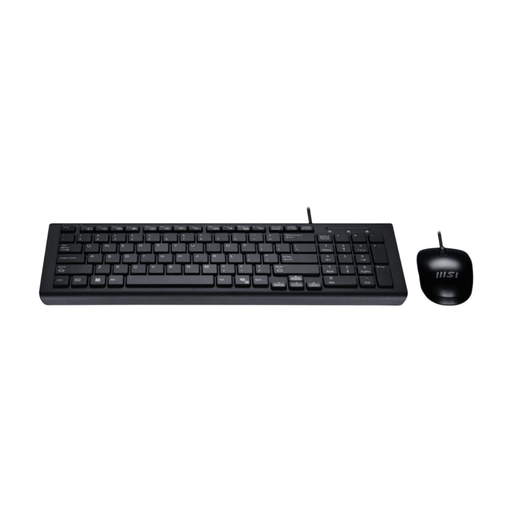
MSI GK-701 Office Keyboard and Mouse Set, UK Layout
A separate-control option for prolonged laptop work when the screen is raised or an external display is used.
The bundle includes a full-size UK-layout keyboard with number pad, low-profile membrane keys, a wired USB-A connection and an optical mouse.
Check that your laptop has sufficient USB-A ports or a compatible hub. This set provides controls but not a screen riser or external display.
Joybuy
Frequently asked questions
Do hybrid workers in the UK need a separate monitor, keyboard and mouse?
Not automatically. The Health and Safety Executive says suitability should be considered for the individual home setup, but for prolonged laptop use it recommends a separate keyboard and mouse so the screen can be elevated on a riser or similar support; a separate display is another option.
Can any USB-C dock run an external monitor and charge a laptop?
No. The laptop’s USB-C port must support video output for a dock or adapter to provide display video, and the laptop must accept the dock’s delivered charging wattage. Microsoft also notes that not all USB-C cables support all features, so check the laptop, dock, monitor and cable together.
Will a dock guarantee that two external monitors work?
No. The number of simultaneous displays and their available resolution or refresh rate depend on the specific laptop model and display configuration. Apple states that external-display support depends on the Mac model and the resolution and refresh rate of each display; check the equivalent specifications for any laptop before relying on a dual-monitor setup.
What UK display screen equipment rules matter for regular hybrid workers?
The Health and Safety Executive says the Display Screen Equipment Regulations can apply to people who work from home permanently or long term, including people who routinely split time between home and the workplace. Where the regulations apply, the employer should assess the relevant work situations; if an assessment indicates equipment is needed, the worker cannot be charged for that provision.


