Laptop commuters with a regular desk at each location
Keep the items you carry to those needed to connect your laptop, power, display and call equipment. Check which accessories can remain at each desk before choosing a travel hub or a dock.


Start with the laptop approved for work, then carry the connections, display and charging equipment your work actually requires at both locations. A compact hub may suit a few connections on the move, while a dock can make a regularly used desk quicker to reconnect; either choice depends on the laptop’s documented video and charging capabilities. Check what your employer supplies or permits before buying equipment personally.
Keep the items you carry to those needed to connect your laptop, power, display and call equipment. Check which accessories can remain at each desk before choosing a travel hub or a dock.
Check the laptop’s video output, supported number of external displays, charging requirements and cable capabilities before choosing a dock, hub or portable monitor. Apple Support notes that a Mac’s simultaneous display support depends on its model and the displays’ resolution and refresh rate.
Ask what equipment your workplace supplies and which accessories its IT policy allows. In Great Britain, the Health and Safety Executive says that a display screen equipment assessment should cover both home and office where workers use the equipment in both places.
List the connections needed at each desk, then check the exact laptop and accessory specifications before deciding what to carry.
| Priority | What to check | Your needs |
|---|---|---|
| Desk connections | List the display, USB and network connections used at each desk. Match the hub or dock’s host interface and ports to the exact laptop. | I want to reconnect my everyday peripherals without carrying accessories that could stay at one desk. |
| External displays | Check the laptop port’s documented video-output method and its supported display arrangement. Compare the dock and monitors’ stated resolution and refresh-rate modes; Apple Support says Mac display limits vary by model and display settings. | A second screen matters to me at one or both locations, so I need to know whether my laptop can drive the arrangement I plan to use. |
| Charging and cables | Compare the laptop’s charging requirements with the power delivered through the charger or dock. Check the cable’s documented power and data capabilities; the USB Implementers Forum notes that USB cables do not all have the same capabilities. | I would rather carry fewer charging items, provided the charger, cable and laptop work together as required. |
| Calls and portability | Note which call accessories are needed at each location and whether they can remain there. Consider the number of items and connections the travel setup adds. | If I move frequently, I want call equipment I can use without rebuilding the whole desk arrangement each time. |
| Workplace equipment | Ask what the employer supplies or permits and whether a workstation assessment covers both locations. The Health and Safety Executive says such an assessment should cover home and office where display screen equipment is used in both. | Before I buy a monitor or accessory myself, I want to know whether it fits my workplace’s equipment arrangements. |
A dock or portable display may fit the port without receiving a video signal. Microsoft Learn identifies DisplayPort alternate mode as one method for sending display output through USB-C.
Check the exact laptop port’s documented video-output method and the display arrangement required by the accessory.
Ports on a dock do not establish how many displays a particular computer can use. Apple Support says Mac display support depends on the model and the displays’ resolution and refresh rate.
Compare the laptop’s external-display support with the dock’s documented modes and the monitors you intend to connect.
Cables with the same connector can have different power and data capabilities, according to the USB Implementers Forum.
Match the cable’s documented capabilities to the laptop, charger and dock rather than choosing by connector shape alone.
A personal purchase may duplicate supplied equipment or conflict with the accessories permitted for a managed laptop. It may also overlook a workstation need identified through an assessment.
Ask your employer about supplied equipment, IT restrictions and any applicable home-and-office display screen equipment assessment before purchasing.
These brand examples illustrate different dock requirements; compatibility still depends on the exact model and host laptop.
Targus UK lists the DOCK116GLZ as a USB-C dual-display dock with power-delivery pass-through.
Anker UK lists hubs and docks for adding connections to a computer.
CalDigit’s TS5 is a Thunderbolt 5 dock to consider for a regularly used desk with a compatible host.
Dell UK lists the SD25TB4 Thunderbolt 4 dock with different power-delivery figures for Dell and non-Dell systems.
These options cover USB-C desk connections, a portable display and charging for a laptop-centred setup. Match each item to the equipment you use at home and at work.
 No image available
Consider this dock if you reconnect HDMI displays at a regular desk. Its title specifies dual HDMI 4K and 100W power-delivery pass-through; check the exact laptop’s video, display and charging support, as well as what the package includes.
 No image available
For a travel setup needing display and wired-network connections, this adapter’s title lists 4K HDMI, VGA, Gigabit Ethernet, two USB 3.0 ports and 100W power delivery. Confirm the laptop’s USB-C video support, the intended display arrangement and the charging power it requires.
 No image available
This hub offers several desk connections in one accessory. Its title lists two HDMI outputs with individual 4K 120Hz and 4K 60Hz maximum modes, 10Gbps USB-A and USB-C ports, RJ45, SD/TF readers and a USB-C PD input. Check whether your laptop supports the required video route, whether both HDMI outputs work in your intended arrangement and how much charging power reaches the laptop.
 No image available
A portable monitor is worth considering if you need a second screen at both work locations. Before choosing the MB166CR, confirm the exact laptop’s external-display support and how the monitor receives video and power.
 No image available
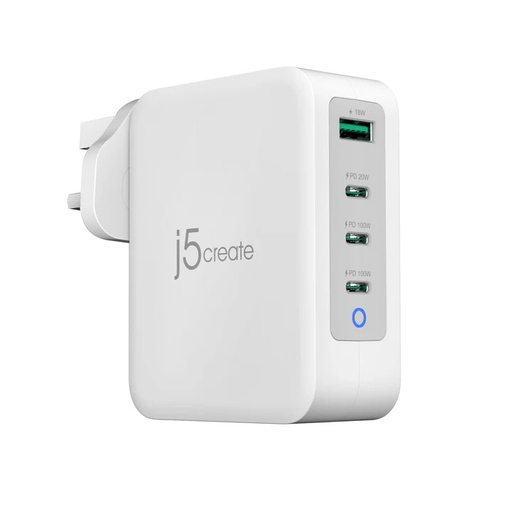
Consider a multi-port charger if several devices travel with your laptop. The JUP43130F title specifies 130W and four ports; check its output profiles and power allocation when multiple ports are used against your laptop’s charging requirements.
No: the connector shape alone does not establish video capability. For a video connection, check the exact laptop port and accessory specifications for a compatible output method, such as the DisplayPort alternate mode described by Microsoft Learn.
Start with the exact laptop’s supported external-display arrangement, then compare the dock’s modes with your monitors’ resolutions and refresh rates. Apple Support says a Mac’s simultaneous display support depends on its model and those display settings; two dock video ports alone do not establish that the intended arrangement will work.
Ask what your employer supplies and permits before buying one. In Great Britain, the Health and Safety Executive says a display screen equipment assessment should cover home and office where workers use the equipment in both; its guidance also specifies assessment duties for workers who use it daily for continuous periods of an hour or more. Northern Ireland’s Health and Safety Executive guidance includes home and mobile workers within its display screen equipment scope.
No: check the cable’s documented power and data capabilities against the connection you need. The USB Implementers Forum notes that cables do not all have the same capabilities, and a cable cannot add a video or charging function that the connected devices lack.
Yes. Check the dock’s software requirements and whether your employer permits installation. DisplayLink says its technology uses a macOS app, and that Apple-silicon MacBooks running macOS Ventura require user approval for USB and Thunderbolt communication with a wired accessory.