What to consider before buying
For regular home or hybrid DSE work, check your workstation assessment and employer’s provision process before choosing accessories; then match any purchase to your desk, laptop and actual working needs.
| Concern |
What to check when buying |
Who this matters to |
| Screen position and workspace |
Check desk space, screen adjustment, resolution and the laptop’s video output. |
If I work at a fixed desk and need a screen I can position separately, I prioritise its fit and connection; around 27% of consumers put screen placement first. |
| Separate screen and inputs |
Check the keyboard layout and connection, and whether a riser fits your laptop’s size and weight. |
If I raise my laptop for regular work, I also need separate keyboard and mouse positions; around 27% of consumers prioritise separating the screen from typing and pointing. |
| Reliable reconnection |
Confirm the laptop’s USB-C or Thunderbolt functions, supported displays, operating system and charging needs. |
If I reconnect my work laptop to several home devices, I need a dock that supports that exact setup; around 20% of consumers prioritise repeat connections. |
| Who provides equipment |
Ask what the assessment identifies, what equipment is already provided and how your employer handles purchases. |
If I am unsure whether a workstation change is an employer-provided measure or an optional upgrade, I check before spending; around 20% of consumers prioritise provision and who pays. |
| Work-call equipment |
Check whether existing camera and audio equipment meet the work requirement and whether new devices are approved. |
If video or audio for work calls is the main gap in my setup, I look at meeting equipment without assuming it will solve screen-position needs; around 6% of consumers prioritise calls. |
Joybuy products for a home laptop setup
These Joybuy options cover external displays, separate inputs and laptop connections for home desk work. Check any assessment and confirm compatibility with your work laptop before choosing.
 No image available
BenQ MA270UP 27-inch 4K UHD USB-C Monitor
For a separately positionable desk display with a compatible laptop, this model lists a 27-inch 4K UHD screen and USB-C with up to 90 W Power Delivery.
The listing describes height, pivot, swivel and tilt adjustment. Its Mac integration features are presented for Mac users; USB-C video, data and power support depend on the connected device.
View on Joybuy
 No image available
MSI MD272UPSW 27-inch 4K Smart Monitor with Google TV
If you want a separate adjustable display, this 27-inch model lists a 3840 × 2160 IPS screen and USB-C with 65 W Power Delivery.
The stand is listed with height, tilt, swivel and pivot adjustment. Whether 65 W meets a particular laptop’s charging needs depends on that laptop.
View on Joybuy
 No image available
Targus USB-C Universal Dual HDMI 4K Docking Station
For reconnecting a compatible laptop to desk devices, the listing specifies two HDMI 2.0 ports, USB connections and Gigabit Ethernet.
It lists up to 100 W Power Delivery pass-through, USB-C Alt. Mode and a requirement for an external 100 W or higher adapter. Host capability and a suitable power adapter are necessary for the intended setup.
View on Joybuy
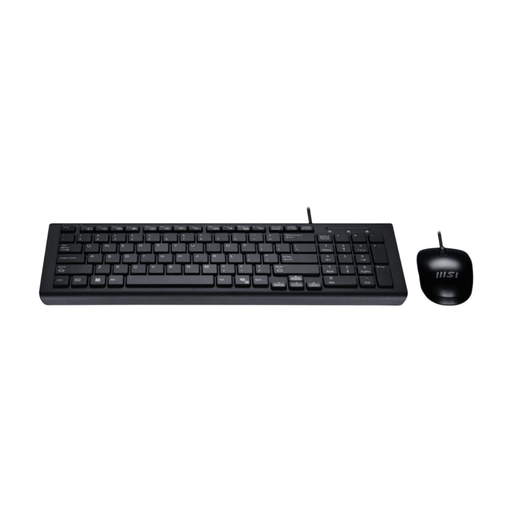 No image available
MSI GK-701 UK-Layout Keyboard and Mouse Set
If you need separate typing and pointing devices alongside a laptop screen or riser, this set includes a full-size UK-layout keyboard and wired optical mouse.
Both devices use USB-A and are listed as plug-and-play; check that your laptop or hub has suitable USB-A connections.
View on Joybuy
 No image available
Dell P2425 24-inch WUXGA Monitor
For a separate desk display, this 24-inch monitor is listed with a WUXGA 16:10 screen and an adjustable stand.
The listing describes USB-C, DisplayPort, HDMI and VGA inputs, plus a USB hub. Check the laptop’s supported video output and the monitor’s connections against your setup.
View on Joybuy
Frequently asked questions
Does regular home or hybrid laptop work require a DSE assessment in Great Britain and Northern Ireland?
For workers using DSE daily for continuous periods of an hour or more, guidance from the Health and Safety Executive and the Health and Safety Executive for Northern Ireland describes employer workstation-assessment duties, including for home working. Great Britain and Northern Ireland have separate applicable rules, so check the guidance that applies to your workplace and work pattern.
If my assessment identifies equipment I need at home, should I buy it myself?
Do not assume you should pay personally. The Health and Safety Executive says a worker cannot be charged for action identified by a DSE assessment, such as providing equipment; the Health and Safety Executive for Northern Ireland also describes employer responsibilities for assessing home equipment needs and implementing suitable controls. Confirm the assessment finding and your employer’s provision process before making a personal purchase.
Can I raise my laptop and keep using its built-in keyboard?
For prolonged laptop use, Health and Safety Executive guidance describes using a separate keyboard and mouse so the laptop screen can be elevated, or using a separate display. Consider your complete workstation arrangement rather than treating a riser as a complete setup.
Will any USB-C dock charge my laptop and extend two monitors?
No; a USB-C connector alone does not establish that a dock supports your laptop’s video and charging requirements. Check the exact laptop’s capabilities, the dock’s supported host modes, operating system and power supply. For example, Anker states conditions for dual extended displays on Windows for its A210B and says its external monitors mirror on macOS.
When should a workstation setup be reassessed?
A new or changed workstation, a change in how it is used, a new user or reported discomfort can be a reason to revisit an assessment. The Health and Safety Executive and the Health and Safety Executive for Northern Ireland describe assessment or review in connection with changes to DSE workstations or users and reported discomfort; tell your employer about a material change rather than relying indefinitely on an older assessment.


