What should you check before buying?
Start with the task and where you do it, then check that the accessory’s connections work with your laptop and any employer-managed settings.
| Priority | What to check | Your needs |
|---|
| Desk connections |
Check the laptop’s documented USB-C video and charging capabilities, the host cable and the dock’s required ports. Kensington notes that USB-C video through its docks requires DisplayPort Alt Mode; host charging requires Power Delivery support. |
I reconnect a display, network cable and USB devices regularly. Would a hub I carry or a dock left at one desk better match where I use them? |
| Screen space |
Check the laptop-to-display connection, the monitor’s input and the intended cable or dock path. For a multi-monitor dock, check the conditions attached to its stated display count and resolution. |
Documents and reference material need to stay visible alongside my laptop screen. If that happens at both locations, a portable display may make more sense than one left on a desk. |
| Calls |
Check camera placement and connection, headset connection method, meeting-platform requirements and permission to use external devices on a managed laptop. |
For calls in different places, I want a camera and microphone arrangement I can set up where I work, without relying on a connection my work laptop does not allow. |
| Input devices |
Check keyboard layout, carrying size, Bluetooth or receiver connection, and available laptop ports. If UK key legends matter, confirm the listed English UK variant. |
A separate keyboard and mouse would help with my document work. I need to decide whether to carry them or keep a larger set at one desk. |
Which brands are relevant?
These brand references help identify specifications and compatibility questions; they do not establish that every product from a brand suits your laptop.
Kensington
Kensington’s dock guidance is useful when checking a USB-C desk connection for displays and peripherals.
- Kensington specifies up to three external Full HD displays for its SD4842P dock under stated conditions.
- Kensington warns that USB-C host capabilities vary; check video, charging and cable requirements for the exact laptop and dock.
Logitech
Logitech has documented webcam, headset and input-device options relevant to a portable call or typing setup.
- Logitech lists a privacy shutter and USB connection options for Brio 4K, and an English UK QWERTY variant of MX Keys for Business.
- Connection types and meeting features vary by model. Confirm the chosen variant and its use on your work laptop.
Microsoft Surface
Surface Dock information is particularly relevant to a workplace using compatible Surface devices and managed dock settings.
- Microsoft says Surface Dock 2 connects external monitors and peripherals and supports central firmware management.
- Those are Surface Dock capabilities, not a promise of compatibility with every laptop. Microsoft also documents port settings that IT administrators can configure.
Joybuy accessories for home and office
These options cover a travelling second screen, a USB-C adapter, call devices and a keyboard-and-mouse set. Which item belongs in your bag depends on the work you do at both locations and what your laptop permits.
 No image available
ASUS ZenScreen MB166C 15.6-inch Full HD USB-C monitor
Consider this portable second screen if you need document space at both work locations. The listing specifies a 15.6-inch IPS display, 1920 × 1080 resolution and a weight of 780 g. Check that your laptop’s USB-C port can provide the video and power required for the intended one-cable setup.
View on Joybuy
 No image available
V7 V7UC-U3CRJ45HDVG-BLK USB-C adapter
This adapter is relevant if you need display, wired-network and USB connections from one device. Its listing specifies HDMI up to 4K at 30 Hz, VGA up to 1920 × 1200 at 60 Hz, Gigabit Ethernet, two USB 3.0 ports and a 100W Power Delivery port. Its technical details specify single-display use, so do not assume HDMI and VGA can drive separate screens simultaneously; check laptop video and charging compatibility too.
View on Joybuy
 No image available
Targus 2K Webcam with Auto Focus
A separate webcam lets you choose a camera position independently of the laptop lid. The listing describes an adjustable clip, tripod thread, autofocus and privacy slider. Its 2K name conflicts with a detailed specification of 1080p at 30 fps; confirm the maximum video resolution, connection and permission to use an external camera before buying.
View on Joybuy
 No image available
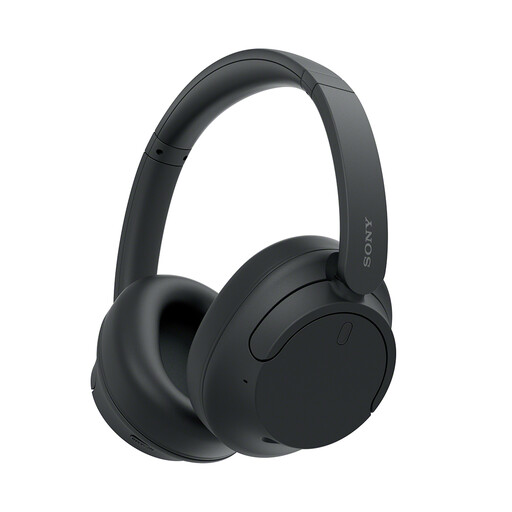
Sony WH-CH720N over-ear headphones, black
These headphones offer a microphone for calls and a choice of Bluetooth or a wired 3.5 mm connection, according to the listing. It also specifies a 192 g weight and fold-flat earcups for carrying. Check whether your work laptop and meeting setup permit the connection method you intend to use.
View on Joybuy
 No image available
Philips 3000 Series SPT6318B/05 UK English keyboard and mouse, black
This set offers a separate keyboard and mouse for document work and is identified as the UK English version. The listing describes a full-size keyboard and a 2.4 GHz connection using a USB-A nano receiver. Check whether the keyboard is convenient to carry and whether your work laptop has a suitable, permitted USB-A connection.
View on Joybuy
Questions about hybrid-work accessories
Will any USB-C dock work with my work laptop?
No. The USB-C connector alone does not establish video output or laptop charging. Kensington says USB-C video through its docks requires host DisplayPort Alt Mode, while charging requires Power Delivery support. Check the exact laptop, dock and cable requirements, plus employer approval for a managed device.
Should I carry a hub or leave a dock at a desk?
Carry a hub if you need a small set of connections wherever you work; consider a desk dock if you repeatedly connect displays, wired networking, USB devices and charging at one location. Check the laptop and monitor against the dock’s stated display conditions before relying on a multi-monitor claim.
Do I need a separate webcam for hybrid calls?
Consider one if you need camera placement independent of the laptop lid or a particular camera feature. Logitech, for example, lists a privacy shutter and mounting options for Brio 4K. Check the chosen webcam’s connection, meeting requirements and permission to use an external camera on your work laptop.
Is Bluetooth the right headset connection for switching workplaces?
Bluetooth is an option if your work laptop permits pairing, but a wired connection may suit a device where wireless use is restricted. Some models, such as Logitech’s Zone Vibe Wireless, offer Bluetooth and a USB receiver; check permission for the receiver and any required software as well as the exact model’s compatibility.


