What to consider before buying
For workers covered by UK DSE regulations who use display screen equipment at home and in the office, the HSE says the employer’s assessment should cover both settings. Use the assessment outcome to guide any personal purchase.
| Concern |
What to check when buying |
Who this matters to |
| Screen and input position |
Check the assessment outcome and whether the laptop can be positioned separately from a keyboard and mouse. Confirm that any stand fits the laptop. |
If I work on a laptop for long sessions, I want to raise the screen without raising its built-in keyboard with it. Around 33% of consumers put independent screen-and-input positioning first. |
| Display area and location |
Decide whether the screen will stay at a desk or travel between locations, then check desk space and the laptop’s supported video output. |
If I need more working area, I want a screen that suits where I work and how often I move between locations. Around 27% of consumers prioritise display space and its location. |
| Connections and charging |
Check the exact laptop, display, hub, cable and charging requirements; a USB-C socket alone does not confirm video or charging compatibility. |
If I reconnect displays and peripherals often, I want the connection setup to work with my laptop and power needs. Around 20% of consumers put straightforward reconnection and charging first. |
| Assessment and provision |
If DSE regulations cover your role, check what the employer’s assessment says about both work locations and any equipment it identifies as necessary. |
If I am unsure whether to buy equipment myself, I want to know what the assessment requires and who should provide it. Around 20% of consumers prioritise assessment and provision. |
Relevant brands to consider
These examples relate to specific product lines and illustrate different workstation needs; inclusion is not an endorsement of every product in a brand’s range.
Dell
The P2425HE illustrates a fixed USB-C hub monitor for a regular desk.
- Dell specifies a 23.8-inch FHD panel, adjustable stand and up to 90 W power delivery for this model.
- Check video and charging compatibility with your laptop, and confirm the stand configuration for the variant you are considering.
Lenovo
The ThinkVision M14 illustrates a portable second-screen option.
- Lenovo specifies a 14-inch FHD screen, a sleeve and a display weight of 598 g.
- Its stated one-plug arrangement requires a notebook USB-C port supporting DP 1.2 Alt Mode and PD 2.0; the screen is smaller than a fixed desk display.
Anker
The 553 USB-C Hub illustrates a portable multiport connection route.
- Anker lists dual HDMI, USB-A, Ethernet and card-reader connections for model A8380.
- The stated 85 W pass-through requires a separate 100 W PD charger and USB-C cable. Check laptop display support and the intended output mode.
Logitech
The MX Keys Mini illustrates a compact separate-keyboard option.
- Logitech describes the MX Keys Mini as a space-saving keyboard and also offers a separate full-size version with a number pad.
- A compact layout may not suit someone who needs a full-size number pad. Manufacturer statements about comfort are not a substitute for a workstation assessment.
Kensington
The Easy Riser Aluminium illustrates a folding laptop-stand option.
- Kensington specifies six height and angle settings, a stand weight of 0.4 kg, and support for laptops up to 16 inches and 5 kg.
- A stand does not add display area or separate inputs; check the laptop’s dimensions and weight against the model’s stated limits.
Joybuy product options
These options cover laptop screen positioning, external displays, multiport connections and separate keyboard-and-mouse input. Check your laptop’s compatibility and any applicable DSE assessment before choosing.
 No image available
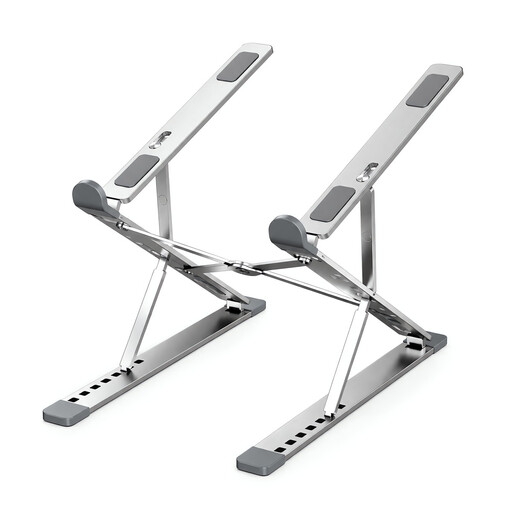
Foldable Aluminium Laptop Stand
For raising a laptop screen at a home desk or between work locations, this listing describes a foldable stand with a carry bag.
Seven height positions and nine width settings; listed for 10–17.3-inch devices and up to 15 kg.
For prolonged laptop work, plan for separate keyboard and mouse positioning as described in HSE guidance.
View on Joybuy
 No image available
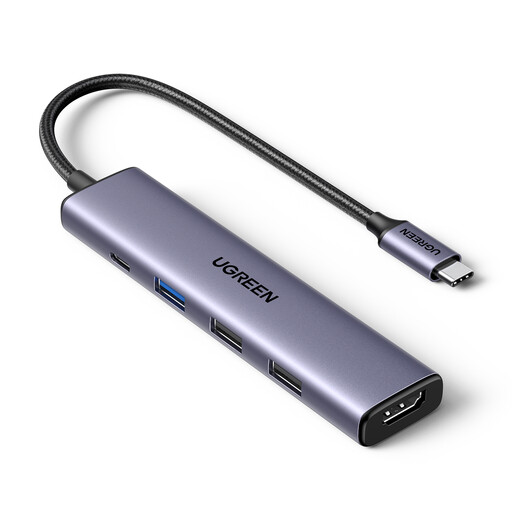
UGREEN Revodok USB-C Hub 5-in-1
For a compatible laptop that needs an external display and additional peripheral connections, this hub lists HDMI and USB-A ports.
Listed features include 4K at 30 Hz HDMI output, three USB-A data ports and 100 W PD pass-through.
Check the laptop, display, cable and charging requirements before relying on a particular output or power arrangement.
View on Joybuy
 No image available
MSI MD272UPSW 27-inch 4K UHD Smart Monitor
For a regular home desk that needs an external display, this listing specifies a 27-inch 4K UHD screen.
Listed features include an IPS panel, USB-C 65 W power delivery and a four-way adjustable stand.
Confirm that the laptop supports the intended video connection and that the stated power delivery suits its requirements.
View on Joybuy
 No image available
HP 680 CFT Dual-Mode Keyboard/Mouse Combo
For a laptop setup where keyboard and mouse need to be separate from the raised screen, this listing includes both input devices.
The listing specifies Bluetooth and a wireless USB receiver, a keyboard wrist rest and a mouse with up to 4000 DPI. It describes connections to up to three devices.
Check the connection method and keyboard layout against the devices and workspace you use.
View on Joybuy
 No image available
ASUS ZenScreen MB166CR FHD
For an extra screen that needs to move between work locations, this listing describes a portable 15.6-inch Full HD monitor.
Listed at 780 g and 11.8 mm thick, with a 60 Hz refresh rate and USB-C DisplayPort Alternate Mode.
The single-cable video connection requires a host with USB-C DisplayPort Alternate Mode support.
View on Joybuy
Frequently asked questions
Does every hybrid worker need to buy a monitor?
No. For workers covered by the DSE regulations, the HSE says an assessment should determine whether additional home equipment is needed. If the existing setup is suitable, an extra monitor may not be necessary.
Can I use a laptop stand on its own for prolonged laptop work?
A stand alone does not separate the screen from the laptop’s built-in keyboard. The HSE’s guidance describes using a separate keyboard and mouse so the screen can be raised independently; check the assessment outcome and whether the stand fits your laptop.
Will any USB-C hub run my monitor and charge my laptop?
No. A USB-C socket alone does not establish video or charging compatibility. Check the laptop, hub, monitor and cable specifications against the intended display mode and charging needs.
Who pays if my DSE assessment says equipment must be provided?
The HSE says that where an assessment indicates the employer needs to take action, such as providing DSE equipment, the worker cannot be charged for that action. A personally preferred upgrade is not automatically an assessed requirement.
Does a DSE assessment cover my home setup as well as my office desk?
Where the regulations apply and you use display screen equipment in both places, the HSE says the assessment should cover both situations. Review the arrangements if your workstation or its use changes.


