For routine laptop work, sort out screen position and separate input devices before adding connection or call accessories. A raised laptop needs a separate keyboard and mouse for prolonged desk use; an external display offers another screen arrangement. Choose a dock only after checking the laptop’s video, data and charging capabilities, and use any employer display screen equipment assessment to guide changes to a covered workstation.
Who this setup is for
Laptop-only desk workers
If a laptop is your regular screen and keyboard, raising its display also moves its built-in controls. The Health and Safety Executive describes using a separate keyboard and mouse with an elevated laptop screen for prolonged use.
Home-office switchers
Moving the same laptop between desks makes repeatable connections useful. Check the laptop’s display and charging capabilities against the equipment at each location before choosing a dock.
Call-heavy hybrid workers
Frequent voice or video calls may make a headset or webcam worth considering once the screen and input arrangement works for routine desk tasks. Call accessories do not replace workstation changes identified through an assessment.
What to check before buying
For prolonged laptop use, settle how the screen, keyboard and mouse will be positioned before deciding whether extra ports or call equipment are needed.
| Concern |
Buying checks |
Who this matters to |
| Screen and input position |
Check that a stand supports the laptop securely and that a separate keyboard and mouse can sit at a workable height. With a monitor, check its position on the desk. |
If I work at one desk for long stretches, I need to move the screen without lifting my hands to the laptop keyboard. About 38% of consumers would put this screen-and-input need first. |
| Moving between desks |
Identify which stand, input devices and connections you would use at home and at work; check what you would need to carry or reconnect. |
When I change desks regularly, I want a setup I can put back together without overlooking the equipment I use each day. Portability would be the primary need for about 31% of consumers. |
| Display and port compatibility |
Match the laptop’s video output, charging input and operating system to the exact dock and monitor requirements. Kensington notes that USB-C connector shape alone does not establish video, data or power capability. |
If my desk uses an external display and several peripherals, I need connections that work with my particular laptop. About 23% of consumers would make connection expansion their first concern. |
| Call equipment |
Check headset or webcam connections and support for the computer and meeting platform; consider the controls needed in a shared space. |
Where calls are a regular part of my work, I may need a separate microphone or camera arrangement. Call workflow would come first for about 8% of consumers. |
Common buying mistakes
-
Buying a riser without planning for separate input devices
A stand raises the laptop’s built-in keyboard and trackpad along with its screen. For prolonged laptop use, the Health and Safety Executive describes pairing an elevated screen with a separate keyboard and mouse.
Decide where the keyboard and mouse will sit before choosing the stand, rather than treating the riser as the whole desk arrangement.
-
Assuming a USB-C port can run a display and charge the laptop
Kensington explains that USB-C describes the connector; supported video, data and power functions depend on the laptop’s implementation. A dock may also have operating-system or display requirements.
Compare the exact laptop specification with the dock’s host, display and charging requirements before buying.
-
Treating accessories as a substitute for an assessment
A monitor or mouse cannot establish what changes a particular covered worker’s workstation needs. The Health and Safety Executive says employers must assess workstations for workers who use display screen equipment daily as part of normal work, continuously for an hour or more.
Use the employer’s assessment process to identify relevant changes at home or at work before buying equipment to address an assumed problem.
-
Applying Great Britain guidance to Northern Ireland unchanged
The Health and Safety Executive’s guidance addresses Great Britain. The Health and Safety Executive for Northern Ireland publishes separate display screen equipment guidance, including for permanent, long-term and routine hybrid home working.
Use the guidance for the location where the employment-safety question arises rather than treating one regulator’s pages as the rules for both places.
Brands to consider
Dell
Dell is relevant when comparing external monitors that also provide a USB-C connection point at a regular desk.
- Dell Technologies lists its Pro P2726HE as a 27-inch FHD USB-C hub monitor with up to 100W power delivery.
- That model specification does not establish what another Dell monitor provides or whether your laptop supports video and charging through the required connection.
Logitech
Logitech is relevant when selecting a separate keyboard, mouse, webcam or headset for a laptop desk.
- Logitech describes its Lift vertical mouse as intended for small-to-medium hands and offers a left-handed option.
- A manufacturer’s fit description cannot establish individual comfort; check hand size, handedness and how the device fits your desk arrangement.
Kensington
Kensington offers laptop risers and docks relevant to screen placement and peripheral connections.
- Its compatibility guidance distinguishes the USB-C connector from the video, data and power functions a particular laptop supports.
- Check the exact dock’s laptop, operating-system and display requirements; a connector match alone is not enough.
Joybuy products for input and connections
These options cover separate keyboard and mouse input, a standalone mouse, and adapters or docks for compatible laptop connections. Choose the screen arrangement and check the laptop’s capabilities before deciding which connection accessory fits your desk.
 No image available
Targus USB-C Universal Dual HDMI 4K Docking Station, 100W Power Delivery Pass-Thru
Consider this dock for a regular desk where you need to connect two HDMI displays and other compatible peripherals. Its title specifies 100W power delivery pass-through; check the laptop’s USB-C video and dual-display support, and confirm what power adapter the package contains.
View on Joybuy
 No image available
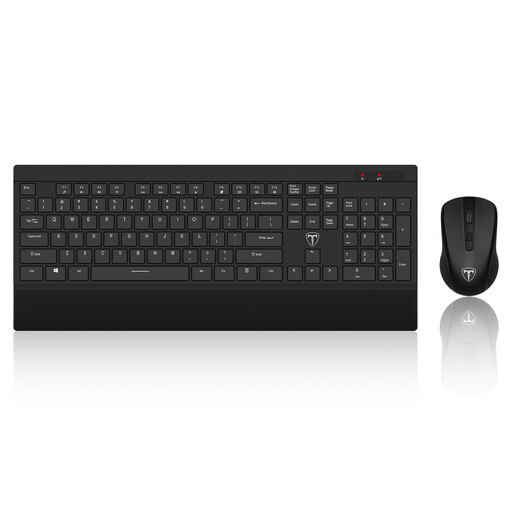
ET 2.4GHz Wireless Keyboard and Mouse Set, US Layout
This set supplies separate typing and pointing devices to consider alongside a raised laptop screen or external monitor. It uses a US keyboard layout; check that the layout and wireless connection suit your computer and typing preferences.
View on Joybuy
 No image available
MOVESPEED DK5A1 USB-C 10-in-1 Docking Station
Consider this hub if your desk needs HDMI output alongside USB connections, card readers and audio. Its title lists 4K 60Hz HDMI, USB-C 10Gbps, USB-A 10Gbps/5Gbps, SD/TF 160MB/s and a 3.5mm audio connection. Check laptop video compatibility, and do not assume the listed USB-C connection charges the laptop.
View on Joybuy
 No image available
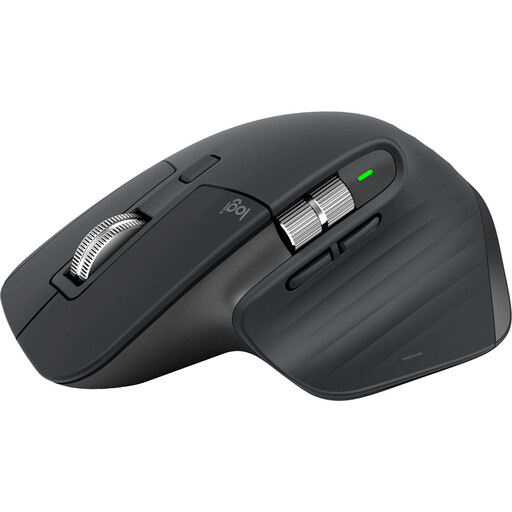
Logitech MX Master 3S Mouse, Black
This is a separate pointing device for a laptop desk, not a replacement for a keyboard or screen arrangement. Check whether its shape suits your hand and whether the package includes the Logi Bolt receiver if you plan to use one.
View on Joybuy
 No image available
V7 V7UC-U3CRJ45HDVG-BLK USB-C Adapter
Consider this adapter for a compatible laptop desk needing a display connection, wired network and USB peripherals. Its title specifies 4K HDMI, VGA, Gigabit Ethernet, 100W power delivery and two USB 3.0 ports. Check USB-C video support, the display input and whether a suitable charger is included if you need pass-through power.
View on Joybuy
Questions about laptop workstations
Is a laptop riser enough for prolonged desk work?
A riser alone leaves the laptop’s keyboard and trackpad raised with the screen. The Health and Safety Executive describes using a separate keyboard and mouse with an elevated laptop screen for prolonged use, or using a separate display as another screen arrangement.
What should I check before choosing a USB-C dock?
Check the laptop’s supported video output, charging input and operating system against the exact dock’s requirements, then match its display connections to your monitor. Kensington notes that a USB-C connector alone does not guarantee video, data speed or power delivery.
Does Great Britain’s HSE guidance cover Northern Ireland?
Do not use Great Britain’s Health and Safety Executive pages as the sole source for Northern Ireland requirements. The Health and Safety Executive for Northern Ireland publishes separate display screen equipment guidance that also addresses permanent, long-term and routine hybrid home working.
Can Access to Work replace an employer’s workstation duties?
No. The Department for Work and Pensions says Access to Work support complements rather than replaces an employer’s reasonable-adjustment duty. Eligibility for individual disability-related support should not be treated as a substitute for the applicable employer display screen equipment assessment.


