Buying priorities
Start with employer approval and the exact laptop, then match desk equipment and travel accessories to the way you move between locations.
| Priority |
What to check |
Your needs |
| Desk reconnection |
Confirm the laptop host port supports the required video and charging functions. Check independent-display support at the intended resolution and refresh rate. Match HDMI, DisplayPort, USB and Ethernet ports to your actual equipment. |
I want the same laptop to reconnect predictably to my monitor, keyboard, mouse, network and charging setup at each regular desk. |
| Portable work capability |
Assess weight and ports together. Confirm required applications, manufacturer support and employer security management. Check a spare charger only against the laptop’s charging requirements. |
I want to carry only what is necessary while keeping approved applications, security and enough connectivity for the working day. |
| Workstation comfort |
Consider monitors and input devices alongside screen placement, lighting, posture and work routine. Assess both home and office arrangements when both are used regularly. |
I need a workstation arrangement that addresses screen position, glare and comfort at home and in the workplace. |
| Employer approval |
Confirm whether BYOD is permitted, which operating systems and applications are approved, and whether device management, encryption or remote-lock controls are required. |
I need to know whether a personal device or accessory can be used with my employer’s software, management and security rules. |
Joybuy product options
These Joybuy options cover portable laptops, desk docking, a portable monitor, input devices and a spare charger for hybrid-work setups. Check employer policies and exact device compatibility before choosing.
 No image available
Targus USB-C Universal Dual HDMI 4K Docking Station
For reconnecting displays, networking and peripherals at a regular desk.
Two HDMI 2.0 ports, Gigabit Ethernet, USB ports, card readers and 100W power-delivery pass-through are listed. Confirm the laptop’s video, charging and independent dual-display support; an external 100W or higher power adapter is required for pass-through charging.
Joybuy
 No image available
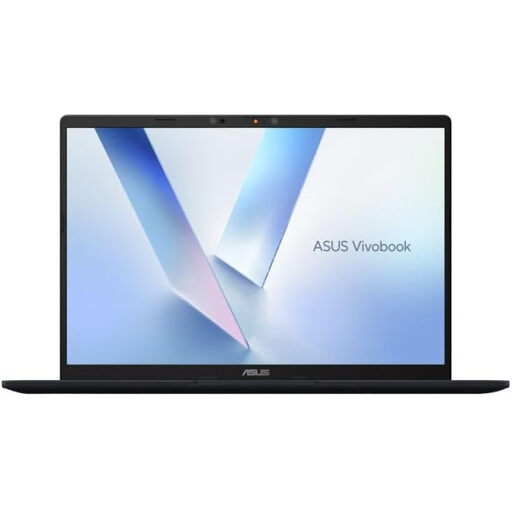
ASUS Vivobook 14 X1407QA-LY003W Copilot+ PC
A portable-laptop option for carrying between home and an employer workplace.
The listing states a 14-inch 1920 × 1200 anti-glare display, Snapdragon X, 16GB RAM, 512GB SSD, two USB4 Type-C ports with DisplayPort and Power Delivery, HDMI 2.1, 1.49 kg weight and a 65W USB-C adapter. Confirm required work applications and employer management controls for Windows 11 Home on Snapdragon.
Joybuy
 No image available
ASUS ZenScreen MB166C Portable USB Monitor
A second-screen option for workers moving between regular desks.
The listing specifies a 15.6-inch Full HD IPS panel, USB-C connection, anti-glare surface, flicker-free backlight, blue-light filter and 780 g weight. Check that the laptop’s USB-C port can provide the required video signal and power; it has no HDMI input or built-in speakers.
Joybuy
 No image available
HP 680 CFT Dual-Mode Keyboard and Mouse Combo
For a repeatable keyboard-and-mouse setup across regular desks and devices.
The set supports Bluetooth or an HP Unifying Dongle connection to up to three devices and lists compatibility with Windows, macOS and ChromeOS. It is a full-size set: the keyboard is listed at 845 g, so it is less suited to minimal daily carrying than a compact option.
Joybuy
 No image available
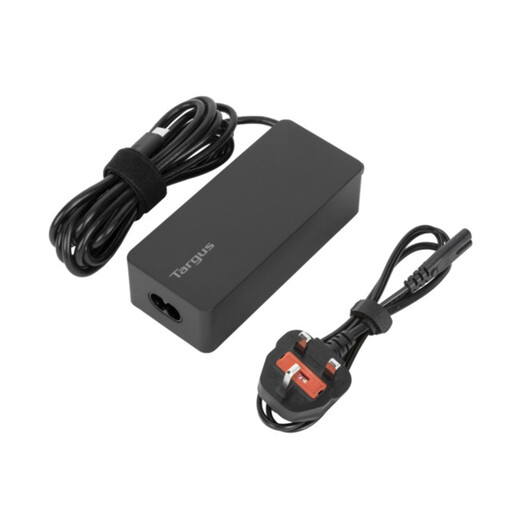
Targus 65W USB Type-C Charger
A spare-charger option for leaving power equipment at one regular desk.
The listing states up to 65W USB-C Power Delivery, a 1.8 m cable, cable tie and EU and UK power cords. Confirm that the laptop accepts USB-C charging and that 65W is sufficient for the intended workload; larger or higher-power laptops may need a different solution.
Joybuy
Frequently asked questions
Do UK DSE duties apply when I work partly at home and partly in the office?
They can. The Health and Safety Executive says the Display Screen Equipment Regulations can apply to workers who routinely split time between workplace and home. Where the regulations apply, the employer should assess the individual workstation, covering both locations when both are regularly used.
Must my employer buy a monitor, dock or ergonomic accessory for home working?
Not automatically. The Health and Safety Executive says an assessment should determine what is needed for the worker’s circumstances. If the assessment indicates that DSE equipment should be provided, the worker cannot be charged for it.
Will any USB-C dock run two external monitors?
No. USB-C does not always carry video or power, and two physical video ports do not automatically mean a laptop can run two independent displays. Check the laptop’s external-display limit, the dock configuration at your intended resolution and refresh rate, and operating-system limitations.
Can I buy my own laptop and use it for employer work?
Only if your employer permits that route and the device meets its application, management and security requirements. National Cyber Security Centre guidance identifies device management as a central consideration for personally owned devices accessing work information.
What should I confirm before buying a spare charger for my work laptop?
Confirm that the exact laptop supports charging through the intended port and that the charger supplies the required power. A USB-C socket alone does not establish charging support, and your employer may also restrict third-party power equipment.


