Start with what your current laptop arrangement makes difficult: a monitor and separate keyboard and mouse suit a fixed desk that needs more screen space, while a stand with separate input devices keeps a one-screen setup more compact. Add a hub or dock only after checking the laptop’s display and charging capabilities, and check your employer’s equipment process before paying for an item that a display screen equipment assessment may identify as necessary.
Who is this setup for?
Fixed-desk hybrid workers
If you regularly work at one home desk, consider how the laptop, screen, keyboard and mouse will fit together each time you sit down. A dock may simplify repeated connections if your laptop supports the devices you intend to attach.
Space-limited laptop workers
If the desk must be cleared or the equipment travels between home and office, a stand and compact input devices may be easier to accommodate than a permanent monitor arrangement. Check the space they still need when set up.
Port-dependent multi-device users
If you connect displays, charging and several peripherals, establish what your exact laptop port and operating system support before choosing a hub or dock. The number of sockets on an accessory does not establish what the laptop can drive.
What should you choose first?
Decide whether screen space, connections, input placement or calls are the main obstacle, then check the laptop and desk against the equipment that would address it. Before a work-related purchase, also ask what your employer already supplies or plans to provide through its assessment process.
| Concern |
What to check |
Who this matters to |
| Screen space and position |
Decide whether you need one additional display or several; check desk space and the laptop’s video output. |
If I spend long sessions at one desk, I need enough screen space without relying on an awkwardly placed laptop display. Around 29% of consumers put screen space and position first. |
| Ports, displays and charging |
Check the exact laptop model’s display-capable ports, supported monitor configuration and charging requirements against the chosen hub or dock. |
When several devices need connecting, I want to know they will work with my laptop before adding a central connector. Compatibility is the primary concern for around 36% of consumers. |
| Input placement and desk fit |
Allow room for a separate keyboard and mouse if the laptop will be raised; check their connection and layout. |
At a small or changeable desk, I need to position the screen without making typing and pointing inconvenient. Around 21% of consumers prioritise that compact input arrangement. |
| Remote-call audio and video |
Check work-laptop and meeting-software compatibility, plus whether suitable equipment is already supplied. |
If calls take up a substantial part of my work, I need equipment that fits how and where I join them. Call equipment comes first for around 14% of consumers. |
Purchases to think through
-
Choosing a hub just because the laptop has USB-C
A USB-C connector does not by itself establish that the laptop can send video through a hub. Anker’s hub guidance identifies DisplayPort Alt Mode support on the connected port as a condition for external-display output.
Check the exact laptop port and the hub’s required display mode before choosing one for a monitor.
-
Assuming a dock’s maximum display output is guaranteed
The connected laptop affects the display result. Lenovo states that actual video output from its ThinkPad USB-C Dock Gen 2 depends on the system.
Compare your intended monitor count and resolution with configurations supported by both the laptop and dock.
-
Raising a laptop without planning where to type
A stand moves the screen, but its built-in keyboard and trackpad move with it. That matters when the laptop is your regular workstation rather than an occasional extra screen.
Assess the stand alongside a separate keyboard and mouse, including the desk area all three will occupy.
-
Paying personally before checking work equipment arrangements
In Great Britain, the Health and Safety Executive says workers cannot be charged where a display screen equipment assessment identifies action such as providing equipment. That does not make every optional desk upgrade employer-funded.
Ask about your employer’s assessment, existing equipment and approval process before buying an item for routine work.
Relevant brands for reference
Lenovo
Lenovo’s ThinkPad dock range is relevant when a work laptop needs repeatable desk connections.
- Lenovo describes its ThinkPad Universal USB-C Dock as compatible with most USB-C laptops running Windows 10 and above.
- Check the exact laptop and dock combination: Lenovo says the video output of its ThinkPad USB-C Dock Gen 2 depends on the connected system.
Dell
Dell docks are relevant to desks that use multiple connections, particularly where charging is part of the plan.
- Dell’s UK dock specifications illustrate that some models distinguish power delivery for Dell and non-Dell systems.
- Check the specification for the particular dock and laptop rather than treating a dock’s stated output as universal.
Anker
Anker offers compact USB-C hubs for adding connections to a laptop.
- Its hub information covers display connections and pass-through charging arrangements.
- Anker says the connected USB-C port needs the required display capability for external video; its pass-through charging figures can also account separately for power used by the hub.
Logitech
Logitech’s external keyboards and mice are relevant when a raised laptop needs separate input devices.
- Logitech offers the Wave Keys and Lift as a wireless keyboard-and-mouse combination.
- Logitech identifies a small-to-medium-hand fit for the Lift mouse; check personal fit, layout and connection needs rather than assuming one combination suits everyone.
Joybuy products for these setups
These choices cover external displays, a dock or hub for laptop connections, and a wired headset for calls. Choose the type of equipment around your principal need, then confirm the connections required by your work laptop.
 No image available
Targus USB-C Universal Dual HDMI 4K Docking Station, 100W Power Delivery Pass-Thru, Retail Packaging
Consider this dock for a desk where you intend to connect two external displays. Confirm that the laptop supports the required display configuration and that you have a suitable power adapter for the intended charging arrangement.
Joybuy
 No image available
ASUS ProArt PA278CV IPS WQHD Monitor
Consider an external WQHD display if screen space is the main limitation at a fixed desk. Check your laptop’s display connection, the available desk space and whether you also need a separate keyboard and mouse.
Joybuy
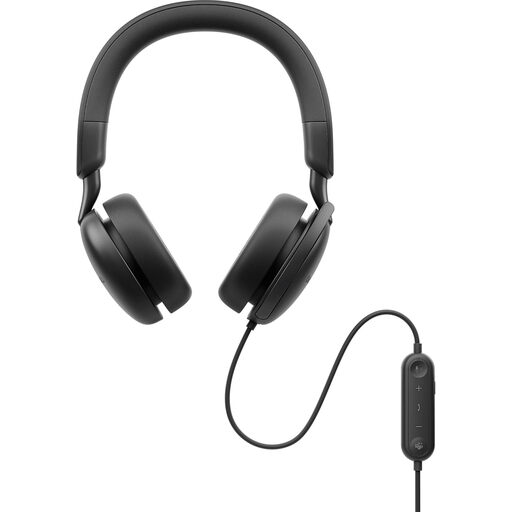 No image available
Dell Pro Plus WH5024 Wired ANC Headset
A wired headset is an option when calls, rather than screen space, are the immediate concern. Confirm its connection and any required work software against your laptop, and check whether your employer supplies approved meeting equipment.
Joybuy
 No image available
Baseus Metal Gleam Series II 10-in-1 USB-C Hub, Cosmic Black
Consider this hub when several desk connections need consolidating. Its stated connections include two HDMI outputs, USB data ports, RJ45, SD/TF readers and a USB-C power-delivery input; check the laptop’s DisplayPort Alt Mode support, achievable display configuration and charging arrangement before choosing it.
Joybuy
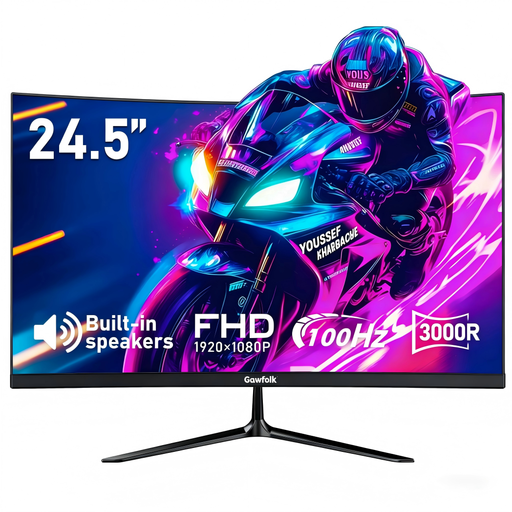 No image available
Gawfolk 24.5-inch 1K FHD Curved Monitor, 100Hz, 3000R
This curved monitor is another external-screen option for a laptop desk. Its title specifies HDMI and a 75 × 75 mm VESA mount; check that its display connection and physical placement suit your laptop and available space.
Joybuy
Frequently asked questions
Should I speak to my employer before buying a monitor, stand or dock?
Yes, if the purchase is for routine employee home or hybrid work, check the employer’s equipment and display screen equipment assessment process first. The Health and Safety Executive says that in Great Britain, workers cannot be charged where an assessment identifies action such as providing DSE equipment; this does not cover every optional upgrade.
Will any USB-C hub connect my laptop to a monitor?
No. The laptop’s connected port must support the display mode required by the hub; Anker identifies DisplayPort Alt Mode as a requirement for external-display output through its relevant USB-C hub. Check the exact laptop and hub specifications before ordering.
Does a dock with two display outputs guarantee two working monitors?
No. The laptop and dock must support the intended display configuration together. Lenovo notes that actual video output from its ThinkPad USB-C Dock Gen 2 depends on the connected system, so check supported monitor count and resolution for your exact laptop.
Do Great Britain’s DSE rules also govern home working in Northern Ireland?
No. Northern Ireland has its own display screen equipment rules and guidance from the Health and Safety Executive for Northern Ireland. Its guidance addresses work equipment used at home and daily use lasting an hour or more at a time; check the Northern Ireland guidance and your employer’s process rather than applying Great Britain guidance automatically.


