What to consider before buying
Confirm what your employer permits and which laptop you will use, then match accessories to the connections and work tasks you actually need at each desk.
| Concern |
What to check |
Who this matters to |
| Carrying a work-ready laptop |
Check permitted applications and operating system, processor architecture, laptop dimensions and the equipment you will carry. |
If I move between locations, I need a manageable laptop that runs my work applications. About 22% of consumers put carrying a work-ready computer first. |
| Reconnecting desk equipment |
Check the laptop’s host port, monitor inputs, intended resolution, display limits and power delivered to the laptop. |
I want to reconnect my display and desk devices without repeatedly plugging them in individually. About 22% of consumers prioritise simpler desk connections. |
| Calls and meeting connections |
Check the exact headset variant, receiver, meeting-app support and charging routine; assess the built-in camera before adding a webcam. |
When calls are central to my work, I want audio and camera connections that suit my laptop and meeting apps. About 22% of consumers put call setup first. |
| Screen space and input placement |
Consider where the screen will be used, whether it needs to travel, independent input placement and any workstation-assessment findings. |
For sustained computer work, I need a screen and input arrangement that suits the tasks at both desks. About 17% of consumers prioritise screen space and input placement. |
| Permission and existing equipment |
Ask what equipment is supplied, whether personal devices and accessory software are permitted, and how work and personal data are managed. |
Before spending, I want to know whether I am allowed to buy the equipment and whether I already have what I need. About 17% of consumers put policy and avoiding unnecessary purchases first. |
Joybuy products for a hybrid-work setup
These Joybuy product choices cover a portable laptop, desk connections, an additional screen and a video-call headset for a setup used across locations.
 No image available
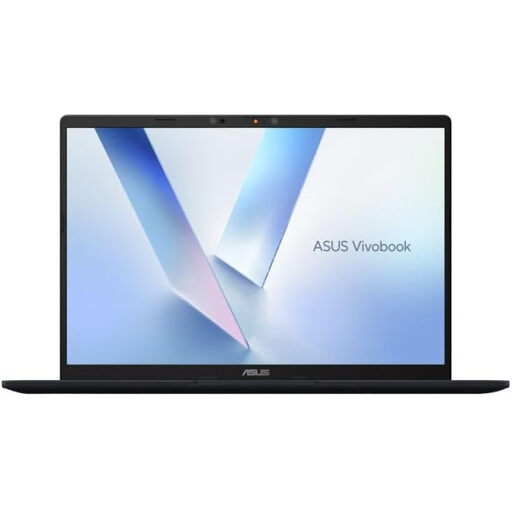
ASUS Vivobook 14 X1407QA-LY003W Copilot+ PC, Snapdragon X, 16GB RAM, 512GB SSD, Quiet Blue
Consider it if you need a portable Windows laptop for work across locations; check that your required applications and peripherals support this exact model.
The listing specifies a 14-inch screen, 1.49 kg weight, 16GB memory and 512GB SSD. It also lists two USB4 Type-C ports with DisplayPort and Power Delivery, HDMI 2.1 and an FHD IR camera.
Joybuy
 No image available
V7 V7UC-U3CRJ45HDVG-BLK USB-C Adapter
Consider it if you need a portable adapter for connecting a compatible laptop to desk peripherals.
The listing specifies HDMI up to 4K UHD at 30Hz, VGA up to 1920×1200 at 60Hz, Gigabit Ethernet, USB ports and 100W Power Delivery pass-through. It supports one display only; HDMI requires a USB-C Alt Mode host, and charging requires USB Power Delivery.
Joybuy
 No image available
Targus USB-C Universal Dual HDMI 4K Docking Station, 100W Power Delivery Pass-Thru
Consider it for keeping multiple desk connections together when your laptop supports the required display path.
The listing specifies two HDMI 2.0 outputs up to 4K at 60Hz, 100W Power Delivery pass-through, USB-A, Ethernet and card readers. The listed setup requires a USB-C Alt Mode host and an external 100W-or-higher power adapter.
Joybuy
 No image available
ASUS ZenScreen MB166CR FHD
Consider it if you need an additional screen that can travel between work locations.
The listing specifies a 15.6-inch Full HD IPS anti-glare display, 60Hz refresh rate and 780g weight. Its single USB-C video connection requires DisplayPort Alt Mode; HDMI is not supported.
Joybuy
 No image available
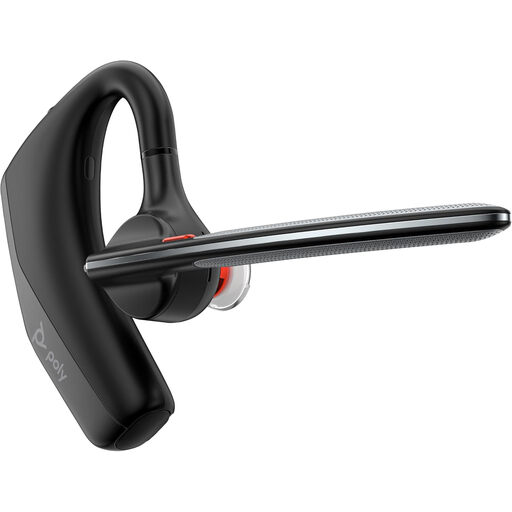
Poly Voyager Legend 30 Headset EURO
Consider it if you want a separate wireless headset with a built-in microphone for calls across locations.
The listing specifies Bluetooth, active noise cancellation, touch controls and a weight of 120.5g. It states up to 10 hours of battery life with active noise cancellation on; wireless use requires charging.
Joybuy
Hybrid-work setup FAQs
Should I buy a personal laptop if my employer already supplies one?
Check whether the supplied laptop meets your work needs and whether personal devices are permitted before buying another computer. The National Cyber Security Centre treats bring-your-own-device arrangements as an organisational security and device-management decision, while the Information Commissioner’s Office addresses separation of personal and corporate data. Employer-issued equipment or explicit approval is required when your organisation’s rules say so; this is not a universal requirement for every hybrid worker.
Does any USB-C port support a monitor and laptop charging?
No; the USB-C connector shape alone does not establish support for video or charging. For the Anker 555 A8383, the manufacturer requires DP Alt Mode for HDMI and Power Delivery for charging, so check the exact laptop port and accessory requirements before choosing a hub.
Will a dual-monitor dock give every Mac two independent external screens?
No; the supported display count depends on the Mac model and display settings, and a hub does not increase that limit. Apple’s support guidance explains the model-dependent limits, while Dell documents an MST extended-desktop limitation for Apple hosts with specified docks. Check both the Mac’s display limit and the dock’s output arrangement.
Are Windows Arm laptops automatically compatible with existing work peripherals?
No blanket compatibility assumption is appropriate. Microsoft says some peripheral manufacturer installers may not support Arm on the Surface devices covered by its guidance. Check the software publisher’s and peripheral manufacturer’s requirements for your exact laptop, devices and applications.
Do home and workplace screen setups both need assessment?
In Great Britain, HSE guidance applies to DSE users who use display-screen equipment daily for continuous periods of an hour or more, and says an assessment should cover both home and office where both are used. In Northern Ireland, HSENI identifies daily use for an hour or more at a time and sets out separate guidance. These conditions should not be applied indiscriminately to infrequent or short-duration screen use.


