What should you choose first?
Start with what limits your current desk setup: screen position, visible workspace, input-device fit or the connections you make each working day.
| Priority | What to check | Your needs |
|---|
| Screen position |
Check whether a laptop riser or adjustable monitor can position the screen for your desk. If you raise the laptop, plan where a separate keyboard and mouse will go; the Health and Safety Executive recommends separating them so the screen can be elevated. |
I use my laptop for sustained desk work and need to position its screen without having to type on a raised keyboard. |
| Visible workspace |
Decide whether the laptop screen provides enough room for your tasks. If not, compare monitor size, native resolution and stand adjustment together rather than choosing by one specification alone. |
Keeping documents or applications visible is the difficulty, so a separately positioned monitor may address more than a stand would. |
| Keyboard and mouse |
Check keyboard layout, mouse handedness, size and connection method. A shaped mouse still needs to fit the person using it; Logitech, for example, describes its Lift mouse as intended for small to medium hands. |
I want separate controls for laptop work, particularly if I raise the screen, but need a layout and mouse that suit how I work. |
| Desk connections |
List the displays and accessories you need to connect. For a dock or USB-C hub monitor, check the laptop’s video mode, supported display count, charging requirements and relevant operating-system restrictions against the exact device. |
Repeatedly reconnecting a display and desk accessories makes a dock worth considering only if my laptop supports the arrangement I intend to use. |
| Employer provision |
Ask about DSE assessment, approved equipment and purchasing arrangements before paying personally. For UK workers to whom DSE rules apply, the Health and Safety Executive says an employee cannot be charged for action an assessment identifies as needed. |
Before I order equipment for regular home working, I want to know what my employer will assess, provide or approve. |
Joybuy options for your desk
These options cover separate monitors, a dock and a keyboard-and-mouse set for laptop work at a home desk. Choose by the limitation in your own setup, then check device compatibility before relying on a particular connection.
 No image available
iiyama ProLite XUB2792UHSU-B6 27-inch 4K UHD monitor
Consider this separate screen if laptop display space is the constraint at your desk. Its name specifies a 27-inch 4K UHD monitor; check the connections and laptop compatibility you need before planning a single-cable display-and-charging setup.
View on Joybuy
 No image available
ASUS ProArt PA278CV IPS WQHD monitor
This is another separate-display option when the laptop screen alone does not provide the workspace you need. The model name specifies an IPS WQHD display; check its size, desk positioning and your laptop’s connections, including charging compatibility if you intend to use USB-C for both display and power.
View on Joybuy
 No image available
BenQ MA320UP 32-inch 4K USB-C Mac monitor
Consider this Mac-focused separate display if you want a larger screen at a fixed desk. Its name specifies a glossy IPS 4K panel, USB-C and a height-adjustable stand; check how the glossy finish works with your lighting and confirm video and charging compatibility with your exact laptop.
View on Joybuy
 No image available
Targus USB-C Universal Dual HDMI 4K Docking Station, 100 W Power Delivery pass-through
Consider a dock if repeatedly connecting displays and desk accessories is the problem you need to solve. This model’s name specifies dual HDMI 4K connections and 100 W Power Delivery pass-through; confirm your laptop can drive the intended displays and check whether the required external adapter is included.
View on Joybuy
 No image available
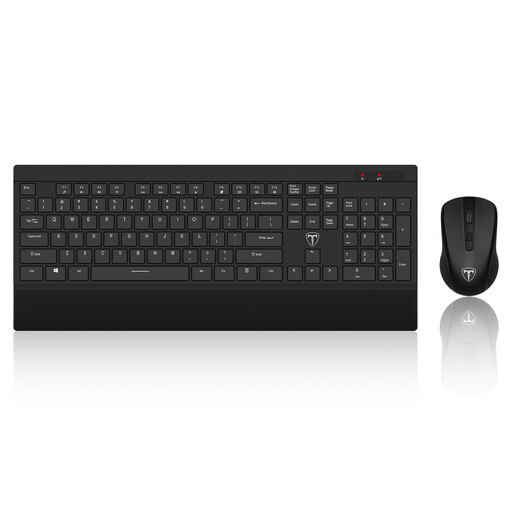
ET 2.4 GHz wireless keyboard and mouse set, US layout
Separate input devices are useful when a laptop screen is raised or you want a different keyboard-and-mouse arrangement at your desk. This set’s name specifies a full-size keyboard and US layout; check that its keys, mouse fit and connection method suit your work devices.
View on Joybuy
Common questions
Does a UK employer have to provide home-working equipment?
Not automatically for every home worker or for every requested item. The Health and Safety Executive says DSE rules can apply to long-term and hybrid home workers using screens daily for continuous periods of an hour or more; an assessment determines what action is needed. If it identifies action such as providing equipment, the worker cannot be charged for that action.
Is a laptop stand enough for sustained desk work?
A stand addresses screen height, but the Health and Safety Executive’s laptop guidance says a separate keyboard and mouse allow the screen to be elevated. If you also need more visible workspace, consider whether an external monitor addresses that separate need.
Will any USB-C dock run two monitors and charge my laptop?
No: check the exact laptop’s video mode, supported display count and charging requirements against the dock. Manufacturer guidance from Anker, Plugable and CalDigit notes that display support depends on the connected computer; CalDigit, for example, says original M1-based Macs do not support dual displays through its TS4.
Should I buy a monitor or raise my laptop?
Choose based on the constraint: a separate monitor is relevant when you need more visible workspace or a separately positioned screen, while a riser keeps the laptop screen as your display. For sustained work with a raised laptop, the Health and Safety Executive recommends using a separate keyboard and mouse so the screen can be elevated.
Can an employer reimburse home-working equipment without a tax charge?
GOV.UK says equipment provided or reimbursed for an employee working from home is not reportable or taxable if it is used only for business, or if any private use is insignificant. That tax condition does not itself entitle an employee to reimbursement; check your employer’s approval process before making a personal purchase.


