Keep a compatible dock at a desk where you regularly reconnect displays and peripherals; carry a portable monitor if you need a second screen at changing locations. For frequent calls, choose a headset or webcam according to whether sound or the camera image is the problem. Check laptop ports, display limits and power requirements before buying, and consider comfort across the complete setup at both work locations.
Which work setup sounds familiar?
How often you return to the same desk determines whether a connection point can stay put or an accessory needs to travel with you.
Regular home-and-office desk switchers
If you return to established desks at home and in the office, decide which connections can remain at each desk and what you are willing to carry. The Health and Safety Executive’s display screen equipment guidance covers home workers, mobile workers and hot-desking.
Workers who need a second screen on the move
A portable monitor is worth considering when documents or spreadsheets need more screen space and another display will not always be at your destination. Check the laptop’s video and power connections against the exact monitor: Lenovo, for example, specifies DisplayPort 1.2 Alt Mode and Power Delivery 2.0 for its ThinkVision M14.
Frequent video-call workers
If calls take place in shared rooms or under changing lighting, identify the problem before choosing equipment. A close microphone and private listening address a different need from camera positioning or lighting handling; connection and meeting-app requirements also depend on the device and variant.
What should you check before buying?
Start with the task that is difficult at your current work locations, then check whether the laptop and proposed equipment can make the intended connection.
| Priority |
What to check |
Your needs and related survey findings |
| Desk connections |
Count the displays and peripherals used at the regular desk. Check the laptop’s supported external-display count, dock connection type and charging requirements; video ports on a dock do not establish what every laptop can drive. |
I want to reconnect my laptop without rebuilding a regular desk setup each time. |
| Portable screen space |
Check screen size and carrying weight against the journey. Confirm that the laptop provides the video output and power required by the exact monitor; Lenovo specifies DisplayPort 1.2 Alt Mode and Power Delivery 2.0 for the ThinkVision M14. |
Extra space for documents matters to me at more than one location, but the screen also has to be practical to carry. |
| Calls and connectivity |
Separate microphone, listening and camera problems from internet or mobile coverage problems. Check headset pairing and meeting-app requirements, or camera placement and lighting, according to the issue you face. |
I need to know whether call equipment would address my problem or whether the connection at the location needs attention. In a Cellnex UK survey of 2,000 UK hybrid workers published in June 2024, 40% identified slow internet and 39% identified weak mobile signal among top connectivity issues they faced; those issues can overlap and are not equipment-buying preferences. |
| Workstation comfort |
Consider screen position, keyboard, mouse, desk and seating together. The Health and Safety Executive says that where display screen equipment is used at home and in the office, assessment should cover both situations and support a comfortable, sustainable posture. |
My setup needs to remain workable through regular computer use at both desks, not just be easy to pack. |
What can go wrong with the setup?
-
Assuming every USB-C port can run the intended display setup
A matching connector does not establish video output, charging capability or the number of external displays a laptop supports. The USB Implementers Forum describes USB4 connections as operating according to the mutual capabilities of connected devices.
Compare the laptop’s stated display and power capabilities with the requirements of the exact dock or portable monitor, including any required DisplayPort Alt Mode, USB4 or Thunderbolt support.
-
Buying call equipment to fix a poor connection
A different microphone or camera does not repair slow internet or weak mobile coverage. In Cellnex UK’s June 2024 survey of 2,000 UK hybrid workers, 40% identified slow internet and 39% weak mobile signal among top connectivity issues they faced; respondents could identify overlapping problems.
Check the connection in the rooms where calls take place. Where a wired network is available and permitted, check whether a compatible dock can provide an Ethernet connection; raise persistent building coverage problems with the employer or site team.
-
Treating one portable accessory as the whole workstation
A higher screen position does not, by itself, settle keyboard, mouse, desk or seating position. The Health and Safety Executive says assessments should cover both home and office where workers use display screen equipment in both places.
Identify whether the recurring issue is screen space, screen height, input position or a combination, then consider the complete arrangement at each regular location.
-
Choosing a headset by product-family name alone
Receiver, Bluetooth and meeting-app support can differ between variants. Logitech describes distinct Zone Vibe Wireless configurations, so a compatibility statement for one version should not be assumed to apply to another.
Match the precise headset variant and connection method to the laptop, operating system and meeting app used at both locations.
Brand examples and their limits
These named product lines illustrate different equipment routes; their specifications do not describe every product from the same brand.
Kensington
The SD5760T is an example of a dock for a regular desk with several connections.
- Kensington specifies Thunderbolt 4, Thunderbolt 3 and USB4 host support for the SD5760T, and names 96 W Power Delivery in its product information.
- Confirm the laptop’s external-display support and charging requirements before relying on the dock’s ports for a particular setup.
Lenovo
The ThinkVision M14 illustrates a second-screen option intended to travel with a laptop.
- Lenovo describes the ThinkVision M14 as a 14-inch Full HD monitor that can extend or duplicate a notebook display through a compatible connection.
- For that connection, Lenovo specifies a laptop USB-C port supporting DisplayPort 1.2 Alt Mode and Power Delivery 2.0.
Logitech
The Brio 500 webcam and Zone Vibe Wireless headset address different parts of a video-call setup.
- Logitech describes automatic light correction and noise-reducing microphones for the Brio 500, and lists meeting-platform compatibility for Zone Vibe Wireless.
- Check the precise headset variant and its connection and app requirements; brand feature descriptions are not independent measures of performance in your room.
Joybuy equipment options
These options cover portable second screens, desk connections and wireless earphones for calls. Choose the equipment type for the problem at your work locations, then check the exact laptop connection and accessory requirements.
 No image available
ASUS ZenScreen MB166CR FHD
Consider this portable monitor when a second screen needs to move between work locations.
Check that your laptop supports the display connection and USB-C power needed for your intended setup rather than relying on the connector shape alone.
View on Joybuy
 No image available
Targus USB-C Universal Dual HDMI 4K Dock, 100W Power Delivery Pass-Thru (Retail Packaging)
This dock is relevant when a laptop repeatedly returns to a desk with display and peripheral connections.
The title identifies dual HDMI and 100W Power Delivery pass-through. Confirm the laptop’s supported display mode and charging requirements, and check whether the external power adapter needed for your setup is included.
View on Joybuy
 No image available
UPERFECT 18.4-inch 4K QLED Portable Monitor, VESA-Mountable
This larger portable-screen option is for work that benefits from a second display at changing locations.
The product name specifies a 3840 × 2160 display, USB-C and Mini HDMI connections. If you will carry it regularly, check its weight and the video and power arrangements required by your laptop.
View on Joybuy
 No image available
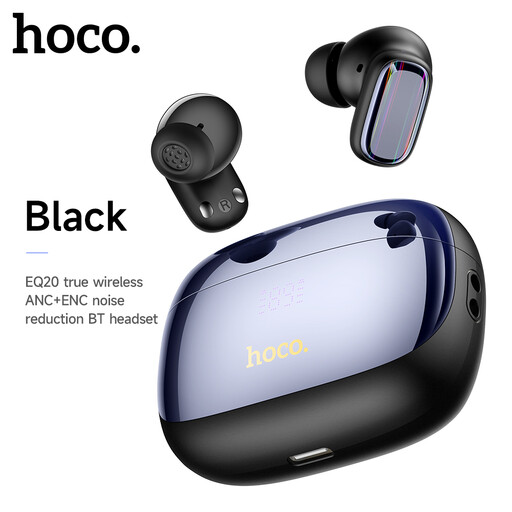
HOCO EQ20 Rhyme Wireless Noise Reduction Earphones – Black
Wireless earphones are an option when listening and speaking on calls matter more than adding desk connections or screen space.
Check pairing, microphone use and meeting-app compatibility with the laptop you take between locations. Do not assume the product name establishes how much background noise will be reduced during a call.
View on Joybuy
 No image available
Mokin 2USBC to TB+ Hub, 2× USB-A 3.0, USB-C 3.0, SD/TF, HDMI 4K60Hz
This hub is relevant when a regular desk needs the peripheral connections named in its title.
Check the laptop’s supported HDMI display mode before planning the screen setup. If desk charging or wired networking is essential, confirm those requirements against the exact product before choosing it.
View on Joybuy
Common questions
Do I need a dock for hybrid work?
A dock is useful to consider when you repeatedly connect a laptop to displays and peripherals at a regular desk; it is not necessary solely because you work in two places. Check the laptop’s exact USB-C, USB4 or Thunderbolt capabilities, external-display limit and charging requirements against the dock before buying.
Will any USB-C laptop work with a portable monitor?
No: the USB-C connector alone does not establish the video and power support a monitor requires. For example, Lenovo specifies DisplayPort 1.2 Alt Mode and Power Delivery 2.0 on the laptop’s USB-C port for its ThinkVision M14’s intended connection; check the requirements of the monitor you choose.
Should I choose a webcam or a headset for hybrid meetings?
Choose according to the weak point in your calls: a headset addresses close-microphone and private-listening needs, while a webcam is more relevant to camera framing or lighting. Check the exact headset variant’s connection and meeting-app requirements, and investigate the network separately if calls are dropping because of connectivity.


