Buying priorities
Laptop-led portable setup
Choose it when: You commute with the same computer and home desk sessions are intermittent or relatively short.
Consider: It keeps cables and equipment to a minimum, but gives the least separation between screen height and keyboard position.
Laptop with monitor and input devices
Choose it when: You work regularly at one desk and need more room for documents, meetings or several applications.
Consider: You gain more flexible positioning, but need desk space, cables and a compatible display connection.
Laptop with USB-C hub monitor or dock
Choose it when: You repeatedly connect a display, keyboard, mouse, Ethernet or other desk peripherals.
Consider: One-cable connection can simplify the desk, but protocols, display support and charging output must match the laptop.
Desktop workstation
Choose it when: The computer will normally stay in one home workspace and portability is unnecessary.
Consider: It supports a stable permanent desk, but needs dedicated space, separate peripherals and careful power planning.
Start with the work pattern and desk space, then confirm the connection, charging and power requirements of every device you plan to use together.
| Priority |
What to check |
Your needs |
| Screen and input positioning |
Check whether the display height, desk depth and input position can be adjusted. For a raised laptop or external display, check whether a separate keyboard and mouse are needed. |
I want my screen and typing position to work for regular desk sessions, rather than relying on a laptop layout that cannot be adjusted around my task. |
| Laptop, display and dock compatibility |
Confirm the laptop’s exact port capabilities, video-output protocol, operating-system support, display count and resolution. Check the cable’s stated charging, data and video functions. |
I need the monitor, dock and peripherals to work with my specific laptop, not simply share a USB-C-shaped connector. |
| Charging and cable safety |
Compare the laptop’s specified power requirement with the monitor or dock’s stated delivery. Avoid overloaded sockets and daisy-chained extensions; keep cables away from walkways and liquids. |
I need enough safely managed power for a computer, display and accessories without creating clutter or trailing-cable hazards. |
| Video-call equipment |
Check webcam operating-system compatibility, available ports, field of view, mounting options and microphone suitability for the distance and room noise involved. |
I want a camera setup that fits my desk, lighting and usual call format without paying for features I will not use. |
Joybuy product options
Joybuy product options for building a hybrid home workspace, including display connections, external monitors and video-call peripherals.
 Image unavailable
V7 V7UC-U3CRJ45HDVG-BLK USB-C Adapter
For a laptop desk needing one external display, wired network access and USB peripheral connections. It specifies HDMI up to 4K/30Hz, VGA up to 1920 × 1200/60Hz, Gigabit Ethernet, two USB 3.0 ports and up to 100W USB-C PD pass-through. It supports one display in the stated SST mode; confirm USB-C Alt Mode, charger, cable and laptop compatibility first.
Joybuy
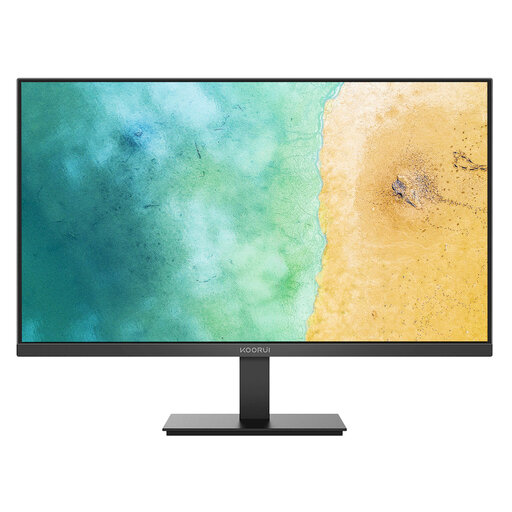 Image unavailable
KOORUI MB27V29FS2 27-inch IPS Monitor
A separate display for a regular fixed desk where screen position can be planned independently of the laptop keyboard. It specifies a 27-inch 1920 × 1080 IPS panel, HDMI 1.4 and VGA inputs, tilt adjustment and VESA 100 × 100 mm mounting. Check the laptop’s video-output path and allow for height adjustment if the tilt-only stand is not enough.
Joybuy
 Image unavailable
CRUA 32-inch 1500R Curved QHD Monitor
For a stable home desk needing a larger external display for documents, meetings and multiple applications. It specifies a 32-inch 2560 × 1440 display, dual HDMI, dual DisplayPort, tilt adjustment and VESA 100 × 100 mm mounting. Confirm device and cable support for the intended resolution, and measure desk space and viewing distance before choosing this size.
Joybuy
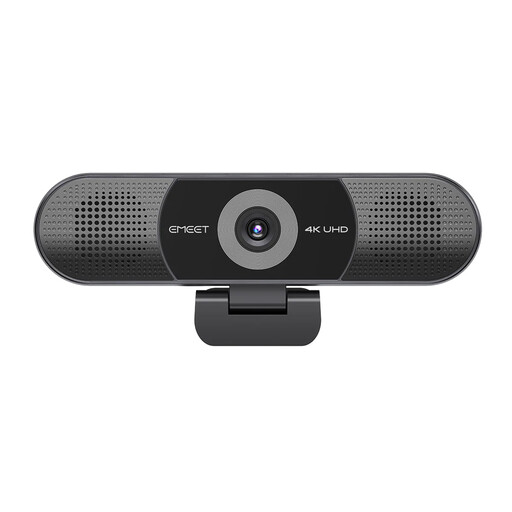 Image unavailable
EMEET All-in-One 4K Webcam
For regular calls where camera, microphone and speaker functions are needed at one desk. It specifies 3840 × 2160 video at 30fps, fixed focus, a 98° adjustable field of view, a four-microphone array and dual speakers. Check USB connection and mounting fit, and consider whether fixed focus and the stated 10-foot microphone pickup range suit the room.
Joybuy
 Image unavailable
Targus Webcam with Auto Focus
For ordinary one-to-one video calls in variable home lighting. The technical specification states Full HD 1080p at 30fps, a 67° field of view, dual microphones, an adjustable clip, tripod thread, privacy slider and USB-C connection with adapters. Confirm the supplied model’s actual resolution, as the title describes it as 2K, and check whether the field of view suits your calls.
Joybuy
Frequently asked questions
Do I need a monitor and separate keyboard for hybrid work?
Not automatically. If you regularly use display-screen equipment at home for sustained sessions, arrange the desk so you can achieve a comfortable, sustainable posture. The Health and Safety Executive says additional equipment should follow an individual assessment and need rather than be treated as mandatory for every home worker.
Will any USB-C dock connect my laptop to a monitor?
No. USB-C is a connector, not a guarantee of video output. Check the laptop specification for the relevant display protocol and the dock’s supported host protocols, operating system and display-output table. Lenovo states that its USB-C and Thunderbolt docks require USB-C Alt Mode, DisplayLink or Thunderbolt support through the laptop’s Type-C port.
How do I check whether a dock or USB-C monitor can charge my laptop?
Compare the laptop manufacturer’s specified charging requirement with the dock or monitor’s stated Power Delivery output, then check whether its documentation supports charging for that laptop. Do not assume every USB-C charger, cable or hub supports the same power level or functions.
Can I use extension leads for a monitor, laptop and accessories?
Use a safe arrangement appropriate to the equipment load and do not daisy-chain adaptors or extension leads. Electrical Safety First advises against overloading sockets, charging devices on flammable surfaces and routing cables where they create trip hazards; use the correct manufacturer-designed charger.
Should UK home-office electronics show UKCA or CE marking?
For products placed on the Great Britain market, the Department for Business and Trade states that CE marking continues to be recognised alongside or instead of UKCA in relevant regimes. A marking does not replace checking that the product is intended for the Great Britain market, has an appropriate plug or charger and meets your compatibility needs.


