Who this setup suits

Frequent office-home commuters

For workers carrying the same laptop between home and work who need a compact kit that packs quickly. Health and Safety Executive guidance highlights the value of separating the screen from the keyboard and mouse during longer laptop sessions.

Regular home-desk workers

For hybrid workers who spend sustained periods at one home workstation and need to assess a display, dock and fixed peripherals as one desk arrangement rather than as isolated accessories.

Meeting-heavy hybrid workers

For workers whose main difficulty is remote calls, camera framing, microphone clarity or noise in a shared space. Teams-certified peripherals can be a useful filter where Microsoft Teams is the employer’s meeting platform.

Buying priorities

Portable work accessories

Choose this when: You work from several locations, have little permanent desk space or need to pack the setup between home and office.

Trade-off: It is easier to carry, but offers less screen area and fewer permanently connected peripherals than a fixed desk.

Monitor and dock desk

Choose this when: Home is a regular workstation and you repeatedly connect a display, charging cable, network and desk peripherals.

Trade-off: Display outputs, charging and enterprise features depend on the exact laptop, dock and monitor arrangement.

Meeting accessories

Choose this when: Video calls, microphone clarity, call controls or a noisy shared environment matter more than extra screen space.

Trade-off: Certification can reduce uncertainty for a named platform, but does not confirm compatibility with every employer-managed laptop.

Priority What to check Your needs
Screen and input position Check whether the screen can be raised separately from the keyboard and mouse. Assess the desk, chair, display height and the length of your usual work sessions together. I want to avoid relying on a low laptop screen and fixed built-in keyboard for long home sessions. A stand with separate input devices or a separate display can help create a more flexible arrangement.
Desk connectivity Confirm the laptop’s USB-C video, data and charging support, plus the dock’s monitor limits, power requirement and included power supply. Connector shape alone is not enough. I reconnect monitors, charging, network and peripherals at the same desk, so a repeatable one-cable arrangement would save setup time.
Calls and platform fit Check the meeting platform, operating-system support, connection method and any required receiver or driver. For Bluetooth, consider the laptop radio and nearby wireless-device load. Clear calls and reliable controls matter in a noisy room or on frequent video meetings. If my employer uses Teams, Teams certification is a useful compatibility check.
Employer approval Ask about approved peripherals, device-management software, USB restrictions, DSE assessment procedures and any equipment process before ordering. I need hardware that can be used with my work laptop and work data, without personally buying equipment that should first be considered through an employer process.

Common buying pitfalls

  • Buying a dock based only on a USB-C connector

    USB-C describes the connector, not the display, charging or data capabilities behind it. Lenovo’s dock guidance identifies USB-C Alt Mode, DisplayLink and Thunderbolt as relevant host-laptop capabilities for compatible models.

    Find the exact laptop model, supported external-display setup, charging requirement and port protocol before comparing dock specifications.

    An incompatible setup may require a different dock, cable or monitor adapter.

  • Using a laptop alone for prolonged desk work because it is portable

    A low laptop display and fixed keyboard can make it difficult to arrange the screen and input devices separately during longer sessions. The Health and Safety Executive advises using a separate keyboard and mouse when raising a laptop screen, or using a separate display.

    Consider a riser with separate input devices or a monitor, then adjust the complete desk arrangement rather than adding one accessory in isolation.

  • Paying personally before checking employer arrangements

    For Great Britain, the Health and Safety Executive says workers cannot be charged where a DSE assessment indicates that equipment or another action is needed. Employer policy can also determine whether personal peripherals or devices may be used.

    Ask about DSE assessment, manager approval, approved-product lists and any reimbursement process before buying a monitor, dock or accessory for work.

    Equipment bought privately may not be suitable for an employer-managed system or may duplicate equipment identified through an assessment.

  • Assuming wireless audio will work identically everywhere

    Bluetooth performance can be affected by the host laptop’s radio, multiple paired devices and busy wireless environments. Microsoft notes that some users may still need a USB receiver.

    For business-critical calls, check operating-system support and try the headset with the actual work laptop and meeting application during the return period.

    A USB receiver, wired connection or alternative headset may be needed if Bluetooth call controls or audio are unreliable.

Relevant brand references

Lenovo

Relevant for a mixed-PC or ThinkPad-led desk setup using a universal USB-C dock. Lenovo’s UK ThinkPad Universal USB-C Dock listing describes a one-cable dock with more than 11 ports, charging up to 100W and multiple-display support.

  • Its dock range can be useful when you need several desk connections through one host cable.
  • Lenovo states that operation depends on compatible USB-C Alt Mode, DisplayLink or Thunderbolt support; a USB-C port alone does not confirm compatibility.

HP

Relevant for workers looking for a USB-C desk dock that can power a compatible laptop and attach several displays and peripherals. HP’s UK USB-C 100W G6 Dock listing states support for up to three external displays depending on configuration.

  • HP lists broad compatibility with USB-C or Thunderbolt laptops that support video, data and power.
  • The achievable display layout and charging result still depend on the dock model, laptop and monitor configuration.

Dell

Relevant for Dell users or workers considering a more capable fixed-desk dock with multiple high-resolution display options. Dell’s UK dock catalogue includes USB-C and Thunderbolt models with varying power and display specifications.

  • The range includes options designed for more demanding multi-display desk arrangements.
  • Some Dell docks list different power delivery for Dell and non-Dell laptops, so check the exact dock and host-laptop combination.

Joybuy product options

Joybuy product options for portable displays, home-desk connectivity and meeting accessories in a hybrid laptop workflow.

Targus USB-C Universal Dual HDMI 4K Docking Station

Targus USB-C Universal Dual HDMI 4K Docking Station

For a regular home desk with displays, wired network and several peripherals connected through one USB-C host cable.

Dual HDMI 2.0 outputs, Gigabit Ethernet, USB-A ports, SD and MicroSD readers, plus stated 100W power-delivery pass-through.

Check USB-C Alt Mode support, the intended dual-display arrangement and whether a required 100W or higher power adapter is included.

Joybuy
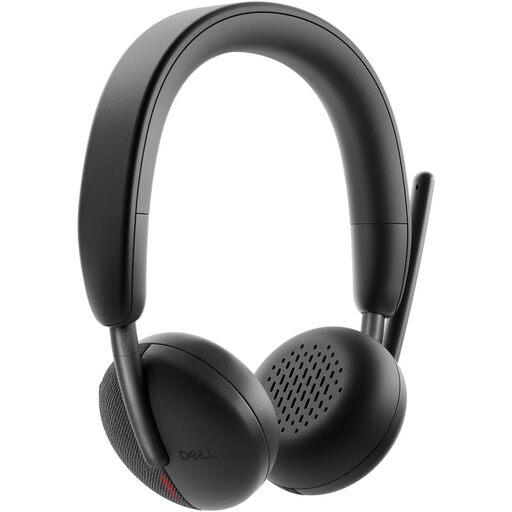
Dell Pro Headset WL3024

Dell Pro Headset WL3024

For meeting-heavy work where a boom microphone and connection options matter in shared or noisy spaces.

Bluetooth 5.3 multipoint, flip-to-mute boom microphone, included USB-C receiver with USB-A adapter, replaceable cushions and foldable design.

Confirm that the employer-managed laptop permits Bluetooth or the USB receiver, and that the required meeting platform and operating system are supported.

Joybuy

Baseus Metal Gleam Series II 10-in-1 USB-C Hub

Baseus Metal Gleam Series II 10-in-1 USB-C Hub

For a home desk using external displays, Ethernet and USB peripherals with a smaller multiport hub format.

Two HDMI outputs rated up to 4K at 120Hz and 4K at 60Hz, 10Gbps USB-C and USB-A ports, Gigabit Ethernet, SD/TF readers and 100W PD input.

Video output requires USB-C DisplayPort Alt Mode; check simultaneous-display support, charger requirements and monitor compatibility.

Joybuy

Targus Webcam with Auto Focus

Targus Webcam with Auto Focus

For hybrid workers who need adjustable camera placement and focus beyond the laptop’s built-in camera.

67-degree field of view, 360-degree adjustable clip, tripod thread, USB-C connection with adapters and a physical privacy slider.

Confirm the supplied model’s capture resolution, employer approval for external USB cameras and whether a separate headset is needed for noisy spaces.

Joybuy

ASUS ZenScreen MB166C Portable USB Monitor

ASUS ZenScreen MB166C 15.6-inch Portable USB Monitor

For commuters who want a second screen without committing to a permanent monitor at each location.

15.6-inch Full HD IPS display, USB-C connection, anti-glare surface, flicker-free backlight, blue-light filter and stated 780g weight.

HDMI is not included; check USB-C video output, power arrangements and whether the stand or carrying setup suits your routine.

Joybuy

Frequently asked questions

Do UK hybrid workers need a DSE assessment for a home laptop setup?

In Great Britain, Health and Safety Executive guidance says DSE rules can apply to workers who work from home long term or routinely split time between home and the workplace. If you use DSE daily for continuous periods of an hour or more as part of normal work, ask your employer about an assessment covering the actual home and office workstations.

Should I buy a monitor before changing my chair or desk?

Do not treat a monitor as a standalone fix. The Health and Safety Executive says an assessment should consider the whole workstation, including equipment, furniture, work conditions, tasks and individual needs; for prolonged laptop use, separate keyboard and mouse can allow the laptop screen to be raised.

Will any USB-C dock work with my laptop?

No. Compare the laptop’s exact video, charging and data capabilities with the dock’s requirements before buying. Lenovo states that its USB-C and Thunderbolt docks require compatible USB-C Alt Mode, DisplayLink or Thunderbolt support, while HP and Dell specifications also make display and charging results model-dependent.

Is a Teams-certified headset necessary?

It is not legally required, but it can be a useful filter when your employer uses Microsoft Teams. Microsoft says certified devices are tested against programme specifications and certified USB peripherals can offer plug-and-play operation and Teams call control; still confirm employer approval and operating-system support for the exact headset.

Can I use my own laptop or accessories for work?

Only if employer policy permits it. The National Cyber Security Centre notes that bring-your-own-device arrangements require organisations to balance usability, security, device management and data protection, so check rules for personal computers, USB peripherals, meeting devices and required management software before purchasing.