Laptop-only hybrid workers
If you work for long periods on a laptop at home, consider screen height and input position together. The Health and Safety Executive advises using a separate keyboard and mouse when raising the laptop screen.


Start with the problem identified by your workstation assessment, rather than buying a monitor or desk accessory by default. For prolonged laptop work, a riser needs a separate keyboard and mouse; a monitor suits a desk where you need an independently positioned screen, while a dock calls for careful checks of laptop, display and charging compatibility.
If you work for long periods on a laptop at home, consider screen height and input position together. The Health and Safety Executive advises using a separate keyboard and mouse when raising the laptop screen.
If you return to the same home desk, an independently positioned monitor may address a need for more screen space. Check its connections against your laptop before planning a one-cable setup.
If the desk serves multiple displays, peripherals or laptops, check each host device against the proposed dock or adapter. StarTech.com’s model-specific guidance illustrates why the same connection type does not guarantee the same display support.
For regular home or hybrid screen work, identify the main issue at the desk first. The Health and Safety Executive says a display screen equipment assessment should consider the whole workstation, including equipment, furniture and working conditions.
| Concern | What to check | Who this matters to |
|---|---|---|
| Laptop screen and input position | Check whether a riser lets you position the screen while keeping a separate keyboard and mouse at a comfortable height. | If I spend long stretches looking down at a laptop, I want to raise its screen without raising my hands to the built-in keyboard. About 36% of consumers put this positioning need first. |
| Screen space at a fixed desk | Check monitor adjustment, desk depth, glare and the laptop’s display connection. | At a regular home desk, I may need a separate screen that I can position independently of my laptop. This is the primary need for about 29% of consumers. |
| Displays and peripherals | Match the exact laptop and operating system to the dock’s stated display modes, ports, charging arrangement and driver requirements. | When several displays and wired devices need connecting, I want the proposed dock to work with my particular laptop. About 21% of consumers prioritise those connections. |
| Shared or compact desk | Check whether you need to switch between two laptops, and whether the displays, inputs and dock fit the desk. | If two laptops take turns at one desk, I need a practical way to share the available space and equipment. For about 14% of consumers, that flexibility is the main concern. |
Raising the screen also raises the built-in keyboard and trackpad. For prolonged laptop use, the Health and Safety Executive advises separate input devices so the screen and hands can be positioned independently.
Plan the stand, keyboard and mouse as one setup, then check their positions together.
A USB-C connector alone does not establish video output, charging or dual-monitor support. StarTech.com specifies different display and operating-system conditions for different adapters and docks.
Check the exact laptop, operating system, required display arrangement, power supply and any driver requirement against the dock model.
A separate screen does not settle keyboard position, furniture height or glare. The Health and Safety Executive’s assessment guidance covers the whole workstation and its working conditions.
Use your employer’s display screen equipment process or an informed self-assessment to identify what needs changing before choosing equipment.
Relevant to adjustable monitors for a regular single-laptop desk.
Relevant to separate keyboards and pointing devices for raised-laptop or compact-desk setups.
Relevant to display adapters and docks where laptop connections need closer scrutiny.
These products address different parts of a home workstation: a separate display, desk connections, laptop inputs or support for two monitors. Choose the type that matches the issue identified at your desk.
 Image unavailable
Consider this external monitor if your fixed desk needs a screen separate from the laptop display. Its name specifies IPS and WQHD; check its connections, adjustment options and your laptop’s video and charging requirements before planning the layout.
 Image unavailable
This 27-inch 4K UHD monitor is another option for a separate screen at a regular desk. Check the available space, screen positioning and the intended laptop connection; do not assume USB-C will provide both video and charging.
 Image unavailable
Consider this dock when your desk calls for two HDMI display connections. The product name specifies 4K and 100W Power Delivery pass-through, but those terms alone do not confirm the display modes or charging available with your laptop. Check host compatibility and the required power adapter.
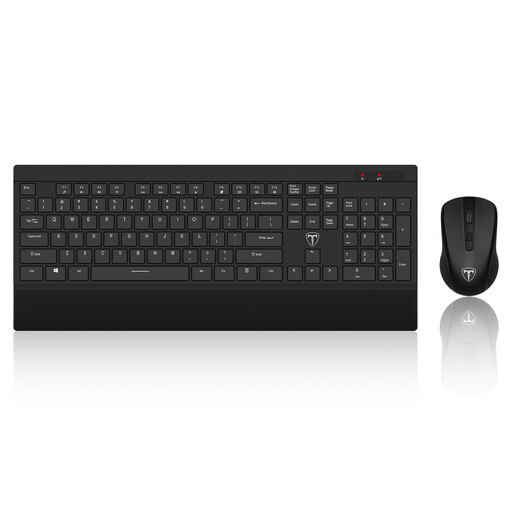 Image unavailable
Separate inputs are relevant when you raise a laptop screen for prolonged work. This set is described as wireless with a US keyboard layout; check that the layout and connection suit your device and typing needs. A laptop riser is a separate setup decision.
 Image unavailable
Consider this stand when you need to position two monitors at one desk; it is a stand, not a display or a dock. Check both monitors’ mounting fit and weight, the desk’s stability and the adjustment range needed for your setup.
Not automatically. The Health and Safety Executive says that, where a display screen equipment assessment identifies action and the employer provides equipment for it, the worker cannot be charged for that equipment. For someone using display screen equipment at home and in the office, the assessment should cover both arrangements.
The Health and Safety Executive says they can apply to permanent or long-term home workers and people who routinely split work between home and the workplace when they use display screen equipment daily for continuous periods of an hour or more. The Display Screen Equipment Regulations extend across England, Wales, Scotland and Northern Ireland.
A stand alone does not separate screen height from keyboard position. The Health and Safety Executive advises a separate keyboard and mouse when a laptop screen is raised for prolonged use; check the positions of all three together.
Review the whole setup, not just the new item. The Health and Safety Executive’s workstation guidance includes equipment, furniture and working conditions, so check how the screen, inputs, desk and surrounding space work together.
No: the exact dock, laptop and operating system determine the available display arrangement. StarTech.com, for example, limits MacBook compatibility to one monitor on its DK30C2DAGPD adapter. Check the intended host and dock model before choosing a dual-display setup.